Fast, secure, and flexible payment options improve customer experience, reduce payment delays, and help businesses maintain healthy cash flow. Odoo 19 provides a robust and fully integrated payment management system that allows companies to accept online payments directly from customer invoices, simplifying the entire billing and collection process.
Odoo 19 supports multiple payment providers and payment methods, enabling businesses to integrate popular online payment gateways such as credit cards, bank transfers, and digital wallets. By configuring suitable payment providers, organizations can offer customers multiple ways to complete payments securely from the customer portal. This flexibility not only enhances trust but also ensures smoother invoice settlements across different regions and customer preferences.
In addition, Odoo 19 introduces advanced payment features such as payment tokens and payment transactions, which streamline recurring payments and provide complete visibility into payment activities. Payment tokens allow customers to securely save their payment details for future use, while payment transactions record and track each online payment in real time. Together, these features enable businesses to manage invoice payments efficiently, monitor transaction statuses, and maintain accurate financial records within a single unified system.
In this blog, we will explore how to accept online payments for customer invoices in Odoo 19 by configuring payment providers, enabling payment methods, managing payment tokens, and tracking payment transactions efficiently.
Payment Providers
In Odoo 19 Accounting, the Configuration menu offers a comprehensive set of tools that allow businesses to define how payments are accepted, processed, and tracked across the system. This section plays a critical role in managing online payments by centralizing all payment-related settings in one place.
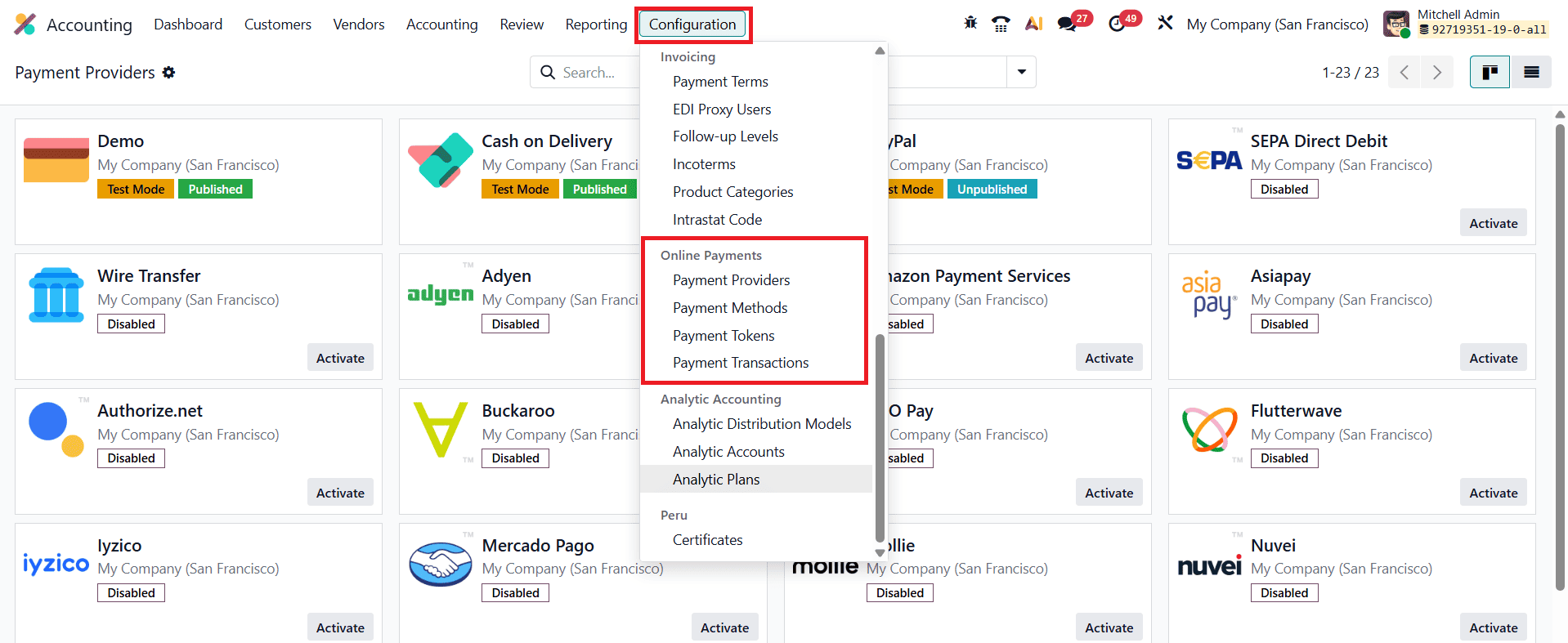
The four key components available here, Payment Providers, Payment Methods, Payment Tokens, and Payment Transactions, work together to create a secure and seamless payment ecosystem that supports the entire payment lifecycle, from invoice generation to successful payment confirmation.
Among these components, Payment Providers form the foundation of Odoo’s online payment framework. By configuring trusted third-party gateways such as Stripe, PayPal, Adyen, and other supported providers, businesses can allow customers to pay invoices and sales orders directly through the Odoo customer portal. This flexibility enables customers to complete payments anytime and from anywhere, significantly improving convenience and reducing payment delays.
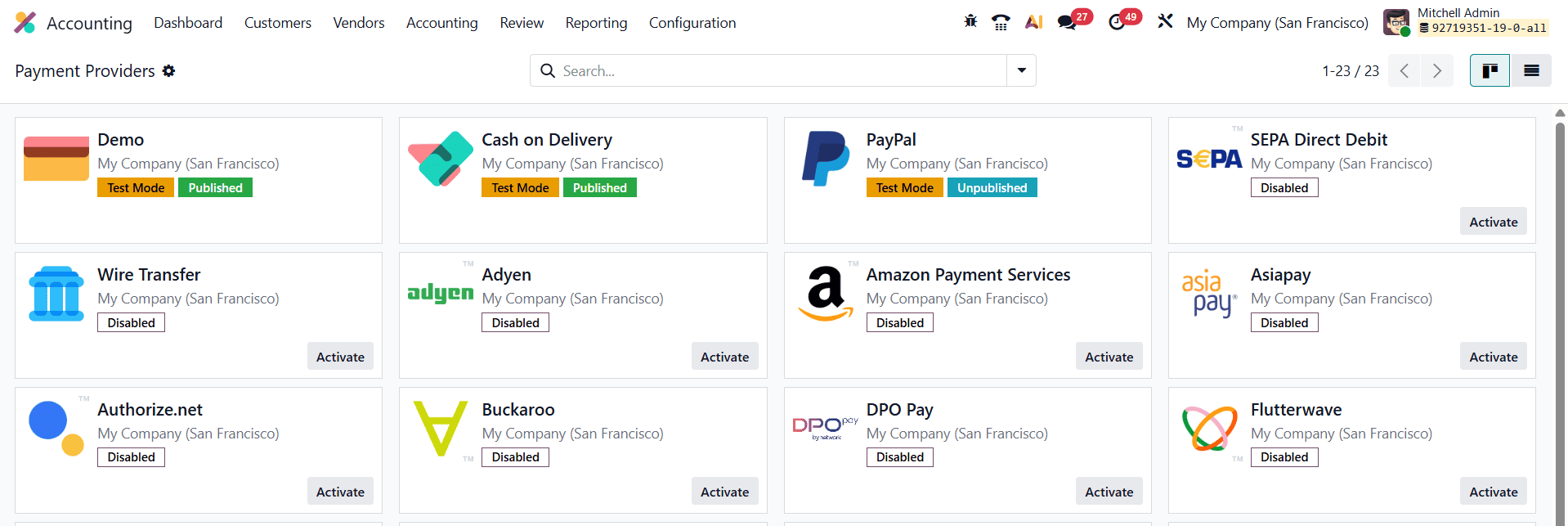
To activate a payment provider, users can navigate to Accounting > Configuration > Payment Providers and click the Activate button next to the preferred provider. Once activated, the provider’s detailed configuration form becomes available for further customization.
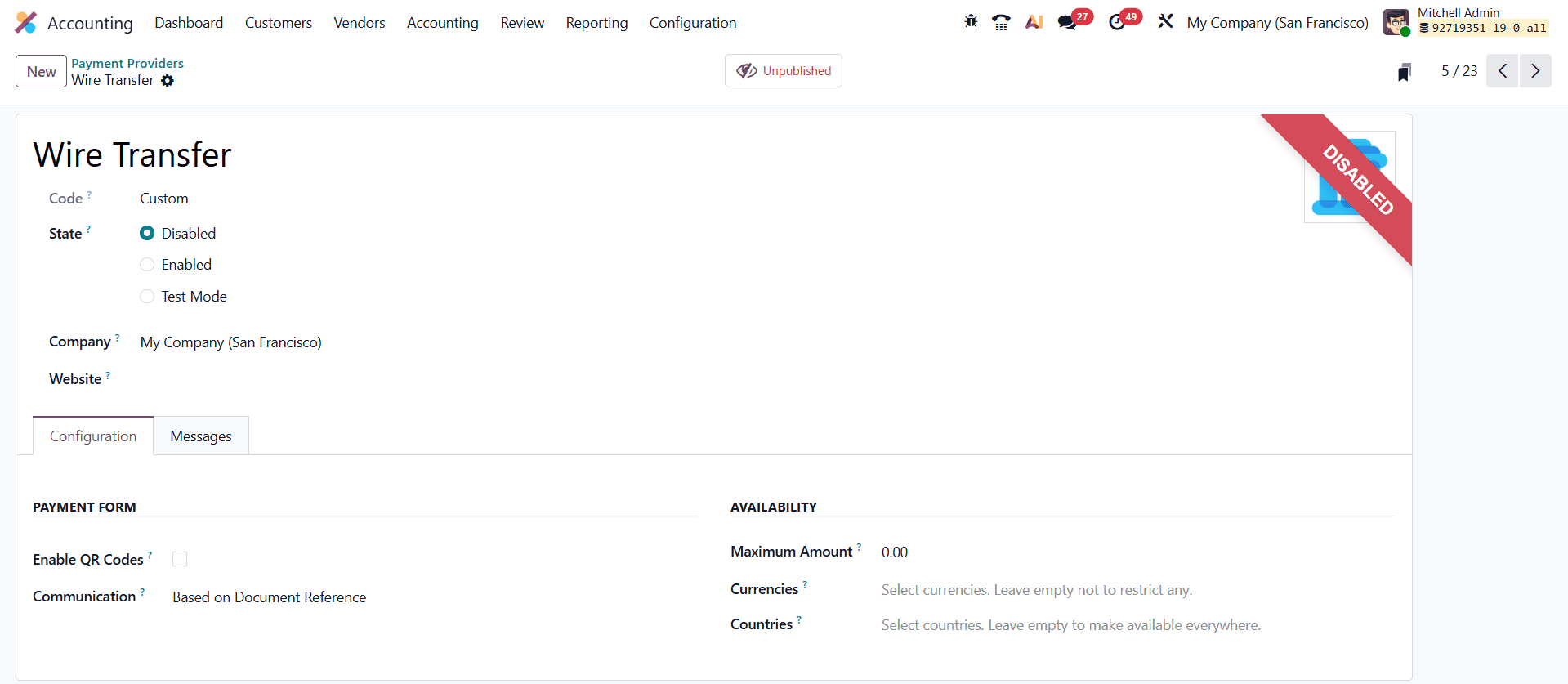
The configuration form begins with basic identification details, including the Provider Name and Technical Code, which uniquely identify the payment gateway within Odoo. Users can define the provider’s operational status as Disabled, Enabled, or Test Mode, with Test Mode being especially useful for validating payment flows without affecting live financial data. The Company and Website fields allow businesses to control where the provider is available; if these fields are left empty, the payment provider can be used across all companies and websites within the Odoo database.
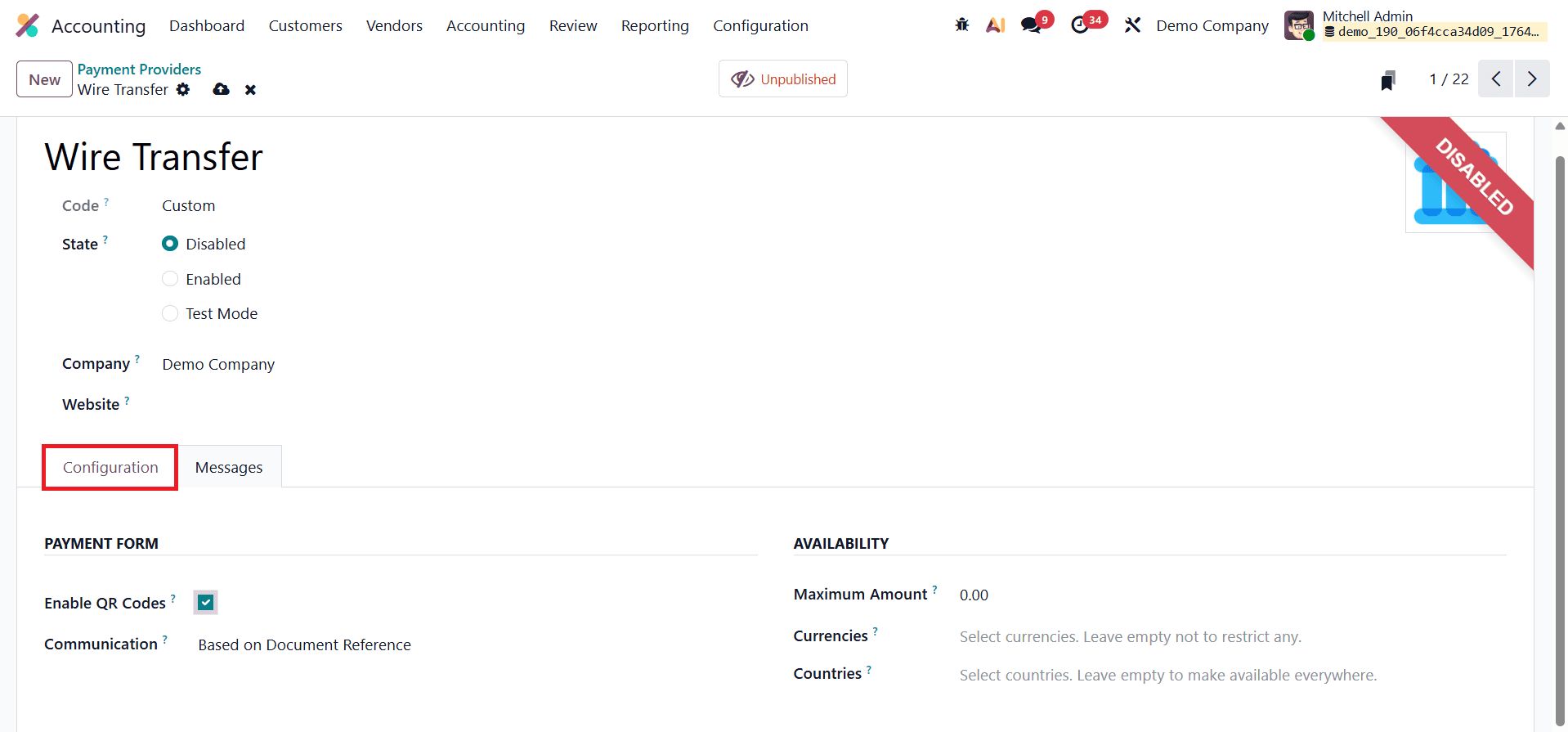
Odoo 19 also offers additional configuration options to enhance payment flexibility and control. By enabling the QR Codes option, businesses can accept QR-based payments directly from invoices. The Communication field allows users to customize the message shown to customers when selecting this payment option, helping provide clarity and guidance during checkout. The Maximum Amount field can be used to limit the value of individual transactions, while the Countries field enables geographical restrictions by allowing the provider to be available only in selected regions, or globally if left blank.
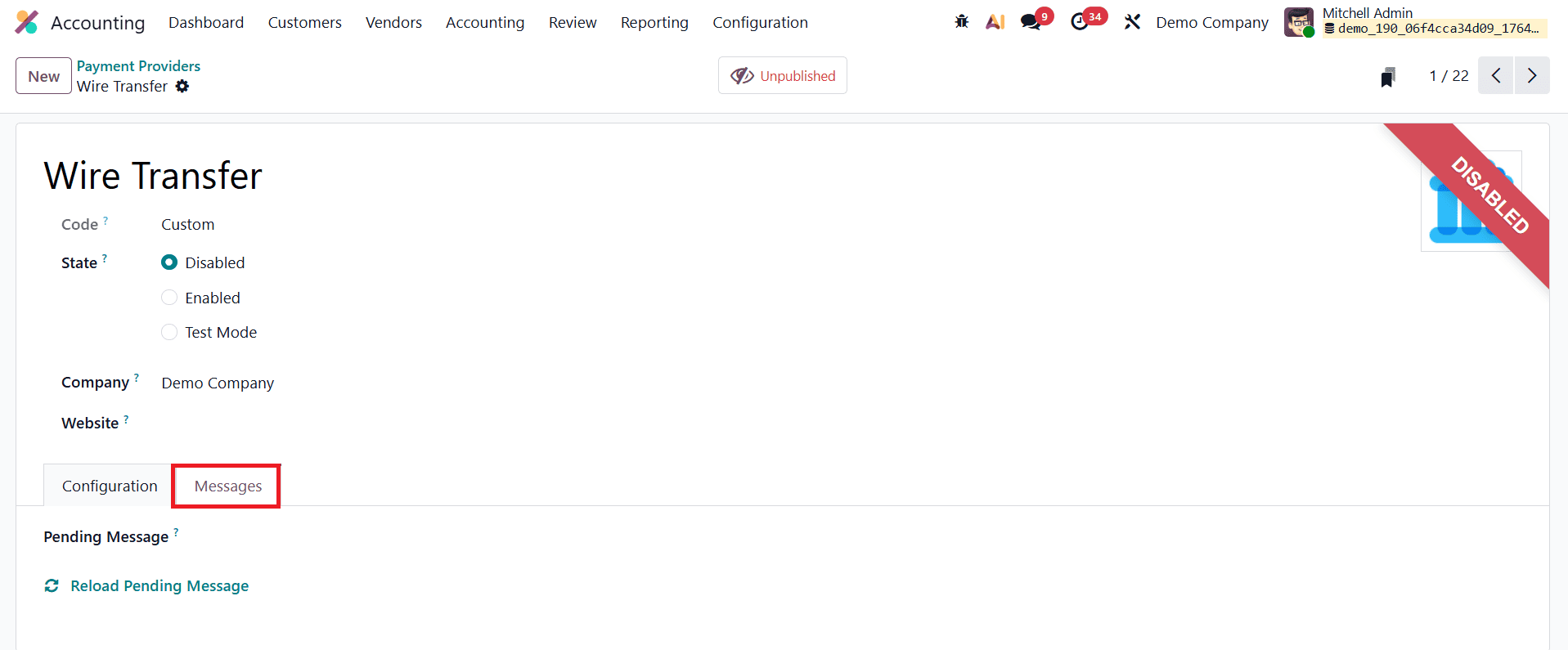
To ensure transparent communication during the payment process, Odoo 19 includes a Pending Message section, where businesses can define the message displayed to customers when a transaction remains in a pending state. This helps manage customer expectations and reduces confusion during payment verification. Additionally, thanks to built-in API integrations with major payment platforms, Odoo 19 fully supports Test Mode, allowing users to safely simulate transactions without real credentials. This feature makes it easy to test, validate, and fine-tune the entire online payment workflow before deploying it in a live production environment.
Payment Methods
In Odoo 19 Accounting, the Payment Methods feature plays a vital role in enhancing the online checkout experience by allowing businesses to define and display recognizable payment method icons such as Visa, MasterCard, PayPal, and other supported gateways. These visual identifiers help customers quickly recognize and select their preferred payment options, creating a smoother and more intuitive payment experience. Payment methods can be configured by navigating to Accounting > Configuration > Payment Methods.
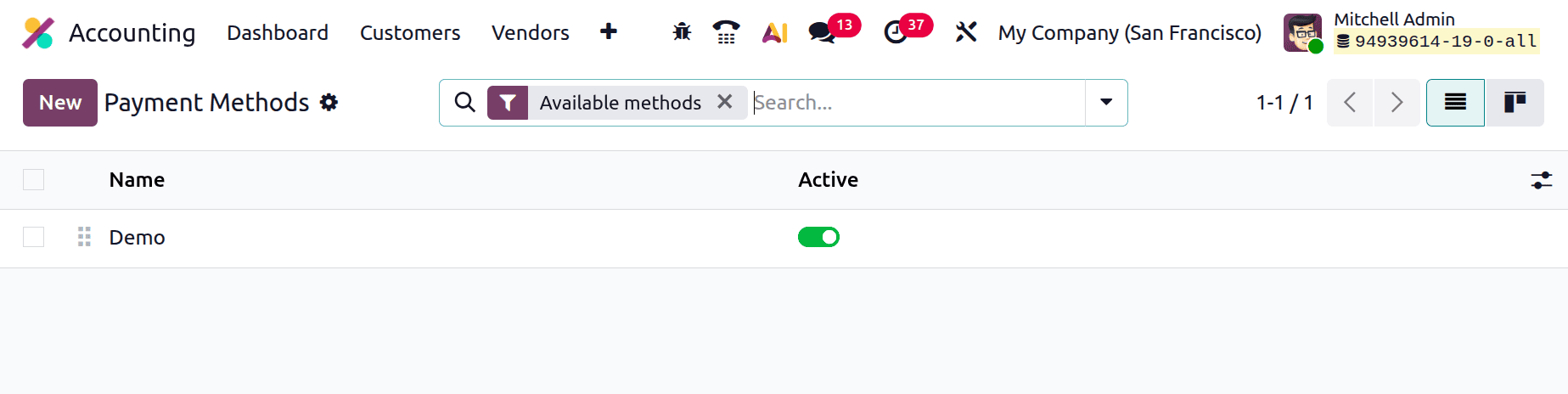
The Payment Methods list view displays all existing methods, with each entry acting as a visual representation of one or more payment gateways available in the system. To create a new payment method, users can click the New button, which opens a detailed configuration form where all relevant information can be defined.
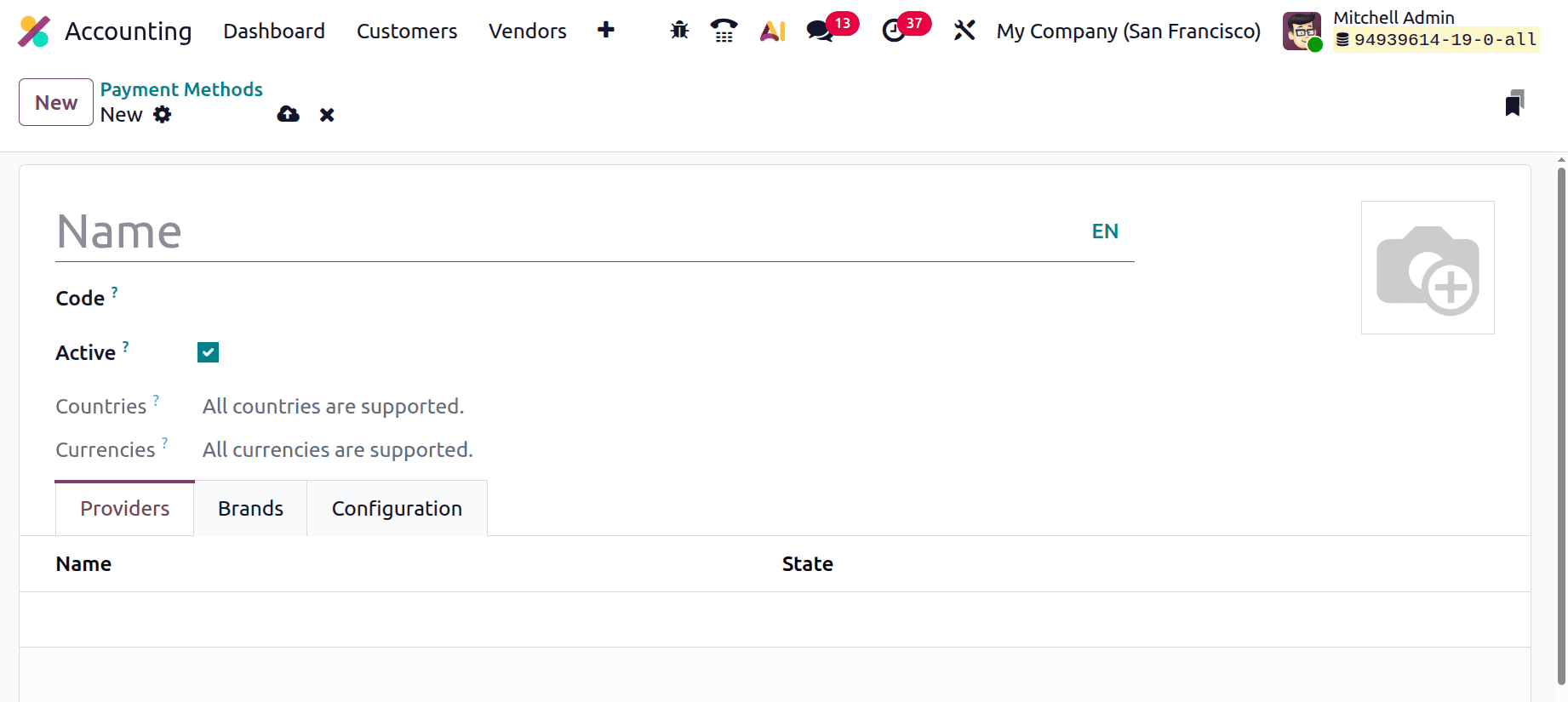
The configuration process begins by assigning a clear and descriptive Name to the payment method. Under the Providers tab, the method must be linked to one or more active Payment Providers that have already been configured in the system. In the Primary Payment Method field, users can specify the main provider that this payment method represents, ensuring proper routing of transactions during checkout.
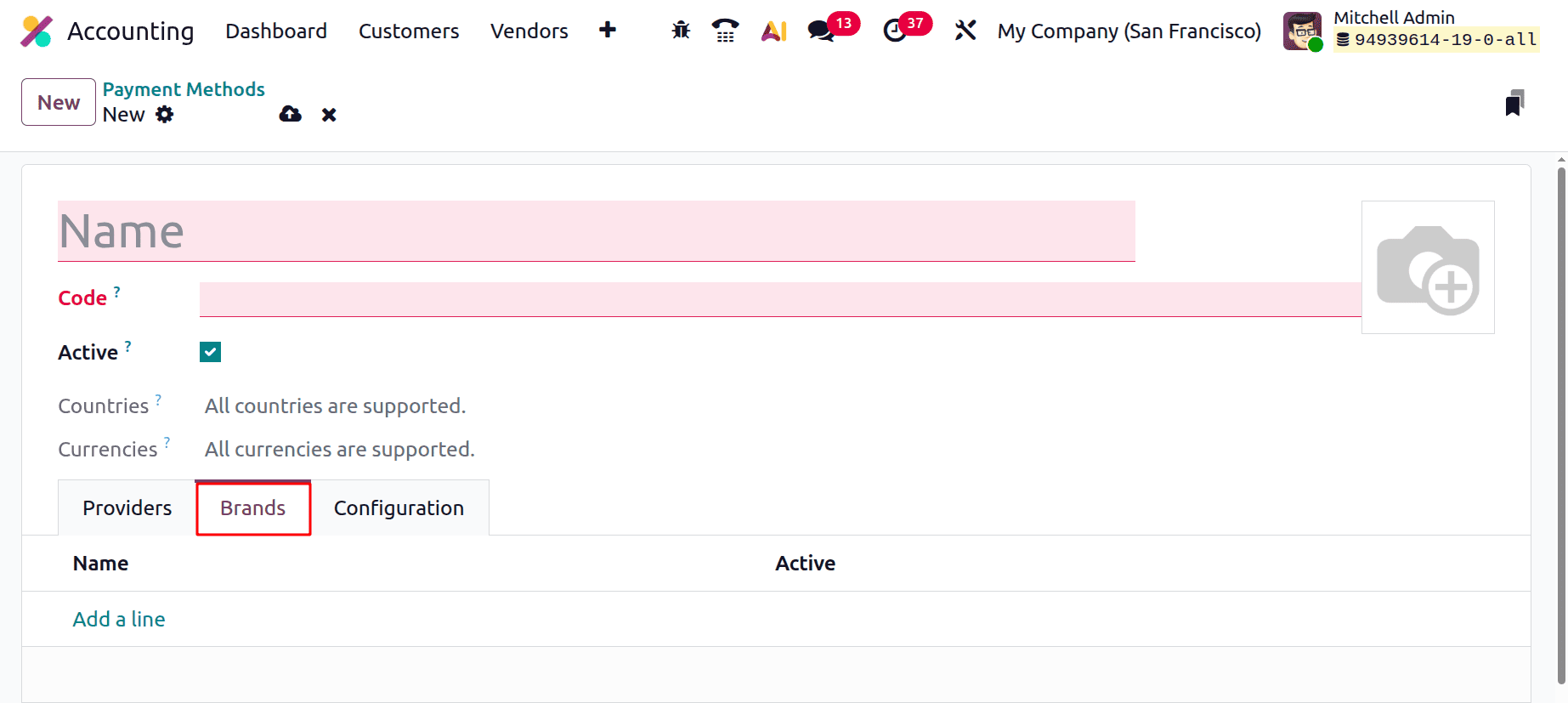
Additionally, individual Brand names can be added one by one using the Add a Line option under the respective tab, allowing businesses to represent multiple card brands or gateway options under a single payment method.
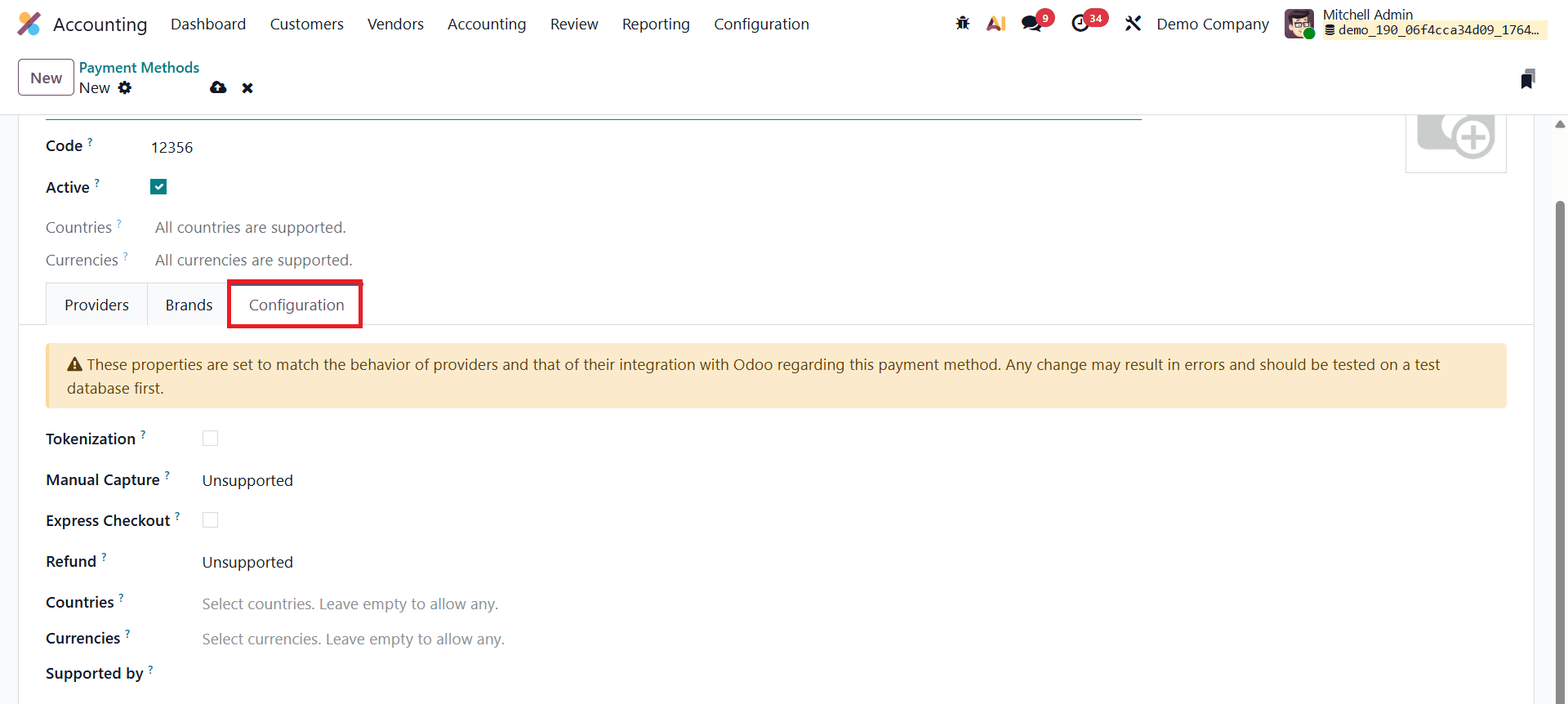
Within the Configuration tab, Odoo 19 introduces enhanced controls for Tokenization and Express Checkout. Enabling Tokenization allows Odoo to generate secure payment tokens immediately after a customer completes a transaction. These tokens are safely stored with the payment provider and enable returning customers to make future payments without re-entering their card details, significantly speeding up the checkout process while maintaining compliance with payment security standards. Express Checkout further improves user experience by reducing the number of steps required to complete a payment.
Additional settings such as Refund, Countries, Currencies, and Supported By can also be configured to ensure that each payment method operates correctly across different regions, currencies, and business scenarios. By setting up multiple payment methods with familiar icons and optimized configurations, Odoo 19 delivers a more transparent, professional, and user-friendly checkout process, ultimately increasing customer trust and improving conversion rates across both eCommerce platforms and customer invoice payments.
Payment Tokens
In Odoo 19, the Payment Tokens feature significantly simplifies repeat purchases and subscription-based billing by securely storing customers’ payment details in a tokenized format. This functionality is designed to enhance customer convenience while maintaining strict payment security standards. When a customer completes a transaction on an Odoo 19 eCommerce website, they begin by selecting one of the configured Payment Providers, such as Stripe, PayPal, or Adyen. Upon choosing a card-based payment method, Odoo displays a “Save my payment details” checkbox during the checkout process.
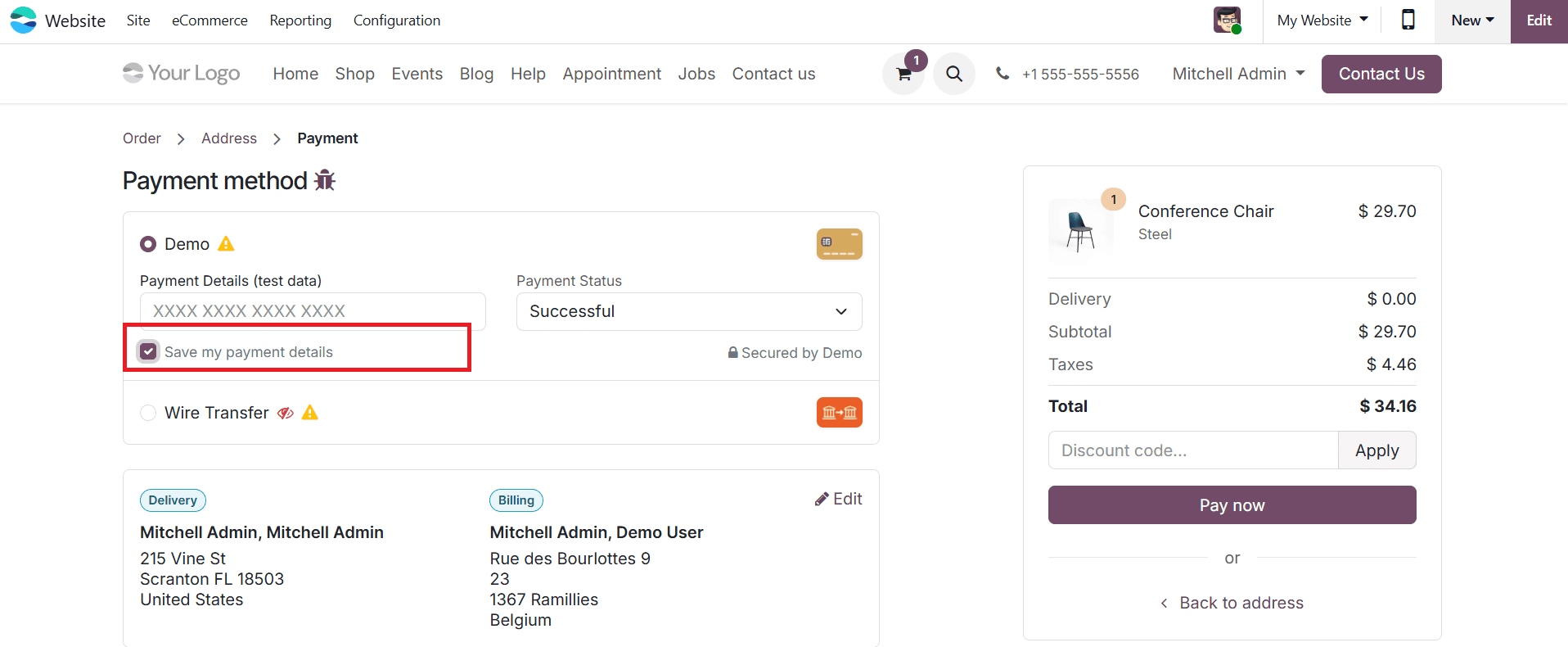
If the customer chooses to save their payment details, the selected payment provider generates a secure token that represents the customer’s card information. Instead of storing sensitive card data, Odoo securely saves this token, ensuring compliance with industry security requirements. These saved tokens can be managed and viewed by navigating to Accounting > Configuration > Payment Tokens, where each token is stored as an individual record.

Each payment token record contains essential information for secure identification and tracking, including the Company, Customer (Partner), Payment Provider, and the Provider Reference generated by the payment gateway. This structured storage allows businesses to maintain complete visibility and control over saved payment credentials without ever handling actual card details.

For future transactions, Odoo automatically retrieves the stored payment token, enabling customers to complete payments with a single click using their previously saved card. This removes the need to re-enter card information for every purchase, resulting in a faster and more seamless checkout experience. The Payment Tokens feature is particularly valuable for subscriptions, recurring invoices, and other ongoing payment models, as it reduces checkout friction, improves customer satisfaction, and ensures secure, compliant payment processing across all repeated transactions.
Payment Transactions
In Odoo 19, tracking and reviewing online payments processed through integrated payment gateways is simple and efficient using the Accounting module. Businesses can access the complete payment history by navigating to Accounting > Configuration > Payment Transactions, where all recorded online payment activities are centralized in one place.
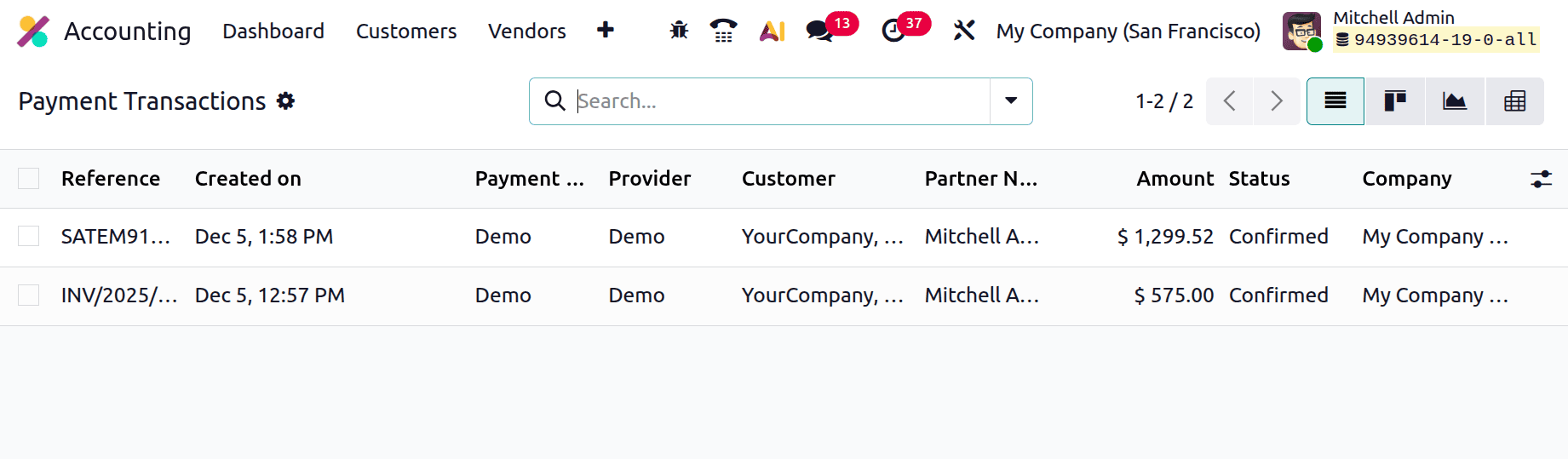
The Payment Transactions view provides a comprehensive overview of every payment event, regardless of the payment provider used. Each transaction record displays key information such as the Transaction Reference, Creation Date, Payment Method, Payment Provider, Customer (Partner) Name, Transaction Amount, Status, and the Company associated with the payment. This detailed visibility allows accounting teams to monitor payment progress, verify successful transactions, identify pending or failed payments, and maintain accurate financial records with ease.
Odoo 19 offers a powerful and fully integrated framework for accepting online payments on customer invoices by bringing together Payment Providers, Payment Methods, Payment Tokens, and Payment Transactions within the Accounting module. By configuring reliable payment gateways, displaying recognizable payment methods, enabling tokenized payments for repeat customers, and maintaining complete visibility into transaction records, businesses can create a smooth, secure, and user-friendly payment experience from invoice issuance to final settlement.
The online payment capabilities in Odoo 19 help organizations reduce payment delays, improve cash flow, and enhance customer satisfaction through faster and more convenient checkout options. With advanced features such as tokenization, express checkout, and real-time transaction tracking, Odoo 19 empowers businesses to manage invoice payments efficiently while maintaining high security standards and operational transparency across all payment workflows.
To read more about How to Set Up and Manage Payment Options in Odoo 18 E-Commerce, refer to our blog How to Set Up and Manage Payment Options in Odoo 18 E-Commerce.