Accurate liability tracking and inventory valuation are critical for maintaining a clean general ledger. A common challenge for accounting teams is handling the timing mismatch between the physical receipt of goods and the arrival of the vendor's invoice. In accounting terms, this is managed via two distinct scenarios: Bills to Receive (Goods Received, Not Yet Billed) and Billed Not Received (Billed, Goods Not Yet Received). Odoo 19 introduces automated workflows to manage these situations, ensuring that your financial statements reflect true vendor liabilities and actual stock assets at any given moment.
Accessing your unbilled purchase data is a simple process within the accounting application. To open the dashboard, navigate directly to the Accounting Module from your main screen header. Once inside, open the Review menu located in the top navigation bar, and select the Bill to Receive report option. This action opens your interactive audit workspace, which is immediately ready for period-closing analysis, supplier evaluation, or document filtering.
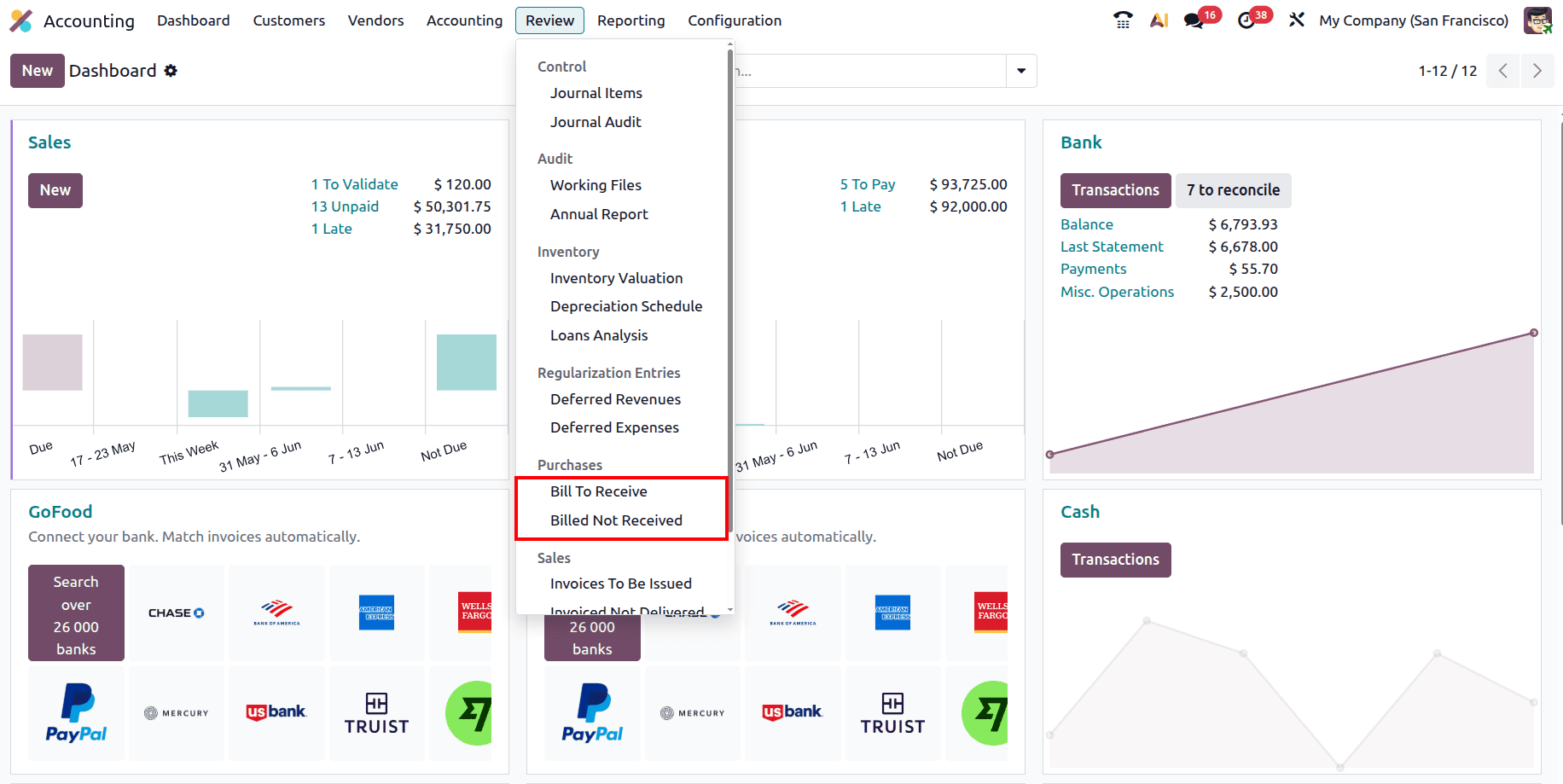
When operating under standard accrual and Anglo-Saxon accounting practices, inventory purchases do not immediately hit your Cost of Goods Sold (COGS) or standard expense accounts. Instead, they flow through an intermediary clearing or suspense account. Odoo manages this using two primary setups, depending on the sequence of your procurement operations.
1. Bill to Receive (Goods Received, Not Yet Billed)
This scenario occurs when a supplier delivers your products, but their financial invoice has not yet arrived. Upon validating the inventory receipt, Odoo automatically debits your Stock Valuation/Asset account and credits a Stock Interim Received (or Bills to Receive) account. Your inventory valuation increases on the Balance Sheet, but your official Accounts Payable is not yet impacted. The interim account holds a credit balance representing a pending, unbilled liability to the supplier.
2. Billed Not Received (Billed, Goods Not Yet Received)
This scenario occurs when a vendor requires prepayment or issues an invoice before shipping the physical items. Validating the vendor bill before receiving the goods debits the Stock Interim Received (or Billed Not Received) account and credits Accounts Payable. Your formal vendor liability is recognized immediately on your Aging Payable reports, and a temporary debit balance sits in your interim account, representing an asset or a pre-paid right to incoming goods.
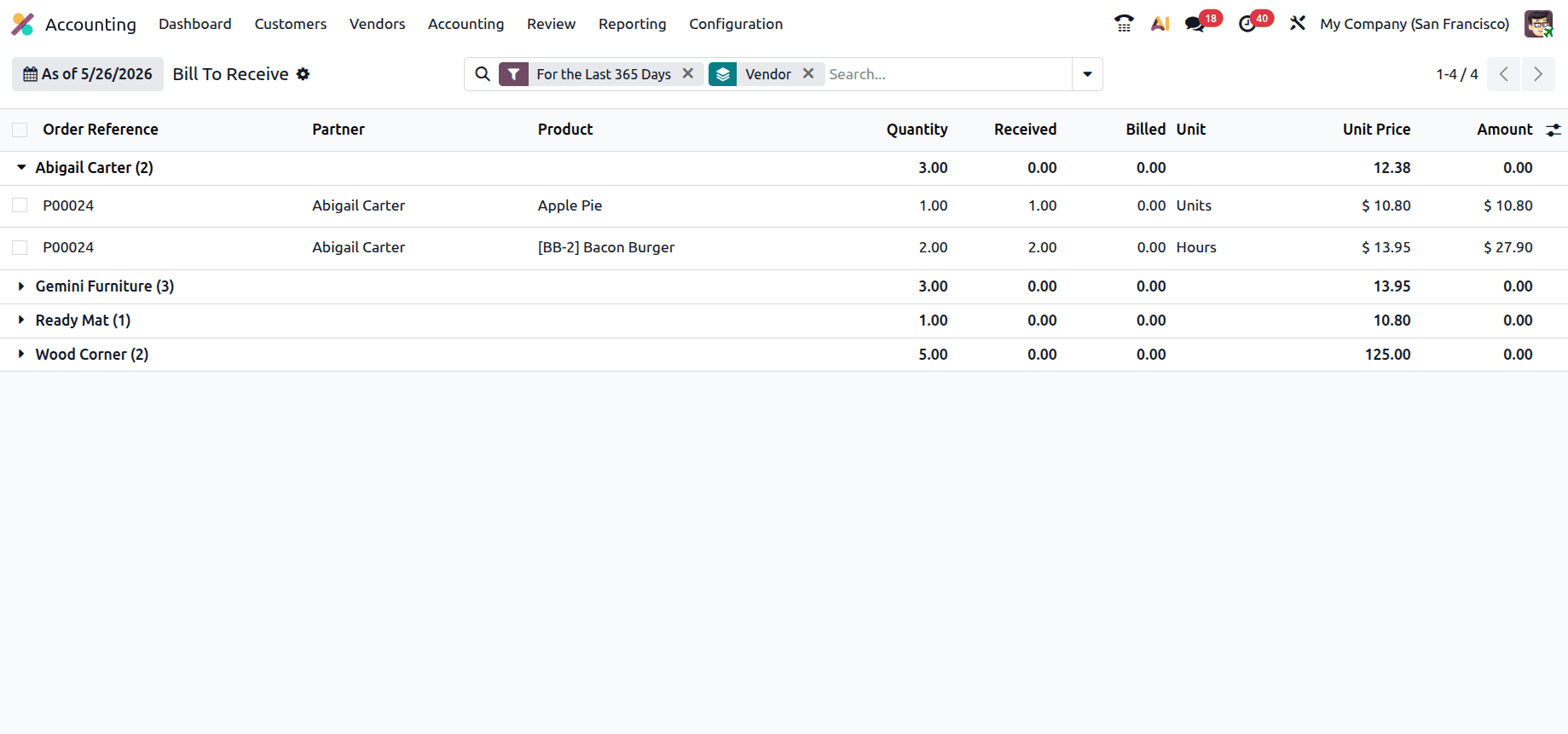
The Bills to Receive dashboard functions as an operational audit tool that scans your entire procurement pipeline to match inventory data with accounting data. By default, the interface automatically groups your pending purchase orders by Vendor. This structural grouping allows accountants to review outstanding financial obligations supplier-wise, making it easy to spot which vendors are falling behind on invoice delivery or which incoming shipments are pending billing.
The core strength of the report lies in its layout columns, which extract granular data pulled directly from your Purchase and Inventory applications into a single screen:
- Order Reference: The unique identifier that corresponds to the original Purchase Order (e.g., PO0001).
- Vendor: The supplier from whom the products or services were purchased.
- Product: The specific product or purchase order line item being evaluated in the report.
- Ordered Quantity: The total quantity originally confirmed on the Purchase Order.
- Received Quantity: The quantity that has been physically received and validated through incoming receipts.
- Billed Quantity: The quantity that has already been invoiced and recorded through validated vendor bills.
- Unit Price: The agreed cost per unit specified on the purchase order line.
- Amount: The total value of the quantity that has been received but not yet billed, calculated based on the unit price and outstanding quantity.
By comparing the Received Quantity directly against the Billed Quantity within a single row, accounting personnel can instantly identify structural discrepancies. Whenever the received quantity exceeds the billed quantity, Odoo flags that item as a pending unbilled liability and calculates the remaining balance.
Utilizing Odoo 19's automated tools for unbilled and pre-billed purchases provides several distinct operational advantages to your daily accounting workflows. First, it eliminates month-end accrual guesswork; instead of manually scanning open purchase orders at the end of every fiscal period, your finance team pulls this report to determine exact accrued liabilities.
Second, it mitigates double-billing and overpayments because Odoo matches the three pillars of procurement, POS, warehouse receipts, and vendor bills, blocking users from validating invoices that exceed the actual quantities received. Finally, ensuring that "Billed Not Received" balances are correctly booked into Accounts Payable allows your cash flow projection tools to accurately predict upcoming bank cash drains. The report can be printed and exported in both XLSX and PDF formats.
Managing the intersection of stock lines and financial entries requires tight control. Odoo 19's Bills to Receive report provides the clarity needed to handle timing differences smoothly without manual spreadsheet work. By automating data collection into a single, vendor-grouped dashboard, Odoo ensures your company maintains clean liabilities, accurate asset valuations, and a precise general ledger all year round.
To read more about How to Use Bill Control Policies in Odoo 19, refer to our blog How to Use Bill Control Policies in Odoo 19.