Performing repetitive actions manually is tedious and risky. Odoo 19 has addressed the above-mentioned issue by introducing scheduled actions, also known as cron jobs. These allow users to perform certain tasks automatically at predetermined intervals without any user intervention. From performing reminder email actions to integration with external systems, there are many benefits offered by these scheduled actions.
This blog will guide you through scheduled actions in Odoo 19 and their workflow, along with their use cases and location.
What Are Scheduled Actions in Odoo 19?
Scheduled Actions is the automatic process implemented by Odoo in order to run tasks at particular times or regular intervals. The system will automatically handle these tasks once the scheduling has been done. Hence, there will be no need for any manual actions.
Rather than making users execute repetitive tasks, Scheduled Actions help in running important tasks in the background.
Examples:
- Automating email notifications
- Maintaining the records' status
- Synchronizing records with third-party tools
- Creating regular reports
- Cleaning temporary or outdated records
Why use Scheduled Actions?
Many business operations occur repeatedly and don't require user intervention. Scheduled Actions help automate these recurring activities, improving efficiency and reducing manual work.
Some of the key benefits include:
- Decreasing manual repetitions
- Improving efficiencies
- Completing the activity within time constraints
- Conducting background activities without disturbing users
- Achieving consistency in business processes
How Do Scheduled Actions Work in Odoo 19?
A Scheduled Action workflow is very simple.
Initially, a Scheduled Action is created through either a custom module or directly via the Odoo application. The action refers to an operation that needs to happen automatically.
The Odoo scheduler constantly checks for any Scheduled Action that require execution at a certain time. Once the preconfigured time comes to an end, the scheduler executes the corresponding task. When the task has been done, Odoo finds out when the next execution of the task will happen.
Generate Scheduled Action > Set Up Execution Frequency > Odoo Scheduler Checks Scheduled Actions > Time for Execution Arrives > Execute Background Task > Task Completes Successfully > Next Execution Time Updated
This automated cycle continues until the Scheduled Action is disabled or removed.
Where Can You Find Scheduled Actions?
In Odoo 19, Scheduled Actions can be accessed after enabling Developer Mode.
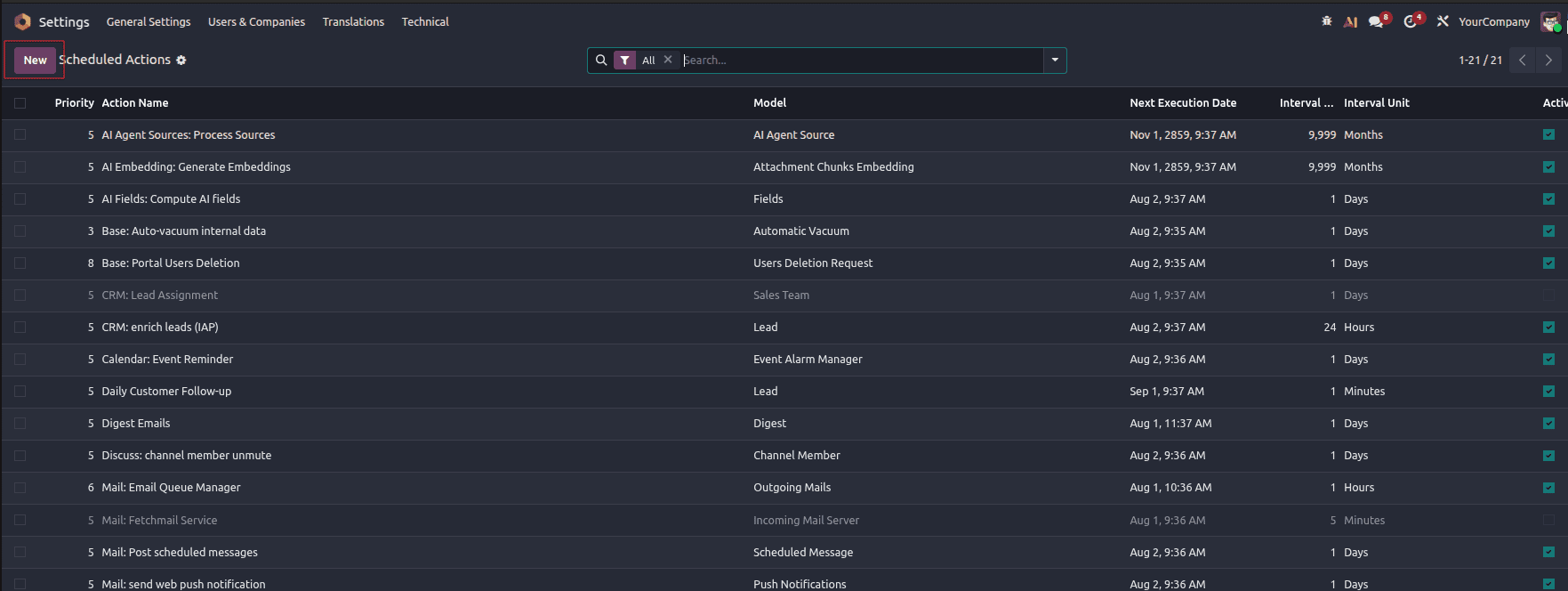
Settings > Technical > Automation > Scheduled Actions
From this menu, developers and administrators can:
- View existing Scheduled Actions
- Enable or disable scheduled tasks
- Modify execution intervals
- Check the next execution time
- Run a Scheduled Action manually for testing
Creating a Scheduled Action Through the User Interface
You can create a new Scheduled Action from the Odoo interface from the Scheduled Actions menu.
Click New, then configure the fields below:
- Name: Specify a meaningful name for the Scheduled Action (e.g., Daily Customer Follow-up).
- Model: Select the model on which the action will be run (for example, Lead/Opportunity (crm.lead)).
- Active: Select this option if you want the Scheduled Action to run automatically.
- Run Every: Set the frequency of task execution (e.g., 1 Day).
- Next Execution Date: Select the first execution date and time.
- Priority: Show the execution priority if there is more than one scheduled action in the queue.
Then, in Action To Do, select how you want the task done. The most frequently used options are:
- Run Python code: Execute Python code directly.
- Run Existing Server Action: Executes a previously created Server Action.
In this example, click “Execute Python Code” and input the following code:
lead = env['crm.lead'].browse(1)
if lead.exists():
   lead.write({
       'description': 'Updated automatically by Scheduled Action.'
   })
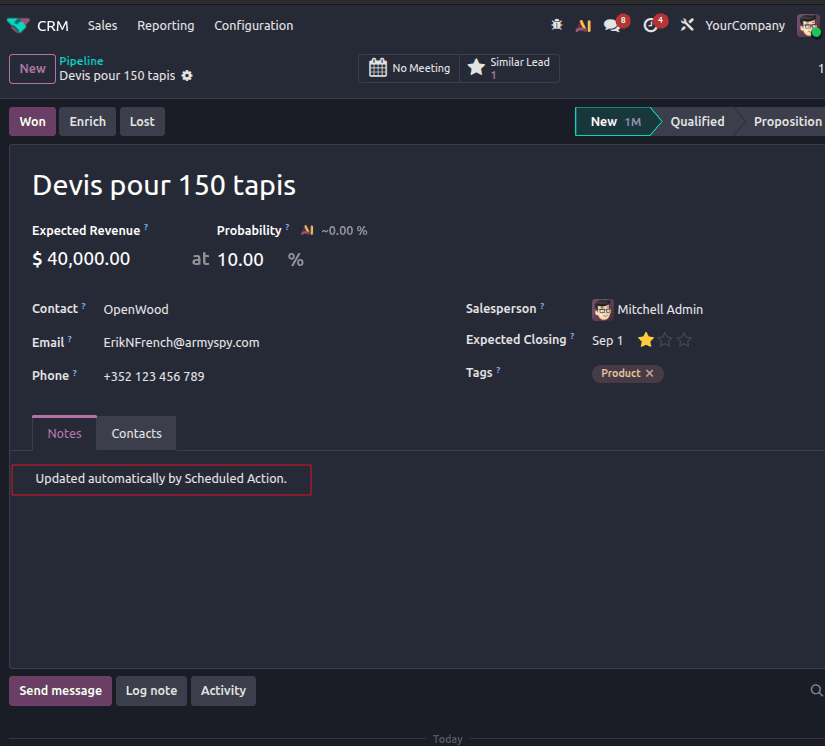
This code gets the CRM lead with ID of 1 and sets its Description field to “Updated automatically by Scheduled Action".
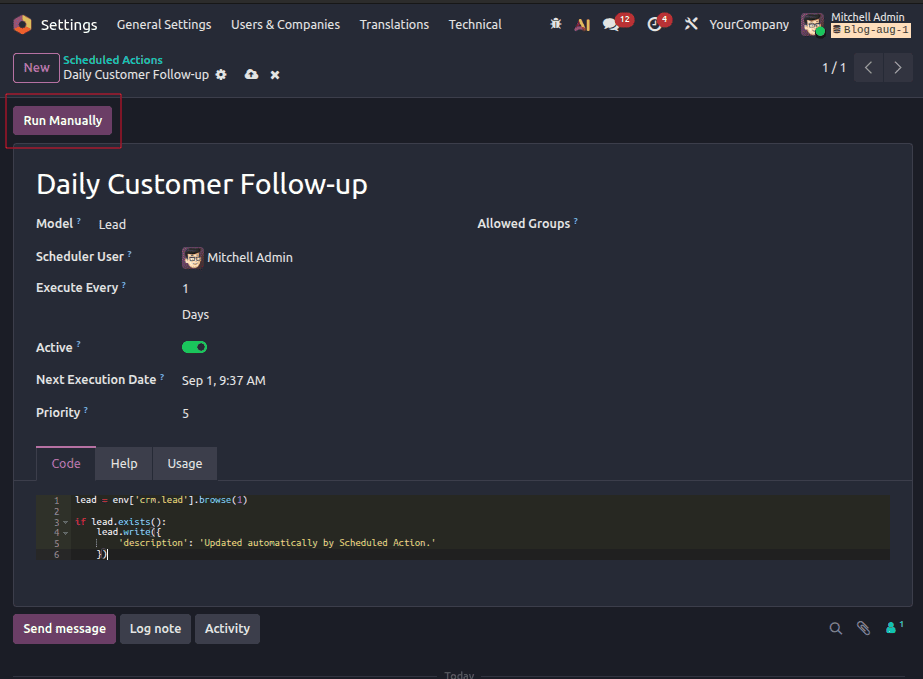
After saving the Scheduled Action, click Run Manually to ensure it works correctly. If the execution is successful, then open the relevant CRM lead and check whether the Description Field has been updated.
Common Use Cases of Scheduled Actions
Scheduled Actions are widely used across different Odoo applications. Some practical examples include:
- Sending Automated Emails
Automated reminders can be sent for payments, follow-up messages, or notifications on a pre-determined schedule.
- Updating Business Records
Actions can be set to be performed on a schedule, such as updating document status or archiving finished documents and maintenance tasks.
- Data Synchronization
Integration between Odoo and other external software can ensure that customer details, products, stock, or accounts are synchronized periodically.
- Report Generation
Automated reports can be scheduled on a daily, weekly, or monthly basis without any manual effort.
- System Maintenance
Old or temporary data can be removed on a scheduled basis to optimize database performance.
Managing Scheduled Actions
Odoo provides several options for managing Scheduled Actions.
- Enable or disable a Scheduled Action
- Set its frequency of execution
- Adjust the next execution time
- Test it manually before deployment
- Monitor scheduled actions to make sure they work
They make it easy for organizations to continue using automated processes as their business needs change.
Scheduled Actions are an important aspect when it comes to automating actions in Odoo 19. Scheduled Actions allow for activities to be automated without the users being involved. It can be used for sending reminders, synchronization of data, creation of reports, and many other activities.
It is essential to understand the principle of operation of Scheduled Actions and where they can be managed.
To read more about How to Configure Scheduled Actions in Odoo 19, refer to our blog How to Configure Scheduled Actions in Odoo 19.