The lower portion of Oil ERP is built on Odoo manufacturing, and the Manufacturing section is the basis for everything in this blog. Activation of the Manufacturing Base function under Downstream Operations leads to activation of two Odoo functions refineries can’t do without – by-products and dependencies of work orders. Thus, there is no need to search for these functions in the manufacturing settings, and the creation of refining orders can begin immediately.
A refining order is a regular manufacturing order with a separate entry point. The Refining option is located under Refinery Operations, right next to the Bill of Material, and displays information about each order alongside the details of its components, the total quantity required, and the final status of the order.
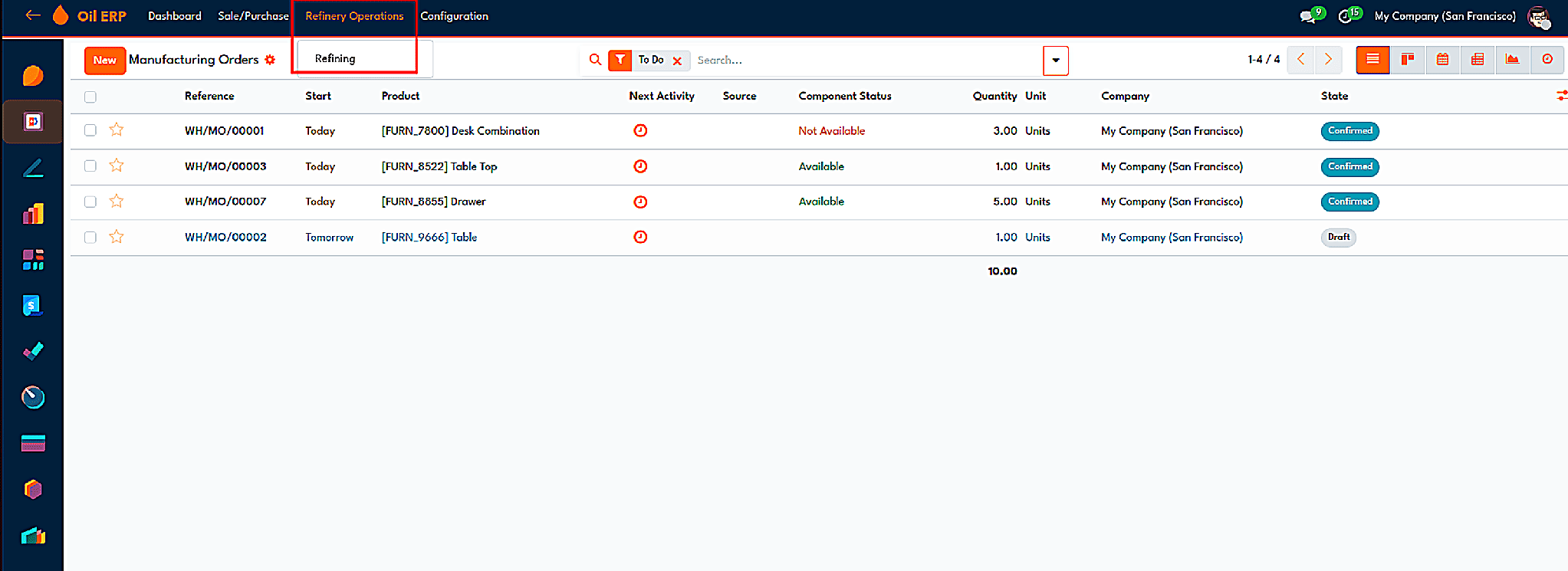
The Refining menu lists manufacturing orders with component status and state.
At the lower level of the dashboard, the same information is shown in tile form. In the dashboard we have tiles that show finished refining orders, orders on time, overdue orders, the status of inspections, and passing inspection rates. Under these tiles is a chart showing manufacturing orders by status along with a chart relating to most produced products. The second page of this dashboard displays results of product inspections, including the inspections workload, volume of inspected products, and the most experienced inspectors.
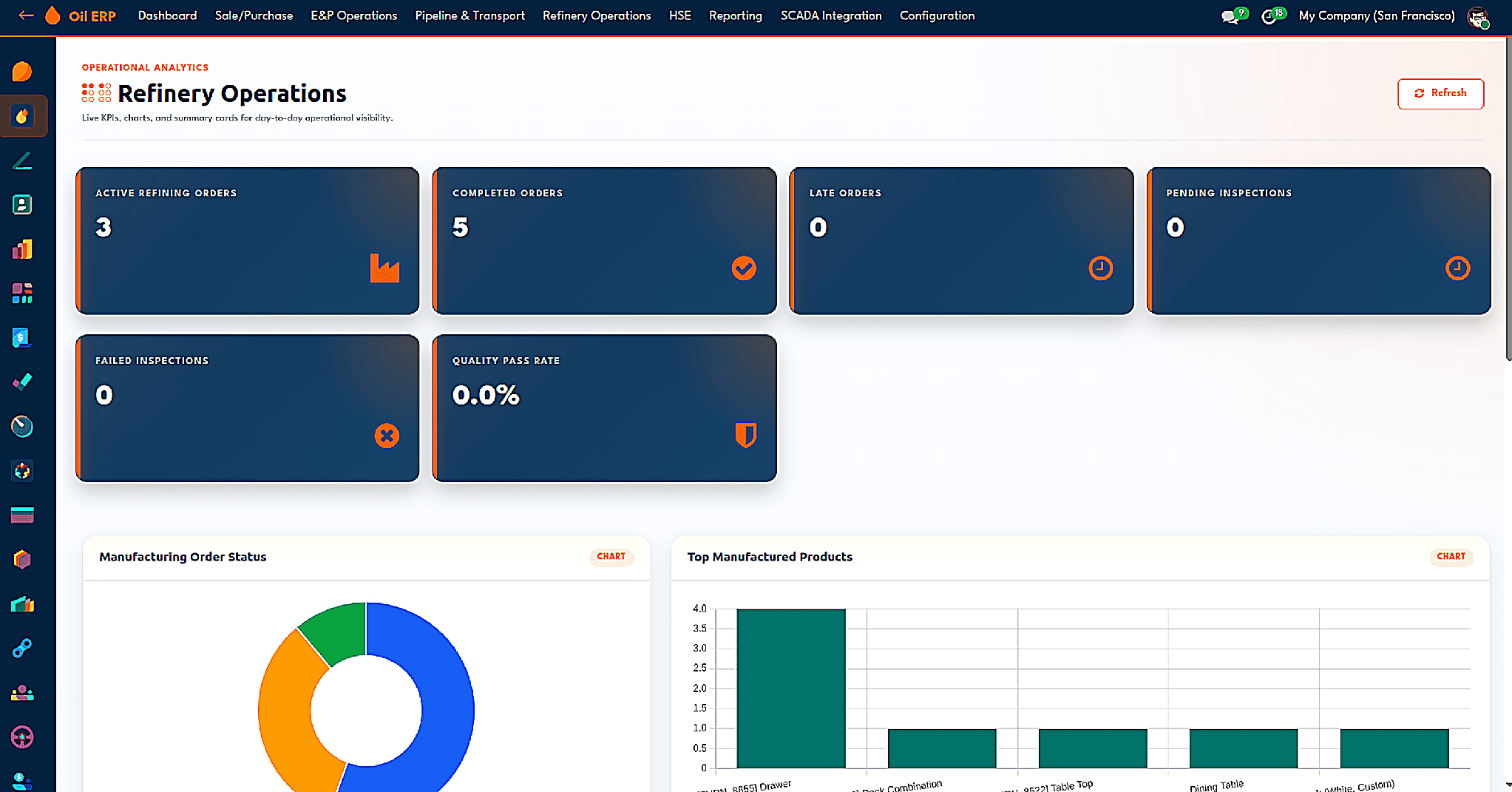
The Refinery Operations dashboard with order and inspection tiles and charts.
Yield Accounting
A refinery profits from the variance between raw inputs and final products, so Yield Accounting must be maintained for each production cycle. Yield Accounting is activated in the Refinery Operations parameter of the settings, and it applies to the bill of materials.
When Yield Analysis is switched on in the bill of materials, the expected yield for the base product and a target yield range are recorded. The expected yield for each by-product is taken into account separately with defined tolerance parameters for the entire process.
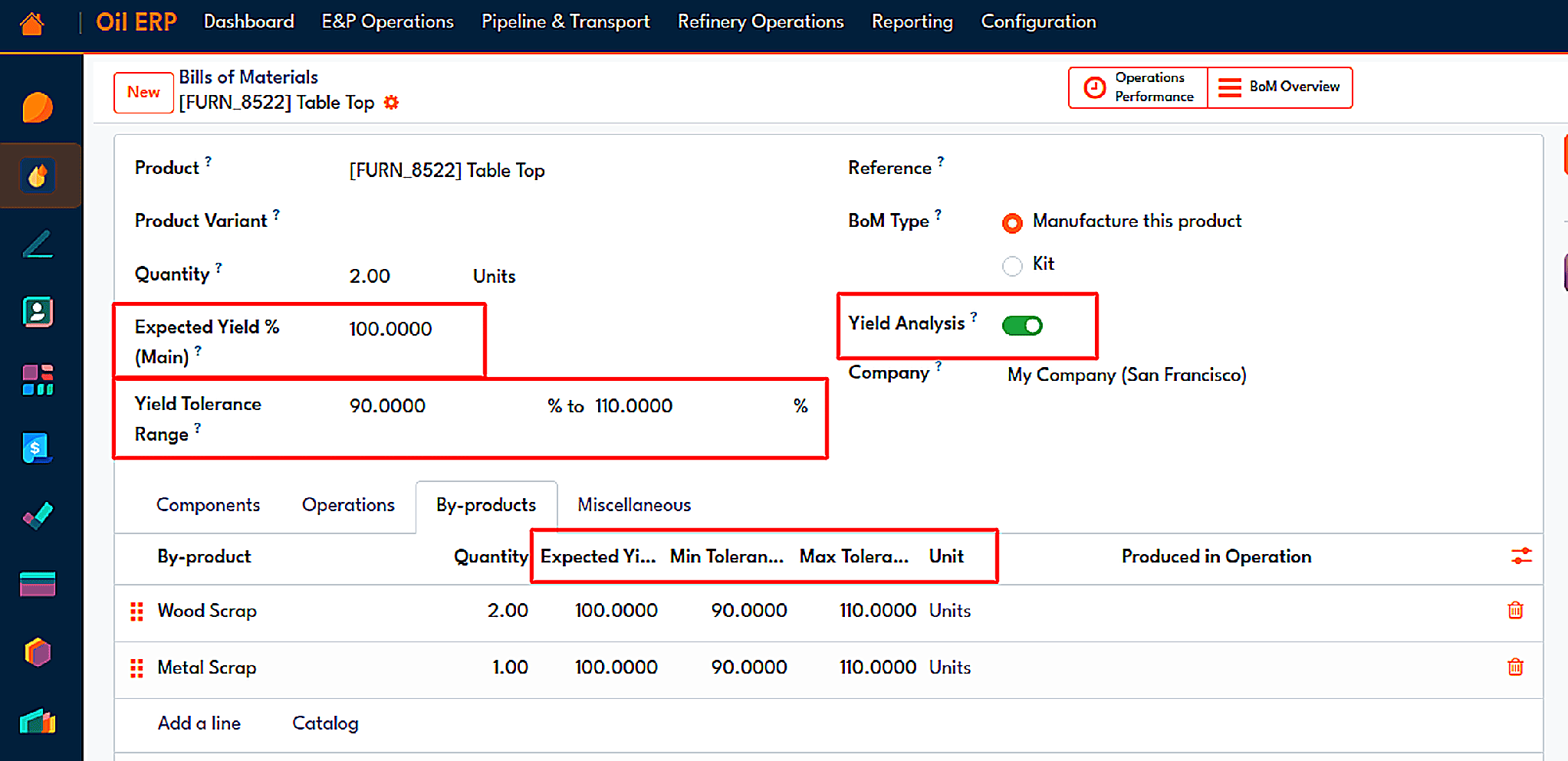
A bill of materials with expected yield, tolerance range, and by-product tolerances.
Only once the order has been completed will the real figures come through. Produce All will launch the wizard that records the products produced with all the expected quantities, actual ones, along with the ongoing statuses like Excess or Low and the variances noted down. Once confirmed that the production order is completed, the variances are recorded in the chatter, and users are enabled to introduce the by-product quantities after the production process. The module uses the quantities typed in by the users in Odoo’s scaling procedures and removes any stock move lines that have no products.
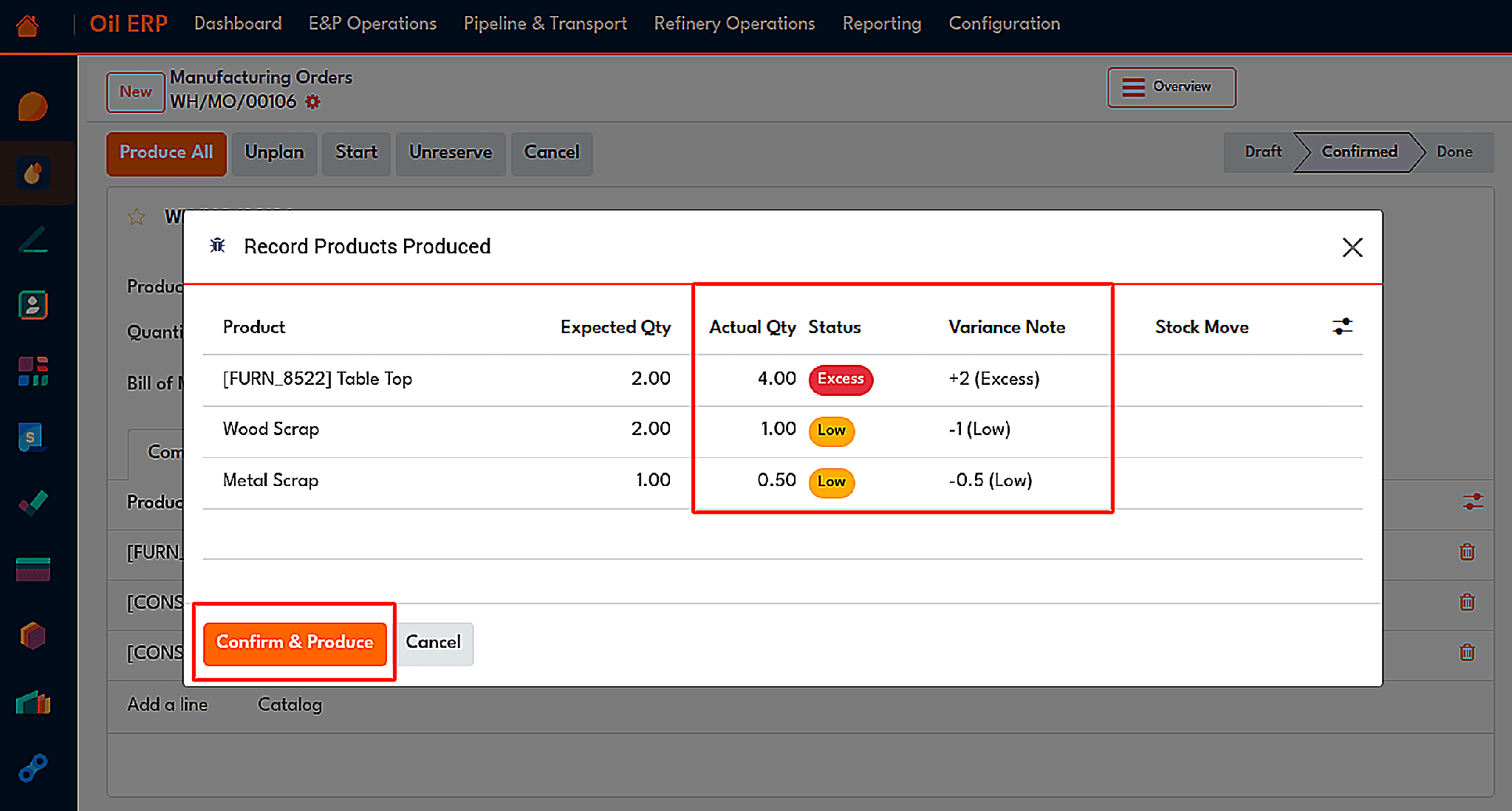
The wizard records actual quantities of the main product and by-products.
As soon as a bill order with a yield plan is recorded as Done, a yield analysis record is automatically created by the module. The raw feed, total yield, production loss, and overall yield percentage are calculated. The yield of every product is calculated as actual divided by expected and multiplied by 100 so that a unit difference between two products does not affect the assessment. Each outcome is classified as Within Tolerance, Warning, or Critical depending on tolerances established by the bill.
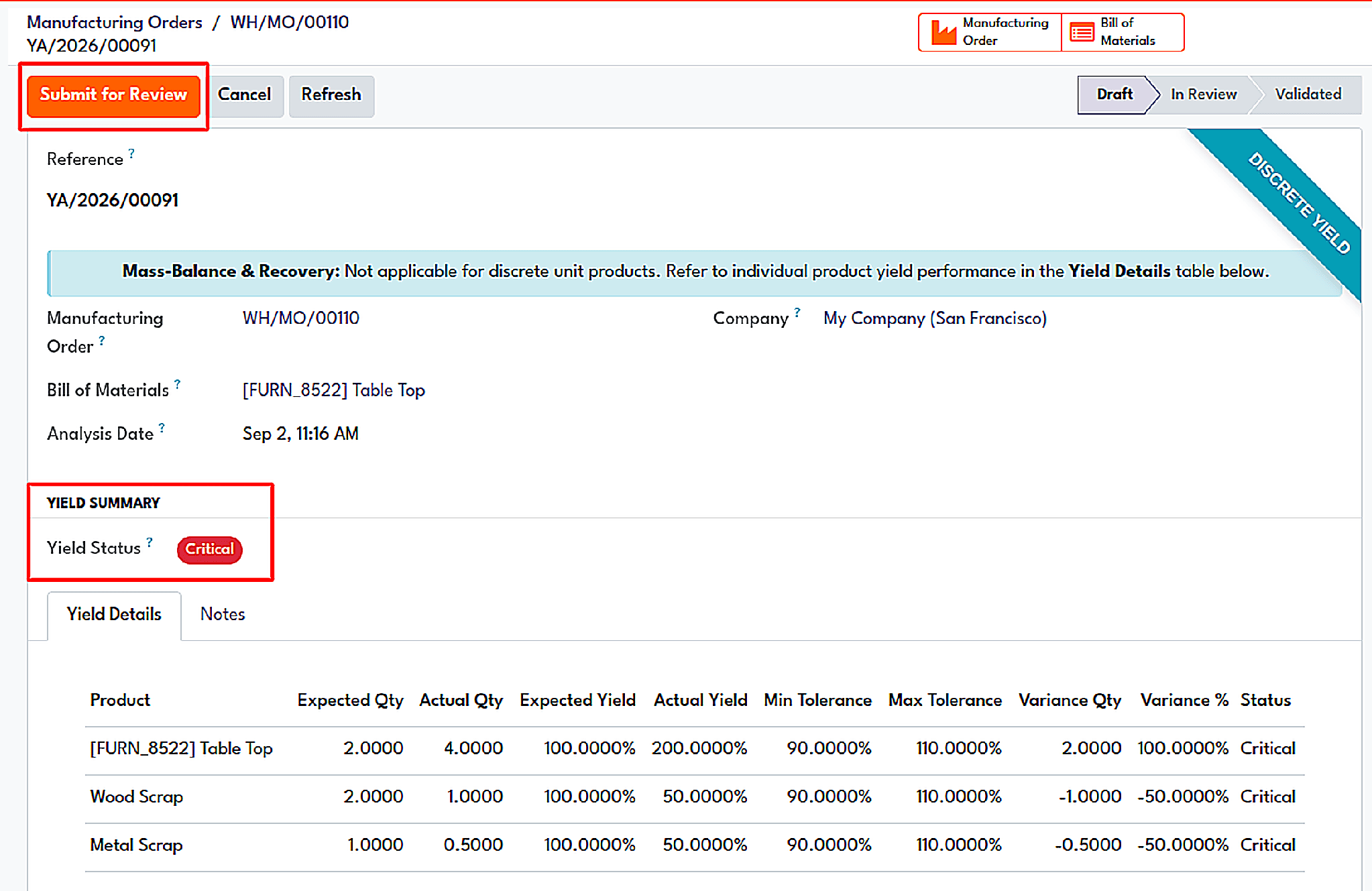
A yield analysis report with expected and actual yield, tolerance limits, and the Critical status.
It is not possible to change the calculated fields manually since calculations are based on actual stock movement data. Stages of records are drafted, reviewed, validated, and cancelled. After declaration of approval by a manager, the record becomes locked, and the manager can only reset the cancelled analysis to draft. There is a smart button in the order which takes the user to the analysis directly.
Quality and Inspection
Yield indicates the amount of product produced, while Inspection determines its quality. The Inspection module is part of the Refinery Operations settings, which also includes the Checklists. The process is initiated with Quality Points. In essence, a quality point is a template. It specifies operation types (receipts, delivery orders, and production) where this point can be applied, the product or product category in question, as well as what the checklist is. Each line of the checklist contains an evaluation type (i.e., percentage), expected result, execution method (whether destructive or non-destructive), reference sample, and critical indicator. In the given example, the crude oil point includes a test for viscosity at the expected value of 60 and shear strength at 85.
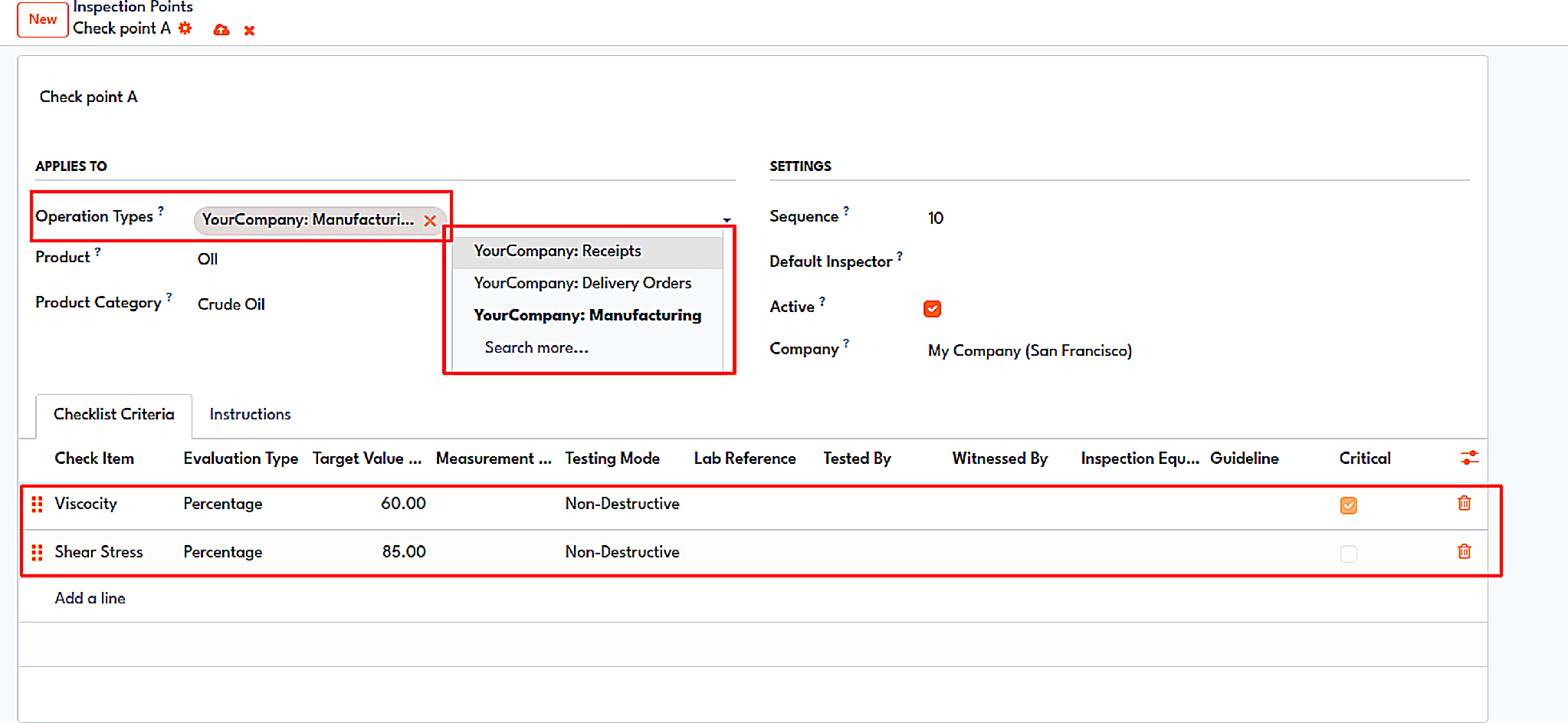
A quality point with its operation types and checklist criteria.
The act of checking the order starts from the completed order. When a production order is finished and matched against the quality checkpoint, a button for Inspections will appear. Upon pressing this button, the related Inspection Order is generated and opened for taking measurements. The inspector then records the measurements in the inspection form for each checklist item.
The inspection results in three possible outcomes. If all criteria pass, the order is accepted. If non-critical criteria do not pass the inspection, then the order will be conditionally accepted. In cases where any critical criterion does not pass the inspection, the order fails; the example of the screens demonstrates this nicely: viscosity over 65 and shear stress over 90 pass the inspection, shear stress equal to 45 yields a conditional pass, and viscosity equal to 40 fails the inspection.
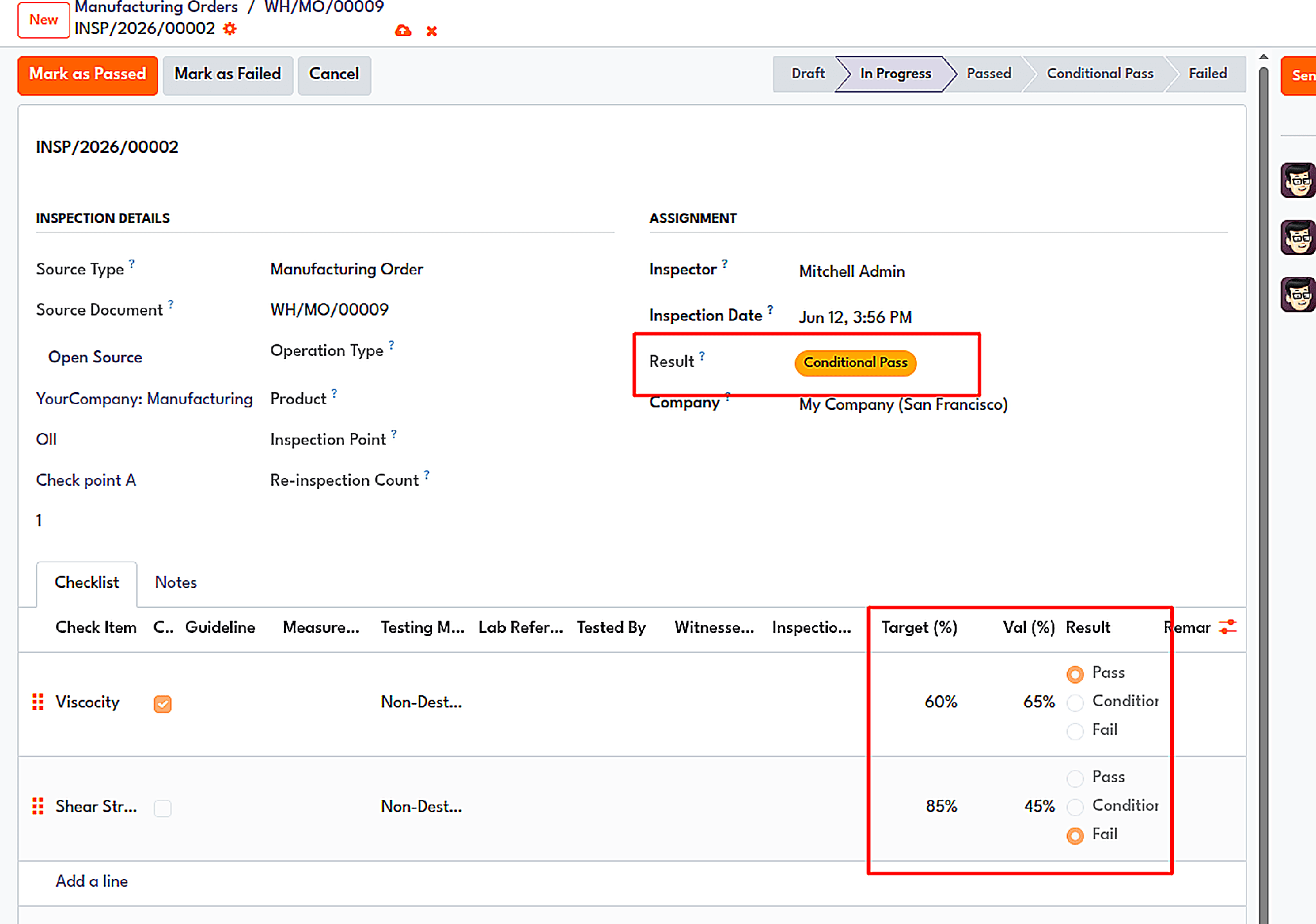
An inspection order is graded Conditional Pass because a non-critical criterion missed its target.
If an inspection is unsuccessful, it passes through the Failure Protocol wizard. The inspector states the reason for the failure, and at this point, it is also possible to create a scrap entry. Quality inspections are not only limited to production, but they occur for incoming and outgoing transactions, as the same quality points and the Inspect button are implemented in receipts, deliveries, and internal transfers.
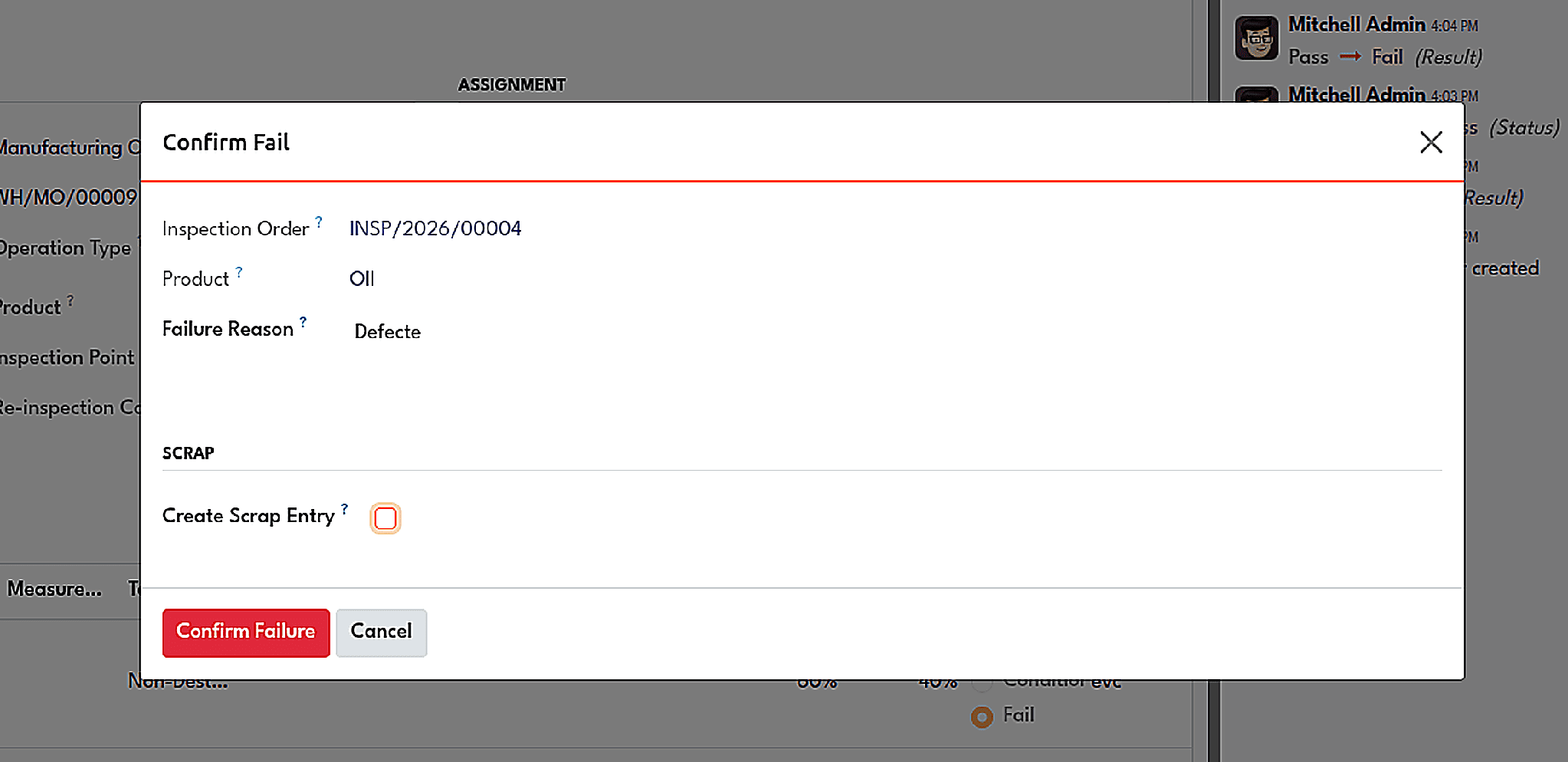
The failure protocol wizard includes the failure reason and the option to create a scrap entry.
The module comprises quality alerts as well as teams and other components that contribute to its output, which makes its way down to the inspection panels in the dashboard.
Quality Certification
In a similar vein, it is possible for a refinery to produce high-quality products but be unable to substantiate it. In such cases, the Quality Certification module takes care of the documentation, including product specifications as well as certificates of quality and authenticity.
Specifications
The specifications database contains information about every particular commodity in its terms. Each specification has test records. Records include details such as the properties, test unit, minimum, maximum, critical flag, and the method of testing. Such records may include, for example, the sulphur test by ISO 20846, the density at 15 degrees by ISO 12185, the cetane number by ISO 5165, and the water content by ISO 12937.
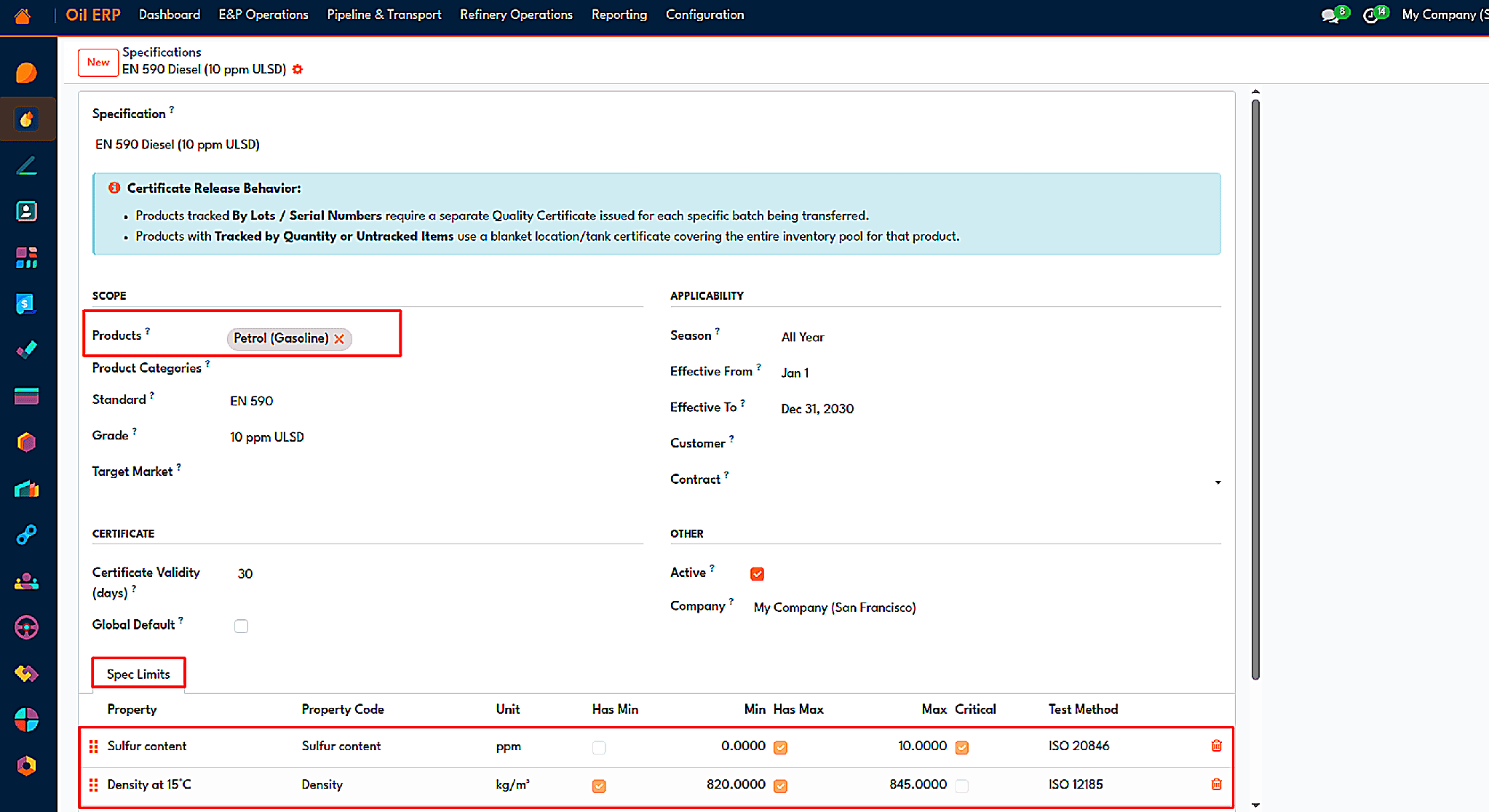
A product specification with its test lines, limits, and test methods.
Batches and holds
After finishing a manufacturing order, the product receives a lot number. It indicates its quality status as Not Controlled, On Hold, Released, or Rejected. When the product is waiting for the certificate, it is displayed with the On Hold sign. For inspection products, the certificate is generated when the inspection order is completed; otherwise, the Create Certificate button will appear on the finished order to generate a new certificate with the lot, product, and specification already set.
Certificates
The lab results are included in the certificate form as per the parameters. The results are then compared against the minimum and maximum from the specifications, whereby the results will be Pass or Fail per line, including an overall result of Pass, Conditional, or Fail. Lines come from the volume correction module, inspection, manual entry, or an external lab. Once the certificate is issued, the lot is released when the result is either Pass or Conditional, and the prior version of the certificate is cancelled. Certificates have different states, such as Draft, Issued, Revoked, and Expired, and an updated certificate can be issued whenever a change in results is observed.
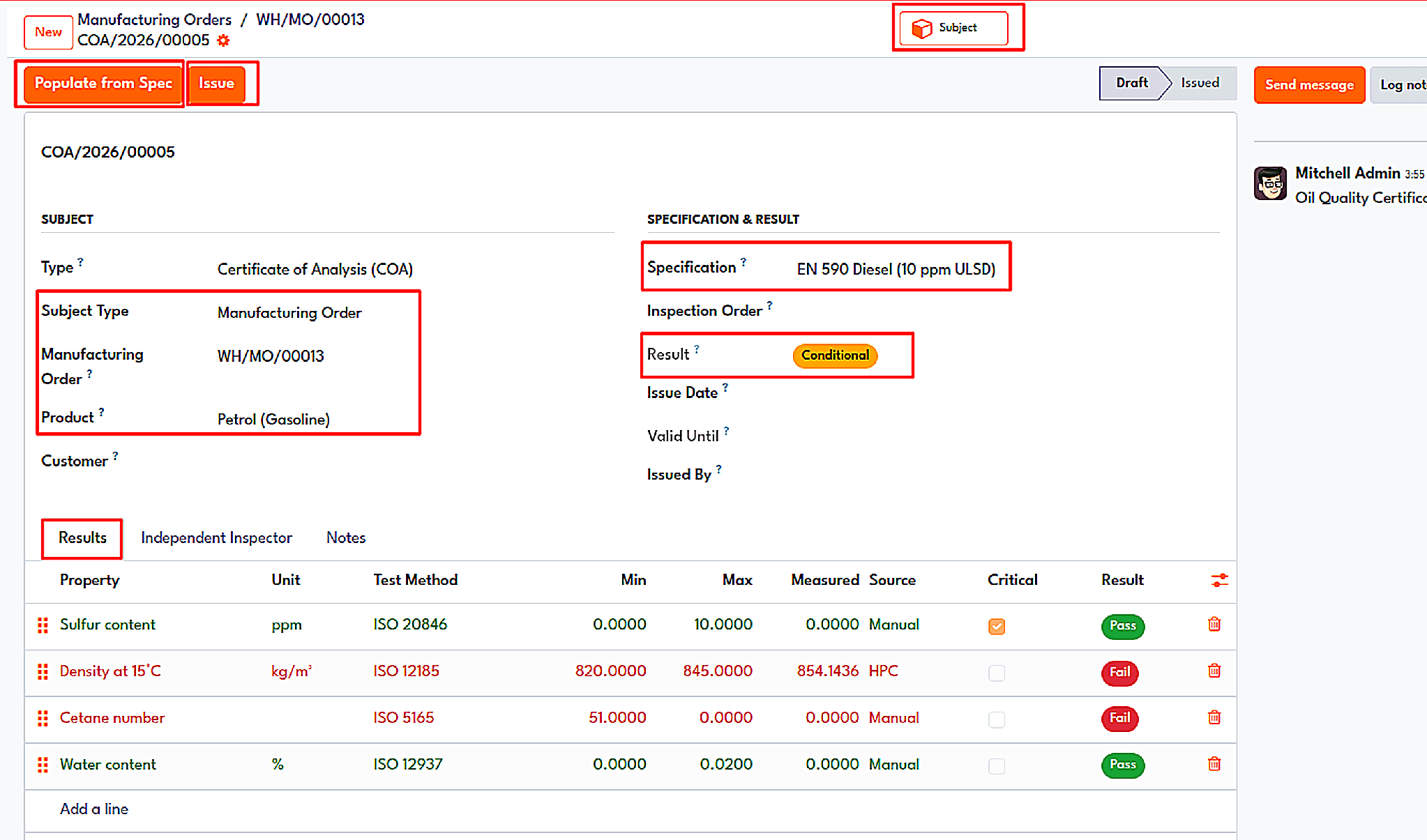
A certificate of analysis form with specification, result, and lab test lines checked against limits.
The printed document represents the Certificate of Analysis, which also shows the company logo, product name, and lot number; all the parameters with their respective methods, units, and limits; the measured values; and signature areas. A Certificate of Quality is included in this form.
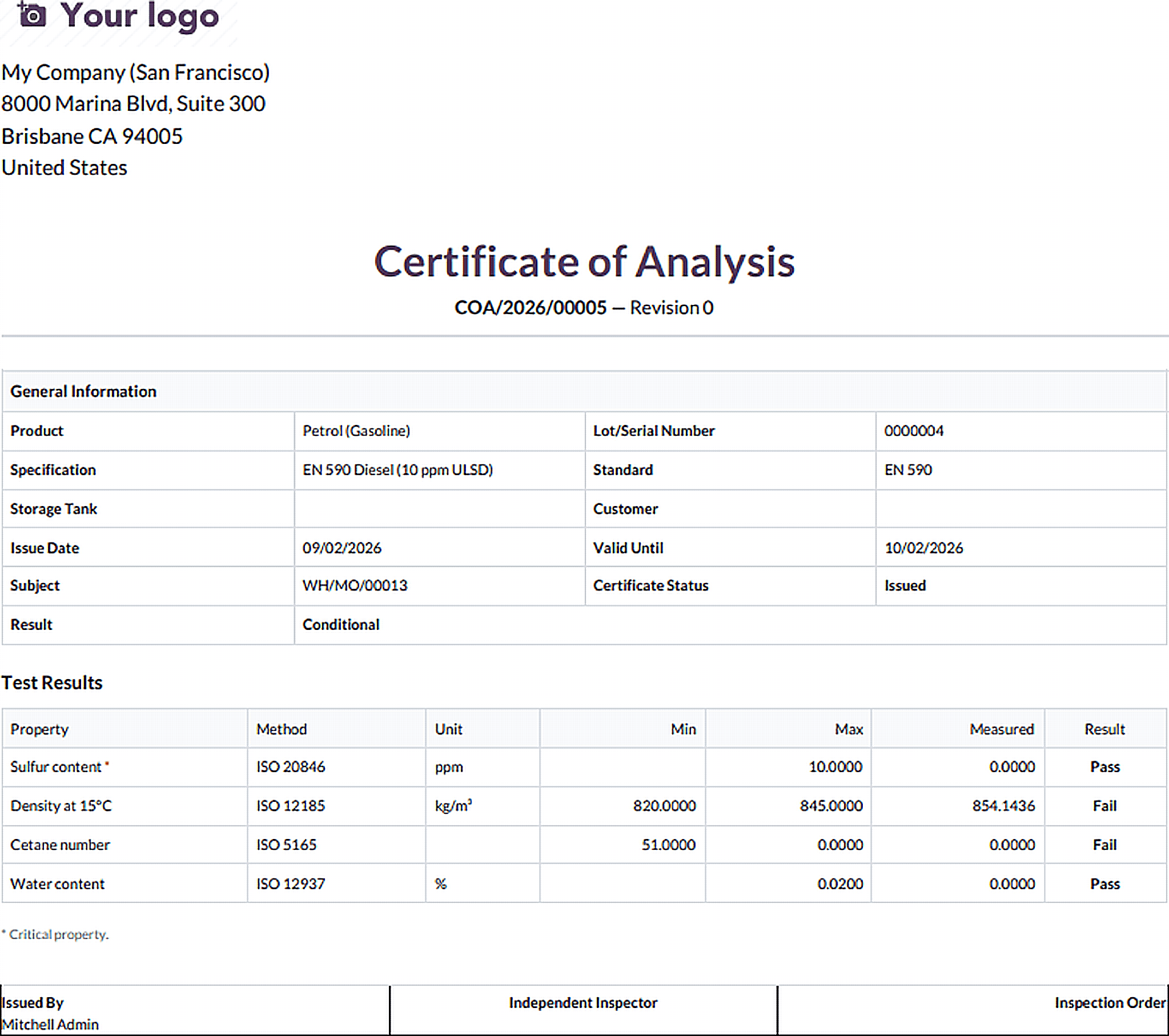
The printed Certificate of Analysis.
Delivery gate
The module's location is the gate. For example, if you try to validate an outbound delivery containing an uncertified lot, Odoo prohibits validation and returns an error message with the lot number saying that validation will not be allowed until a certificate of analysis is available. But if you validate a delivery containing a Conditional Pass certificate, you will only see a warning banner. After issuing a proper certificate for the lot, picking will be validated normally with traceability.
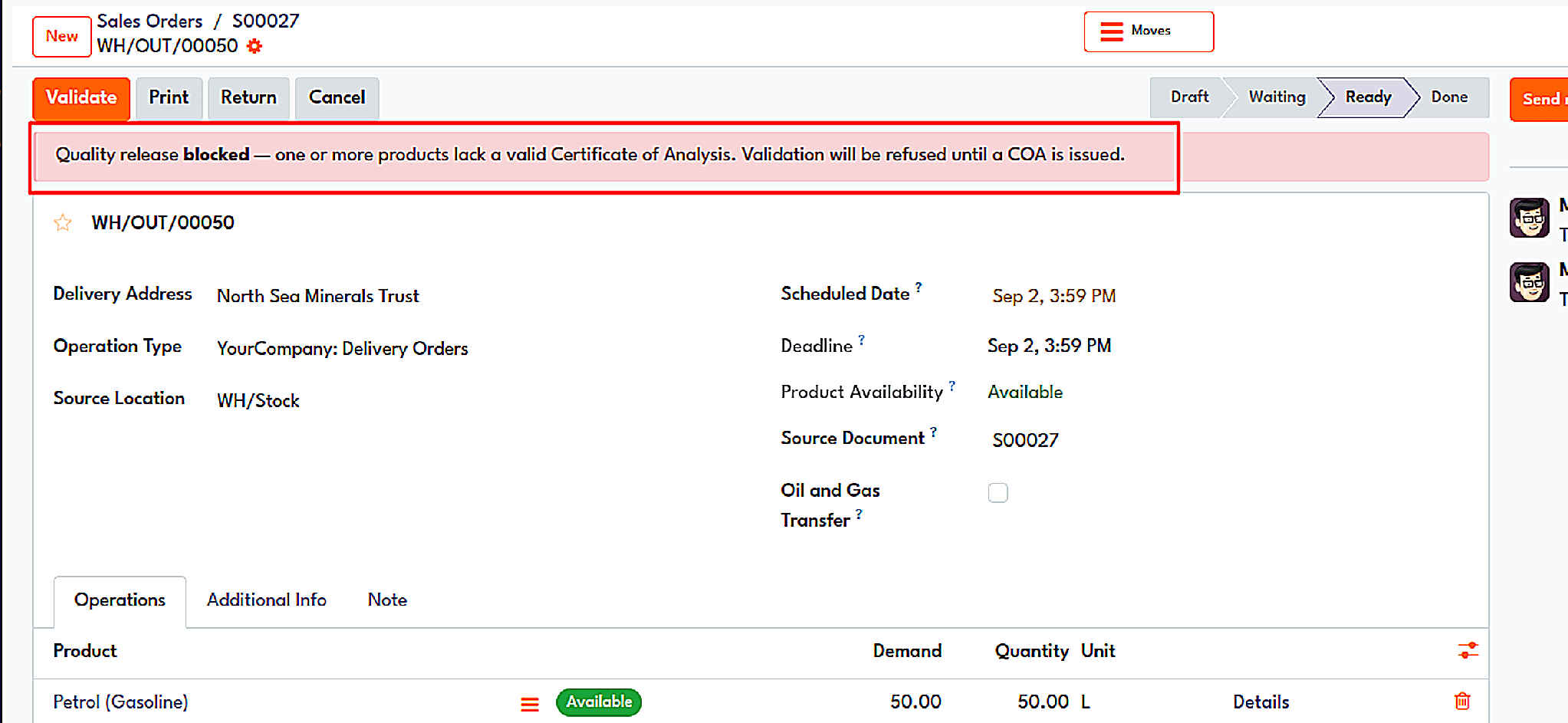
An outbound delivery is blocked because the lot has no valid certificate of analysis.
In addition, there are two other associated components. Logical batches group different production runs or tank transfers together under one unified quality profile. Retained samples allow the tracking of actual bottles stored in the laboratory as they come with a sample identifier, retention date, and storage place, and the sample moves from Stored to Consumed or Disposed.
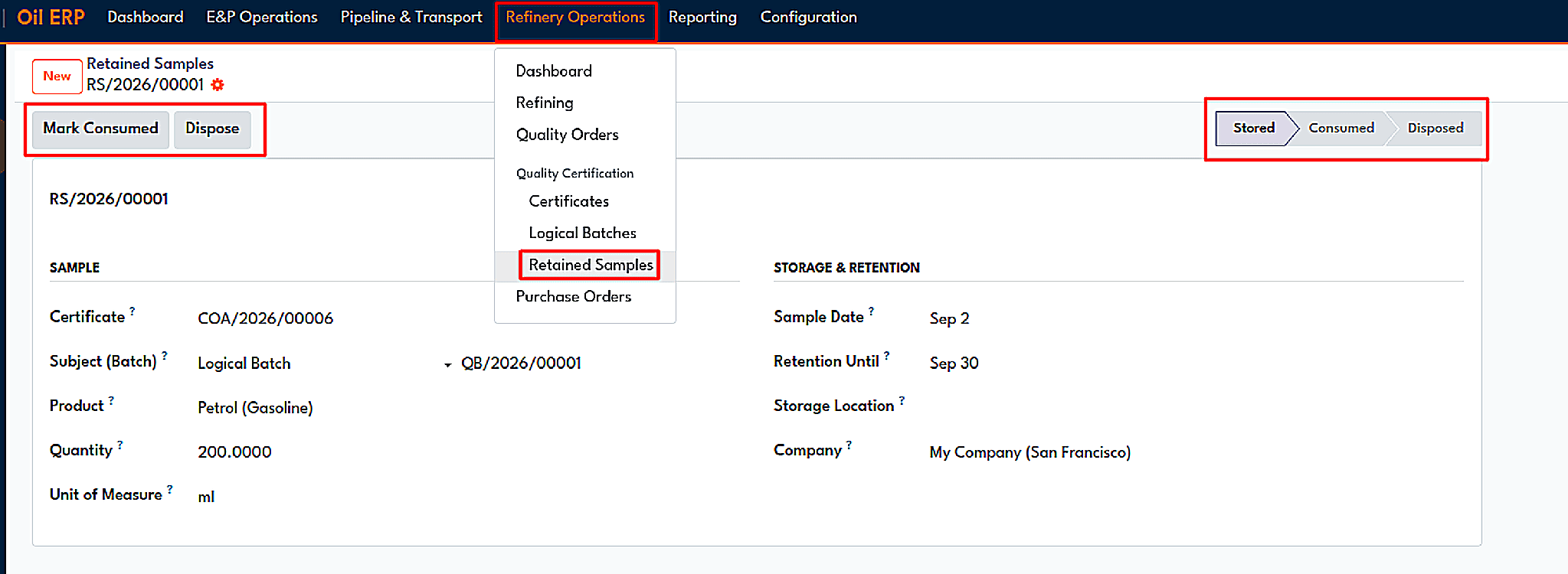
A retained sample record with retention period and storage details.
Retail Fuel Network
The forecourt is the final segment of the downstream chain. Through the activation of the Retail Fuel Network module in the settings, the stations are controlled; the module manages pump operation and fuel storage, records sales per shift and dealer, and makes necessary accounting entries in Odoo’s ERP system.
Stations, tanks and pumps
Every gas station has its mode of functioning. The station can be according to any of the three types, such as company-owned, company-operated, company-owned dealer-operated, or dealer-owned dealer-operated. The station includes its fuel tank, including information like product, volume capacity, current volume, reorder point, dead stock level, as well as pumps and fueling nozzles.
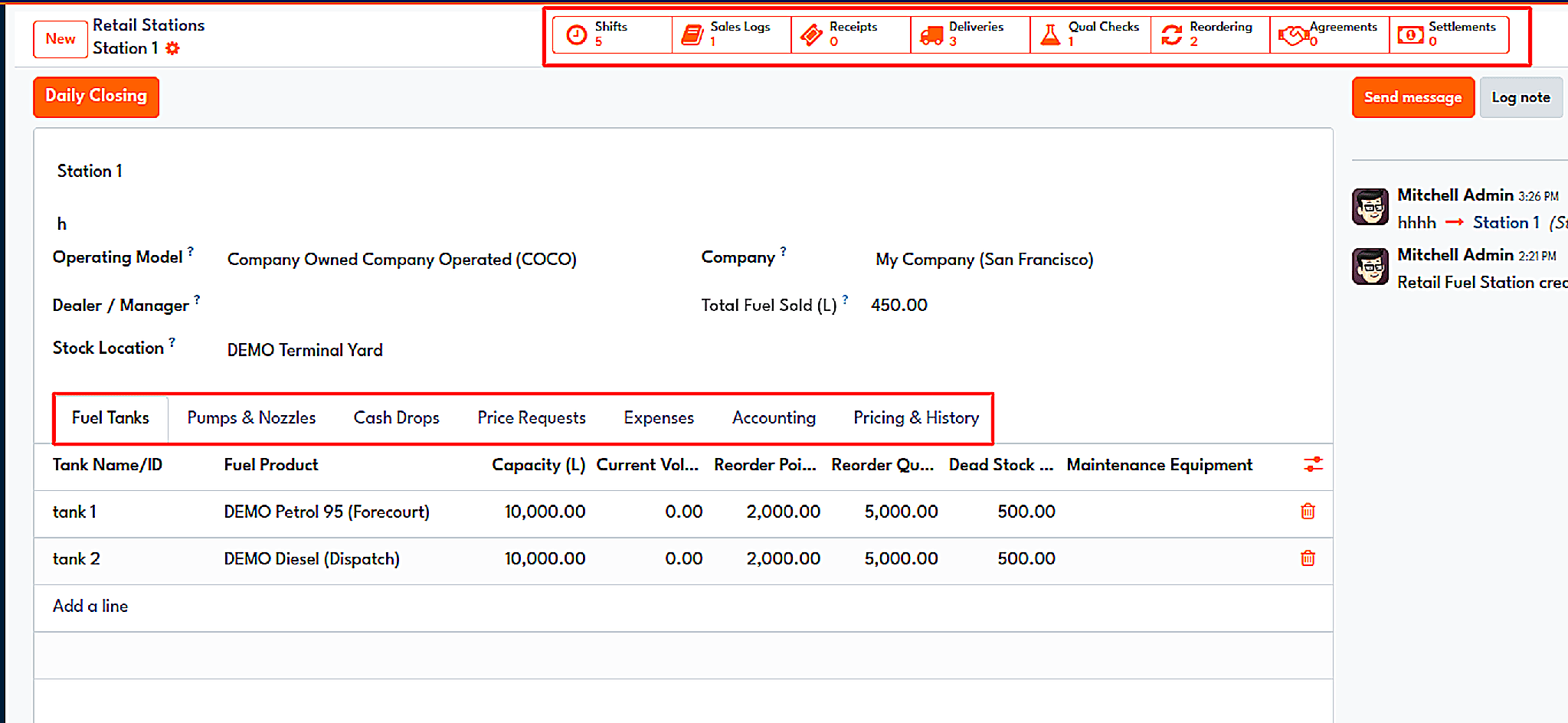
A retail station with its fuel tanks, capacity, reorder levels, and dead stock.
Shifts and daily closing
The recording of sales takes place during shifts. During a shift, the operator captures the opening and closing meter readings of every nozzle. The readings then determine the volume sold and the sales revenue, as well as the unit price data. The shift keeps information about non-fuel sales, amounts of station expenditures, and cash reconciliation, which needs to be checked by a supervisor at the end of the shift.
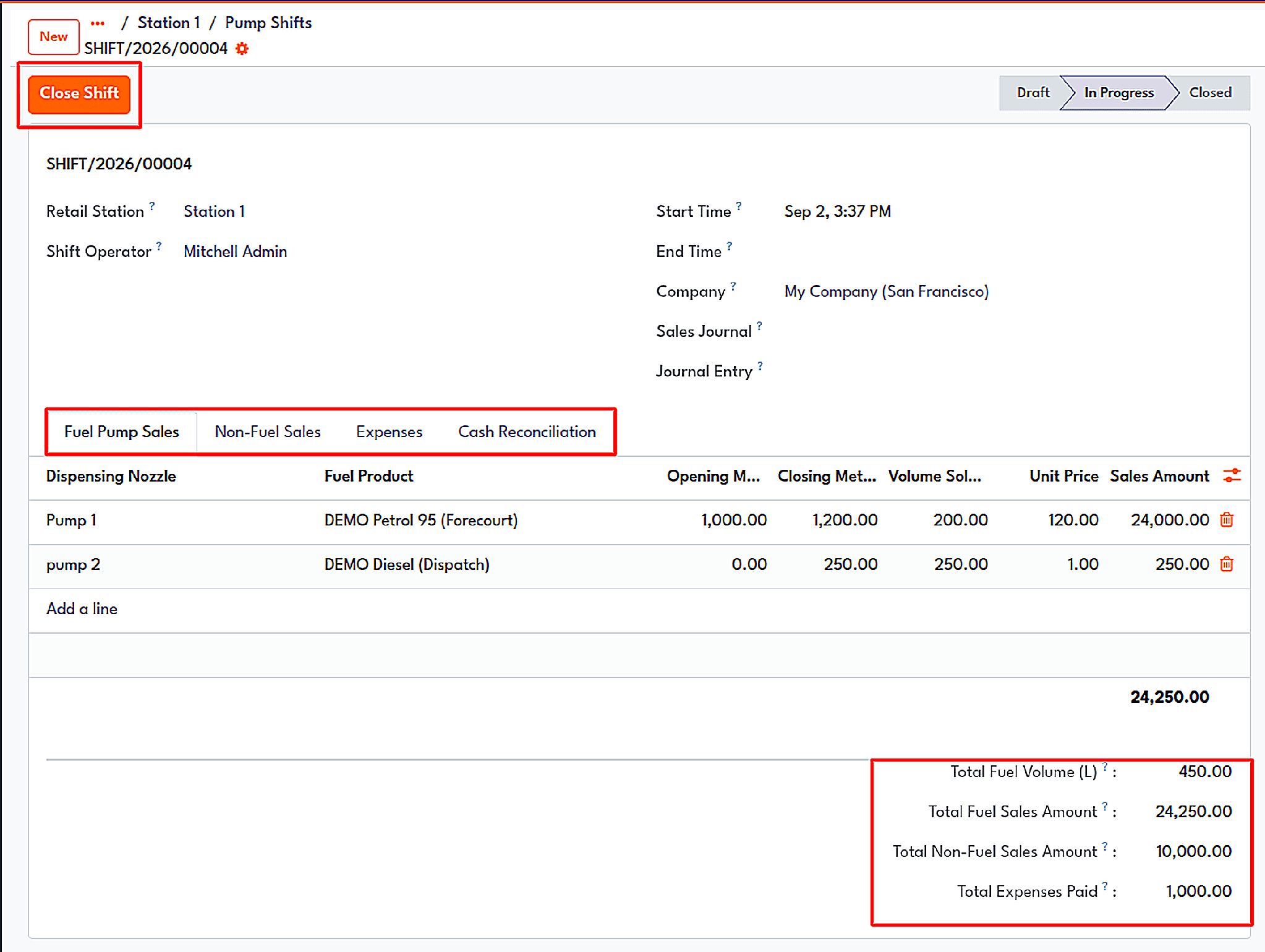
A closed pump shift includes opening and closing meter readings and the sales totals.
At the conclusion of each day, the Daily Closing wizard checks how the tanks are dipped and reconciles the cash in line with the books. The Reconcile and Post Sales Log button is what generates the daily sales log on the system and allows the journal entry to flow through the various statuses: Draft, Reconciled, and Posted. The difference between cash counted and cash expected is indicated as either a surplus or a shortage.
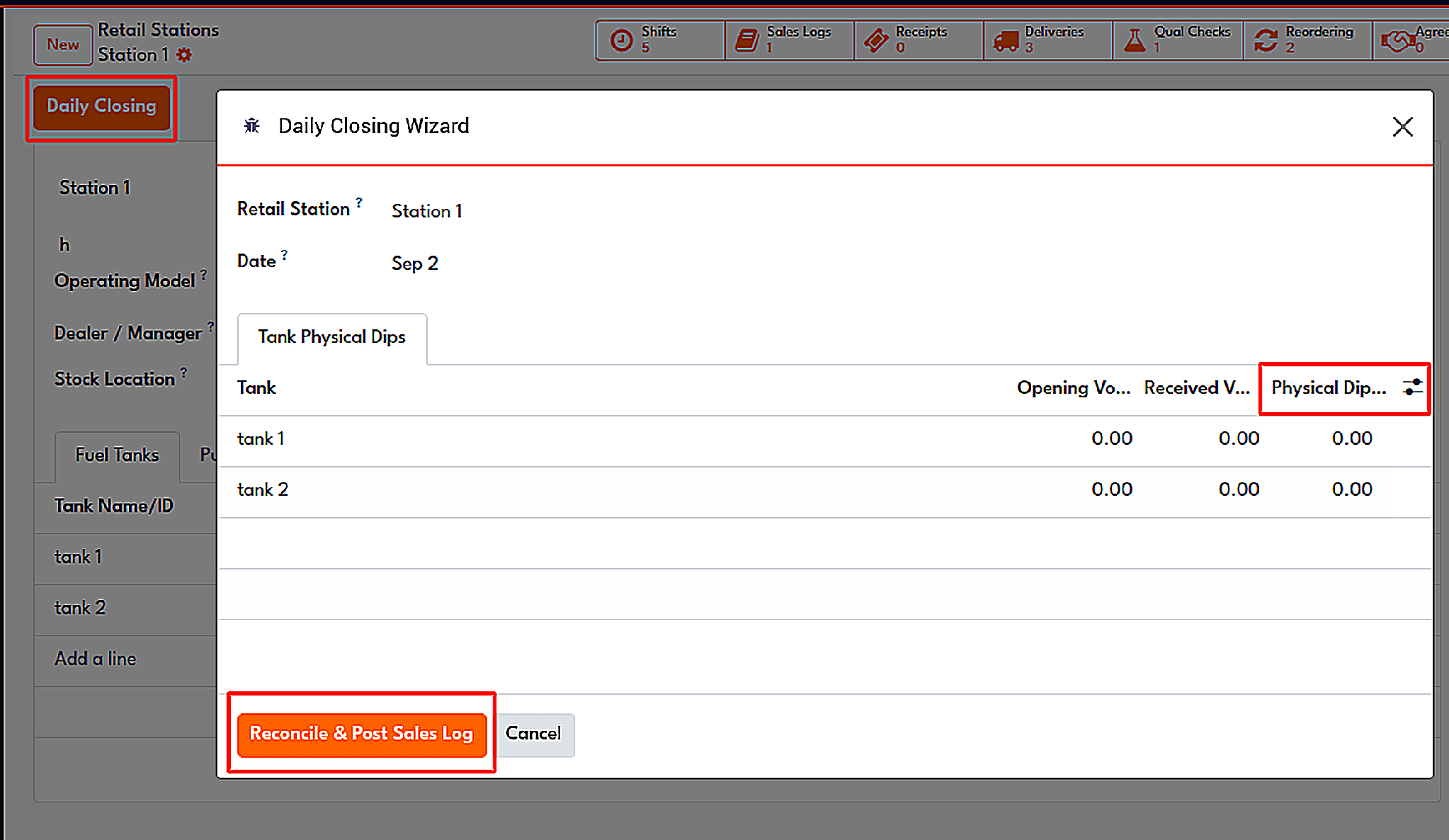
The Daily Closing wizard with the physical tank dip readings.
Receipts and deliveries
The fuel slip is provided to the retail client, and it contains the information on the pump, the product, the volume, the price per unit, and the way of payment. The delivery of fuel is done according to the schedule, which passes through the states of Draft, Unscheduled, In Transit, and Delivered.
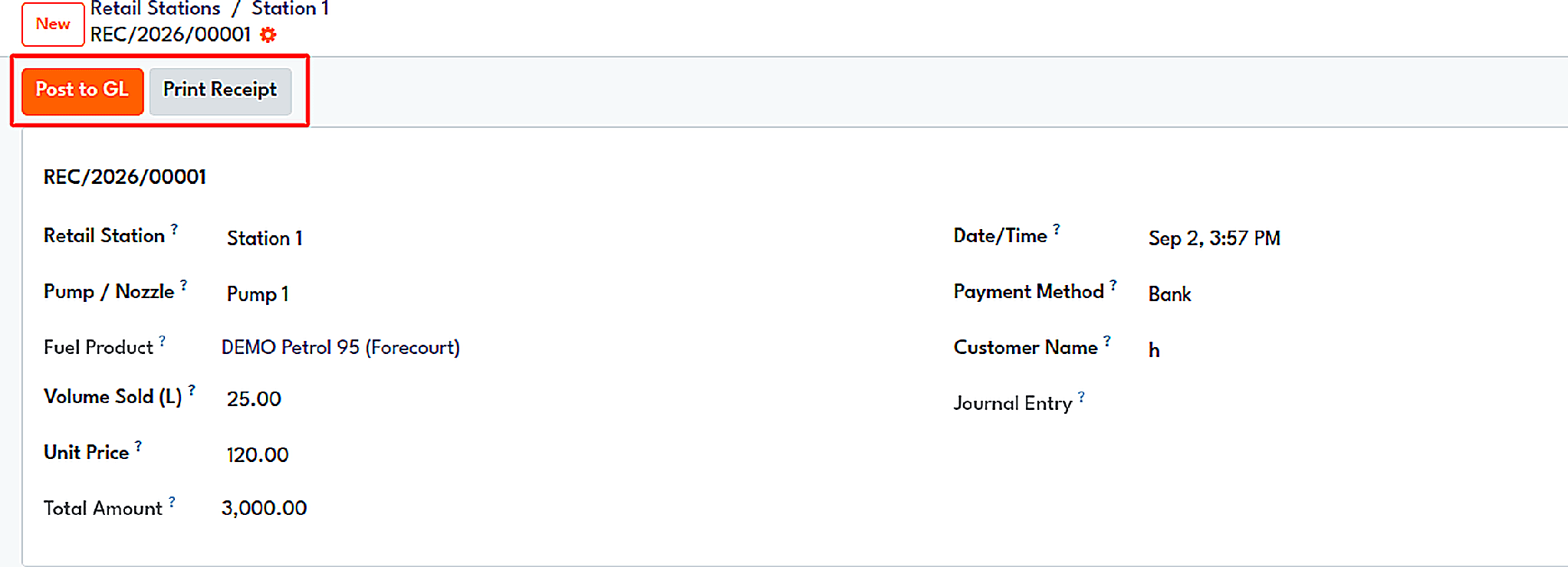
A customer fuel receipt with pump, volume, price, and payment method.
Dealers and prices
Dealer agreements specify the payment amounts for dealer-operated stations. They agree on a certain amount for every litre of fuel sold or a percentage of sales revenues and include special terms for every fuel type. Each agreement can be in any of the three stages: Draft, Active, and Expired. Once the dealer settlement has been prepared, it calculates the amount to be paid to the dealer after taking the expenditures into consideration. The transaction travels through the following stages: Draft, Calculated, Confirmed, and Paid. The module is able to generate the invoice for the vendor payment.
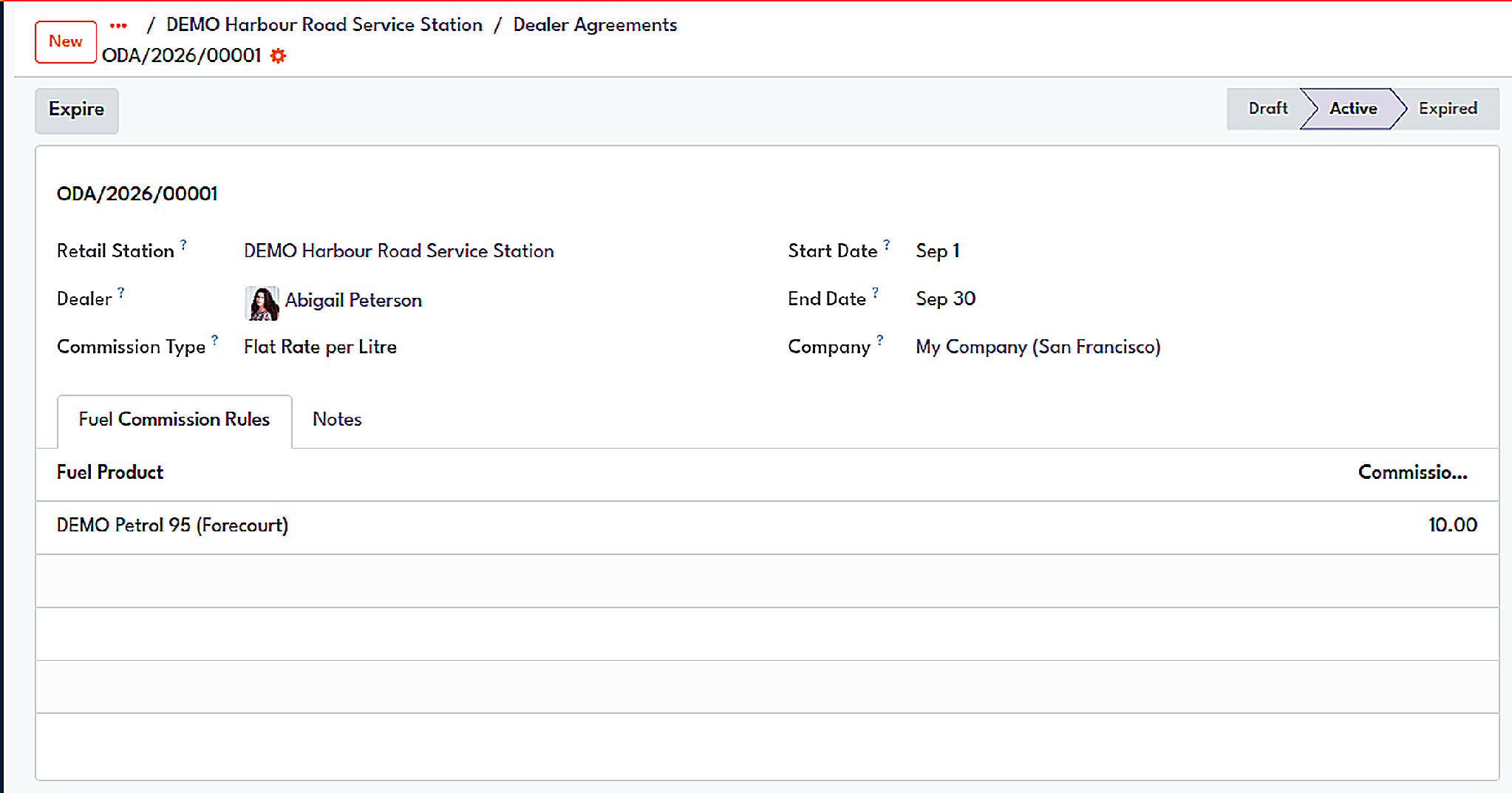
A dealer commission agreement with a flat rate per litre for each fuel product.
Changes to pricing start with a request. The price request includes a list of products showing their old and new prices and moves from Draft through Pending Approval to Approved or Rejected. If the price is approved, it comes into effect and is recorded in the price history of the gas station, which makes it possible to find out how much a litre of fuel was worth on the specified date. Money is taken from the cash register to the safe, while the cost of cleaning, utilities, and maintenance of the gas station is registered the same way, i.e., through the approve-and-post cycle.
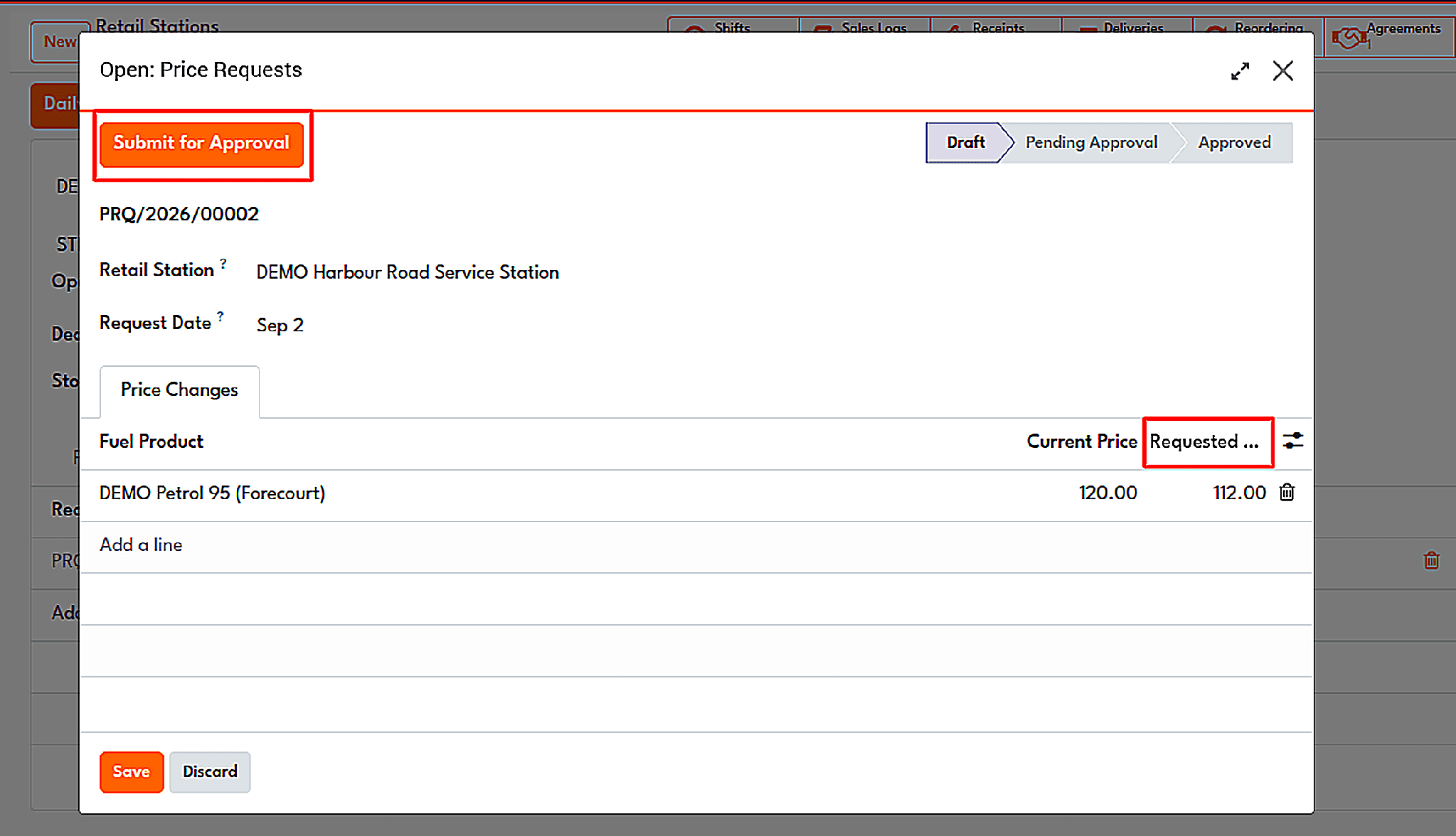
A price change request is awaiting approval, with current and requested prices.
Downstream is where crude finally becomes something a customer pays for, and every step of that conversion leaves a record in Oil ERP. Refining orders run on standard Odoo manufacturing, Yield Accounting compares what each order should have produced with what it actually produced, and the Inspection module grades every batch against its quality points before anything moves on.
Quality Certification then turns those results into specifications, lot holds, and Certificates of Analysis, and the delivery gate makes sure no uncertified lot leaves the site. At the end of the chain, the Retail Fuel Network records every nozzle reading, tank dip, and dealer settlement and posts them straight into accounting. Because all of it shares one database, the refinery, the lab, the forecourt and the finance team are always looking at the same numbers.
To read more about How Oil ERP Manages Oil and Gas Operations, refer to our blog, How Oil ERP Manages Oil and Gas Operations.