The process of logging into the Odoo application creates a session. The concept of a session in the Odoo system makes it possible for the Odoo system to remember the identity of the user while navigating through various pages, menu openings, and other activities. Without the creation of the session, it would be necessary for the user to log in with each individual request made within the Odoo system.
How Odoo Creates a Session
The session creation process starts when a user enters their login credentials on the login page.
Here’s what happens step by step:
- The user enters database, email (or username), and password.
- Odoo verifies the credentials.
- If the credentials are correct, Odoo creates a unique session ID.
- This session ID is stored on the server.
- A cookie containing the session ID is sent to the browser.
- Every future request from that browser automatically includes this session ID.
This is how Odoo knows the user is authenticated without asking for the password again.
What Information Is Stored in a Session?
An Odoo session stores important details such as:
- The user ID (uid)
- The current database
- User context (language, timezone, company)
- Active company information
- Debug mode (if enabled)
This information helps Odoo apply correct access rights, record rules, and company-specific settings.
Authentication Flow in Simple Words
When the login button is clicked, Odoo performs a background check:
- It searches for the user in the res.users model.
- It verifies the password securely.
- If everything matches, it activates the user session.
- The dashboard loads with the user’s environment.
From that moment, all actions are performed under that authenticated user.
Managing Sessions in Odoo 18 (Multi-Device Support)
In Odoo 18 Enterprise, users can see all active sessions from different devices.
To check this:
- Click your profile icon (top-right corner).
- Open My Profile.
- Go to the Devices tab.
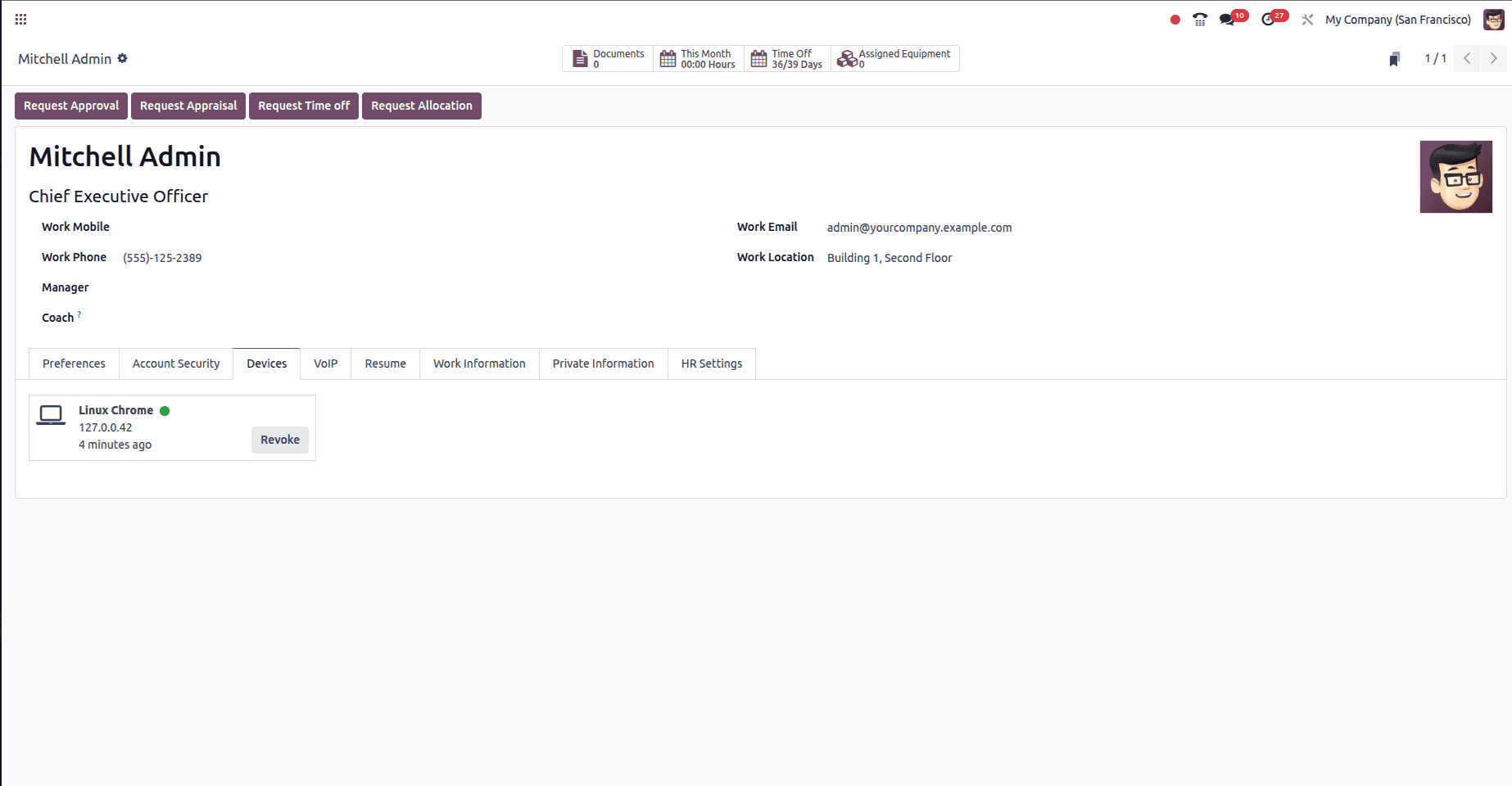
Here you can see:
- Device name
- Browser information
- IP address
- Login time
- Last activity
- Option to revoke the session
If you logged in from a public computer or an old device, you can easily click Revoke to log out from that device right away. This feature boosts account security and gives users more control.
Session Expiration
Sessions do not last forever.
A session will end when:
- The user logs out manually.
- The administrator configures a shorter expiration time.
- The server restarts (depending on configuration).
Administrators can control session expiration settings in the Odoo configuration file.
Why Session Management Is Important
Session management is very important in real business environments.
For example:
- Employees may log in from office and home.
- Managers may access Odoo from mobile devices.
- Warehouse users may share computers.
- Companies may want to monitor login activity for security.
Proper session handling ensures data protection and prevents unauthorized access.
Customizing Sessions (For Developers)
Developers can extend session behavior by:
- Tracking login devices
- Limiting concurrent sessions
- Changing session timeout
- Logging failed login attempts
The facility is provided by Odoo through custom modules without changing the core code.
The mechanism may be complex internally, but the basic idea behind it is simple: when a user logs in to an Odoo system, a secure session is established that will last until the user logs out.
User sessions created through the Odoo authentication mechanism serve a very crucial purpose. While creating every user session in Odoo, a secure server session is always provided. This facilitates free movement within the system for the users. The device management module included in Odoo version 18 enables users to get information on their user sessions, thus improving the system’s security. Information on user sessions is not only required by the developers but also by the users themselves.
To read more about How to Use the Session Storage in Odoo 19, refer to our blog How to Use the Session Storage in Odoo 19.