Is your e-commerce store missing a crucial trick? In today's fast-paced world, customers crave flexibility and immediacy. While home delivery is a staple, offering In-Store Pickup (also known as Click & Collect) and seamless On-Site Payment options can be your secret weapon to stand out, increase sales, and bridge the gap between your online and physical stores.
Odoo 18's powerful e-commerce platform makes implementing these features smoother than ever. This guide will walk you through the compelling benefits and the simple steps to set it all up.
Why Offer In-Store Pickup and On-Site Payments?
Before we dive into the "how," let's talk about the "why." These features aren't just technical checkboxes; they are strategic business advantages.
For Your Customers:
- Convenience & Speed: They can buy online and pick up at their convenience, often within the same day, avoiding shipping wait times and fees.
- Certainty: They know the product is waiting for them, eliminating the risk of "out-of-stock" disappointments after a trip to the store.
- Flexibility: They can choose to pay online for a speedy pickup or reserve items and pay in person with cash, card, or another method.
For Your Business:
- Increase Online Sales: The option for free "pickup" shipping can significantly reduce cart abandonment caused by high delivery costs.
- Drive Foot Traffic: Online customers become in-store customers. This creates opportunities for cross-selling and up-selling as they browse other products when they come to collect their order.
- Reduce Operational Costs: You save on packaging and shipping costs for local orders.
- Optimize Inventory: You can seamlessly sell inventory from your physical storefronts online, giving customers a true view of available stock.
Part 1: How to Configure In-Store Pickup in Odoo 18
Odoo handles In-Store Pickup through its built-in "Shipping Methods" functionality. Here’s how to configure it. To set up ‘Pick Up in Store’ with on-site payments in Odoo 18 eCommerce, navigate to the Website module settings and activate both the delivery methods and the ‘Click & Collect’ option.
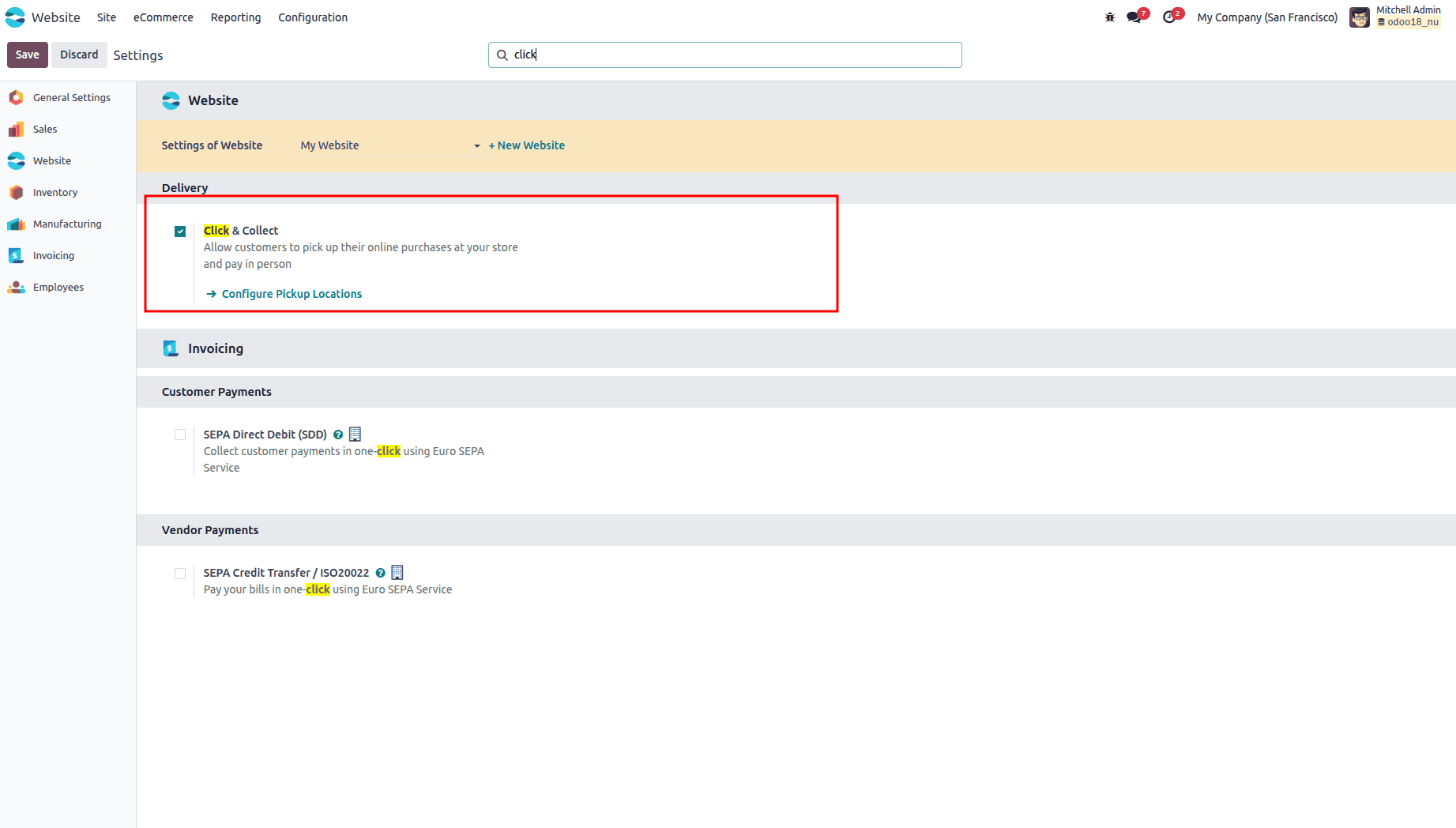
Step 1: Create the "Click & Collect" Shipping Method
Now, create the option customers will see at checkout.
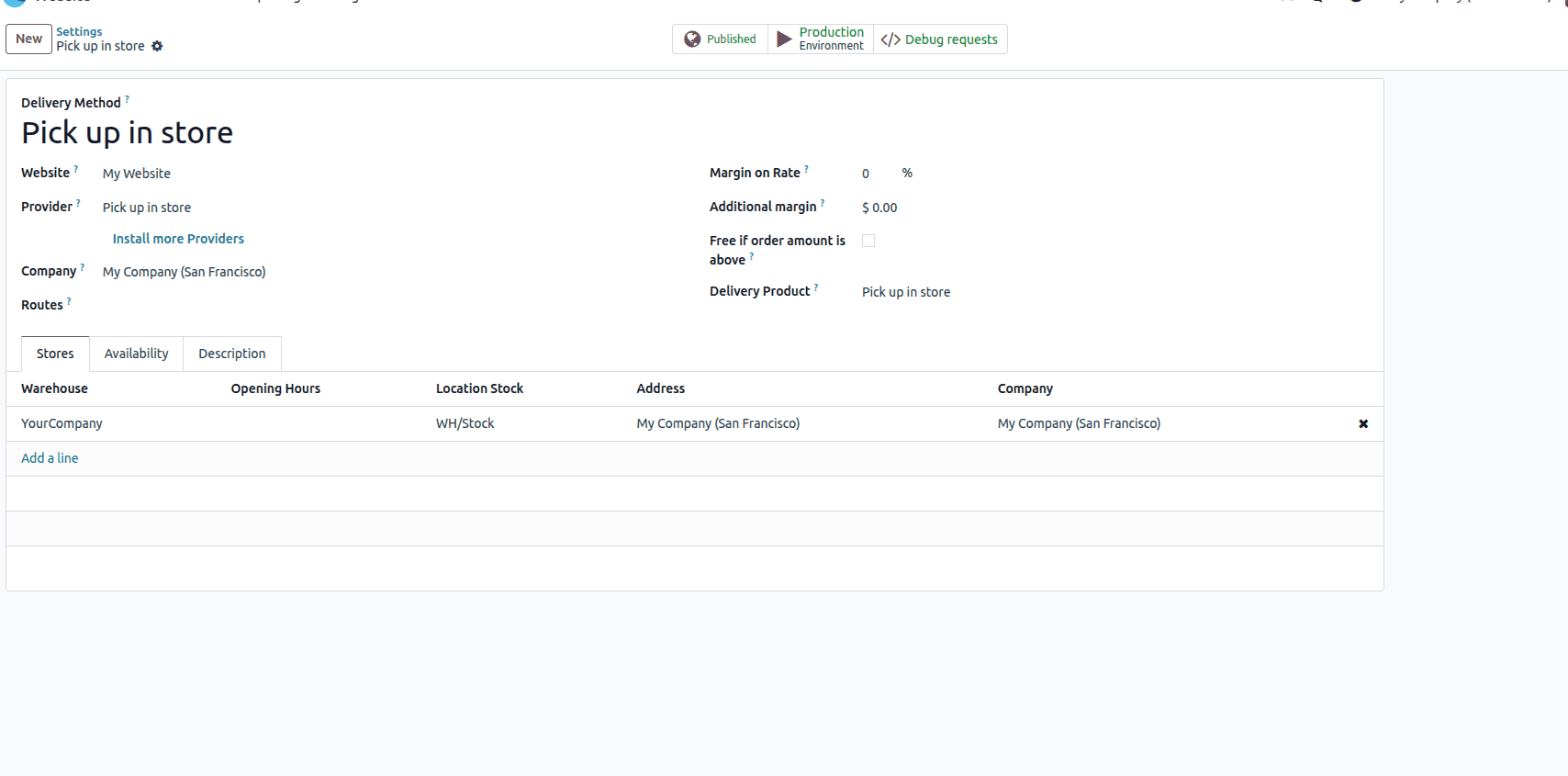
- Go to Website > Configuration > Delivery Methods.
- Click Create.
- Description: Enter a clear name like "In-Store Pickup" or "Click & Collect".
- Warehouse: Select the warehouse you just created for your physical store.
- Availability: Choose "Fixed Price" and set the cost to $0.00 to promote it as a free option.
- Destination: Set to "Country: Local" or choose the specific countries you serve.
- Click "Save".
Your customers will now see "In-Store Pickup" as a shipping option at checkout. When selected, Odoo will automatically reserve the products from that store's inventory.
Part 2: How to Configure On-Site Payments (The Payment Method)
This is where you offer the crucial "Pay in Store" option. This defers payment until the customer arrives for pickup.
Step 1: Enable the "Pay Later" Acquirer
Odoo has a built-in payment method specifically for this purpose.
- Go to Website > Configuration > Payment Providers.
- In the Provider field, select "Custom" (or look for "Pay Later" if available in your version).
- Name: This is what the customer sees. Use a clear name like "Pay in Store", "Pay on Pickup", or "Cash on Collection".
- State: Set to Enabled.
- Save the payment provider.
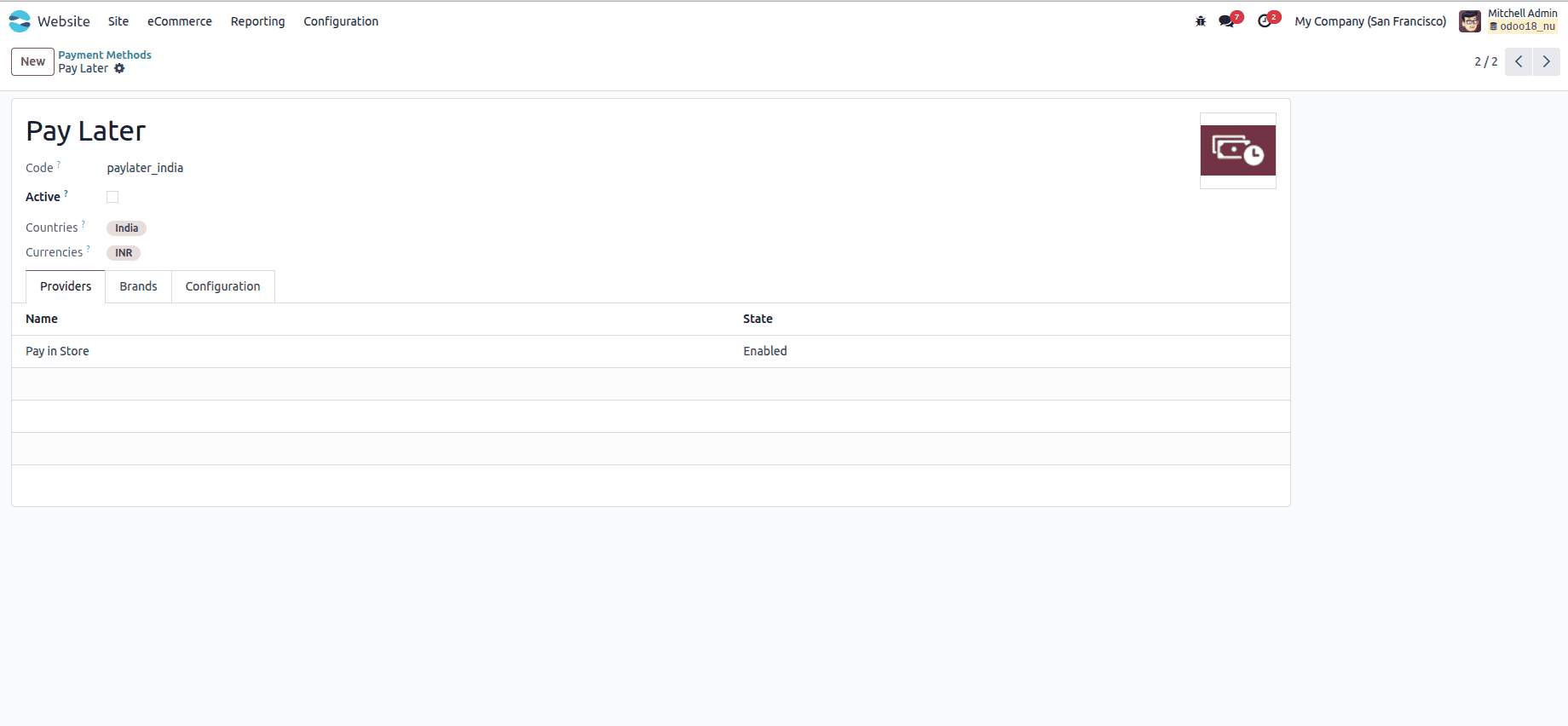
Step 2: (Optional) Fine-Tune the "Pay in Store" Method
To avoid confusion, you can configure this payment method to only appear when a customer chooses pickup.
- On the Payment Provider form, go to the Advanced Settings tab.
- Find the Availability section.
- Under Allowed Countries, you can restrict it if needed.
- Most importantly, use the Domain field to link it to your shipping method. While this requires a bit of technical knowledge, you can create a domain that checks if the shipping method's name contains "Pickup". For example: [('carrier_id.name', 'ilike', 'Pickup')]
- Note: This advanced step ensures "Pay in Store" only shows as an option if the customer selected the pickup shipping method, preventing its appearance for home delivery orders.
Managing the Customer Experience: From Order to Pickup
- Order Placed: A customer places an order, selects "In-Store Pickup," and chooses "Pay in Store." Their order status is "Quotation Sent" or "To Invoice".
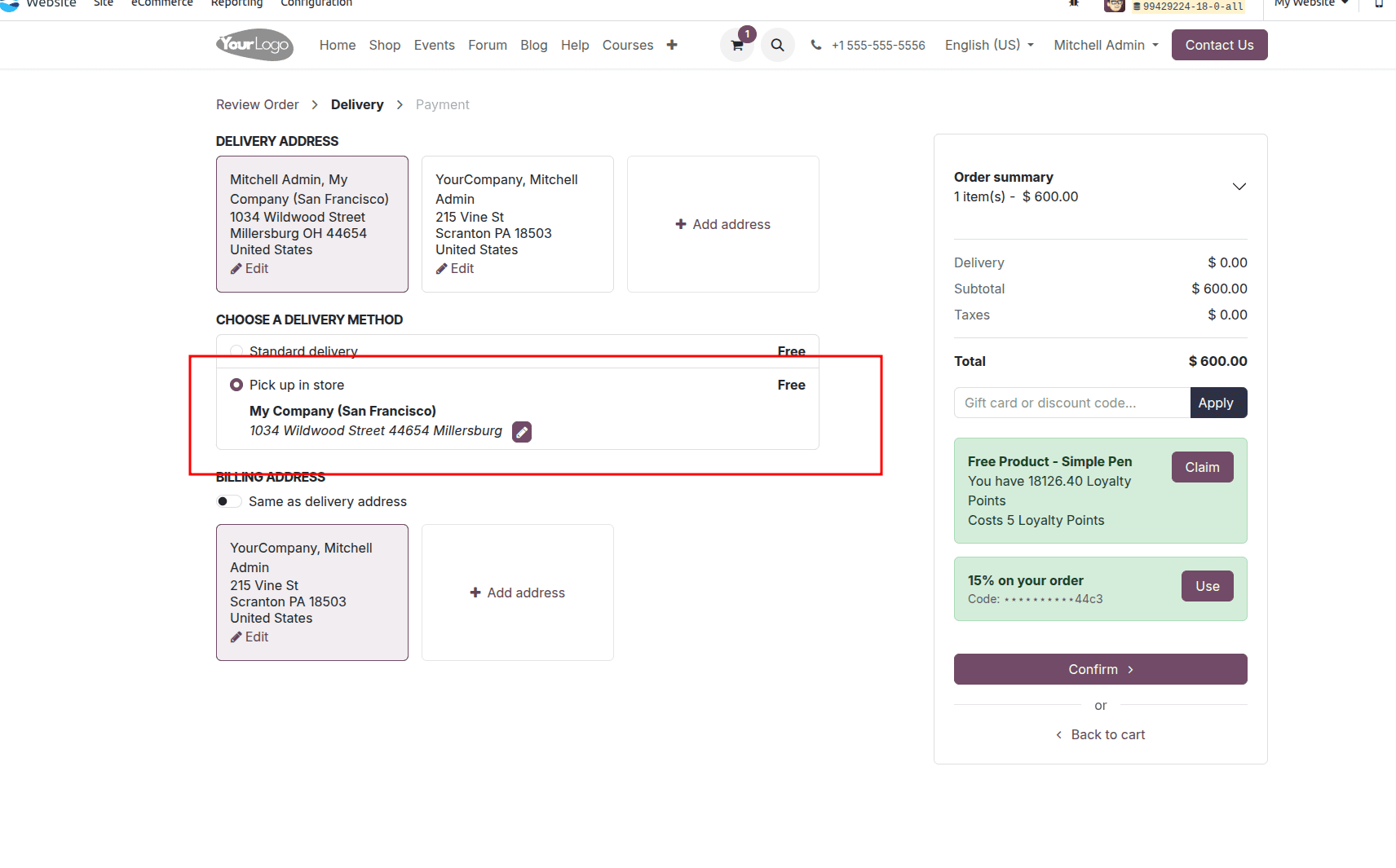
- Your Process: The store staff receives the order. They can prepare the items and create an internal Delivery Order (Picking) to allocate the stock to the order. The order is now ready for pickup.
- Customer Arrives: The customer arrives, provides their name or order number.
- Taking Payment:
- Navigate to Website > Orders > Sales.
- Find the order. You will see it is not yet invoiced.
- Click on the order and press the "Create Invoice" button.
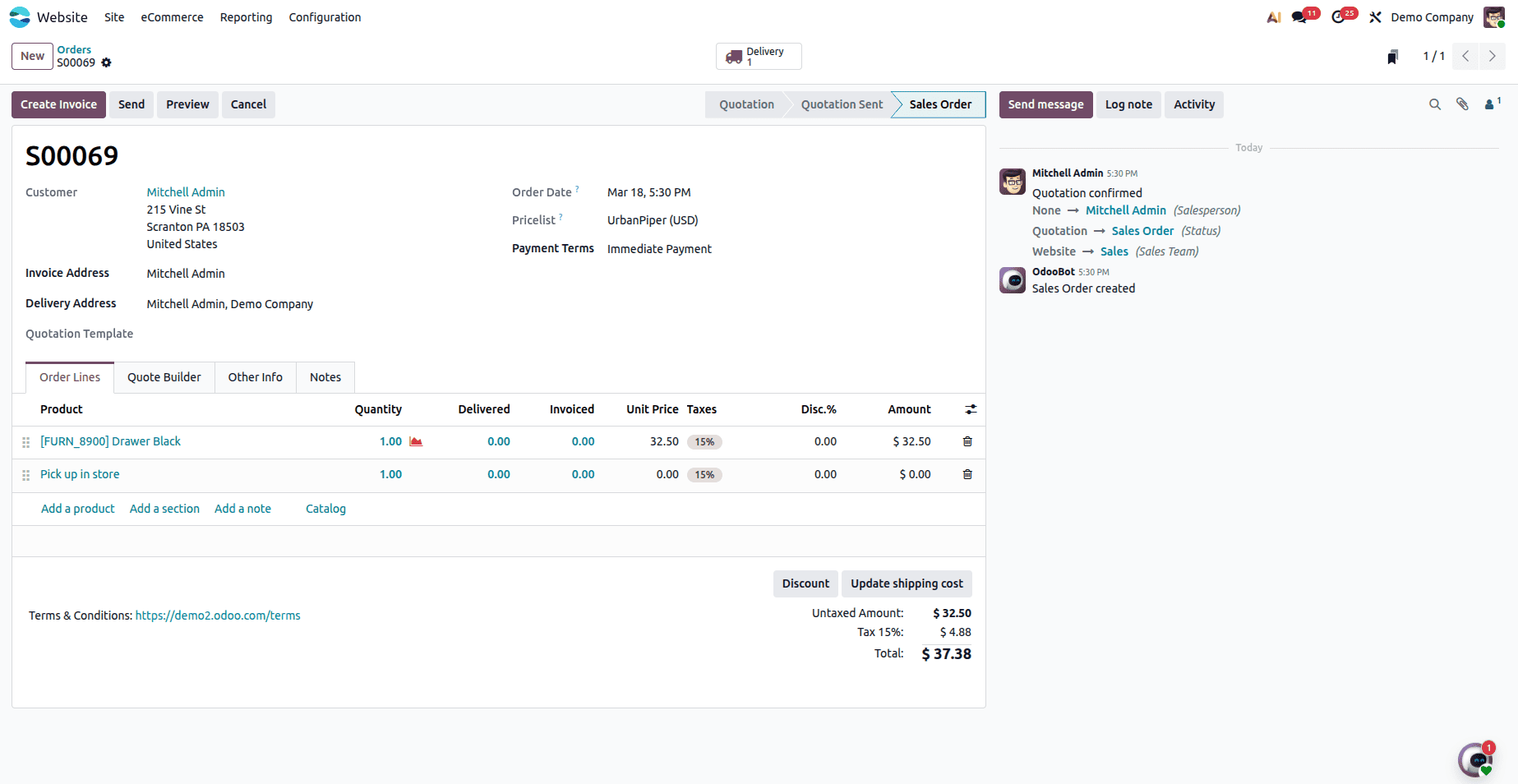
- In the invoice that opens, click "Post" and then "Pay."
- Choose the customer's preferred payment method (Cash, Card, etc.) and receive the payment.
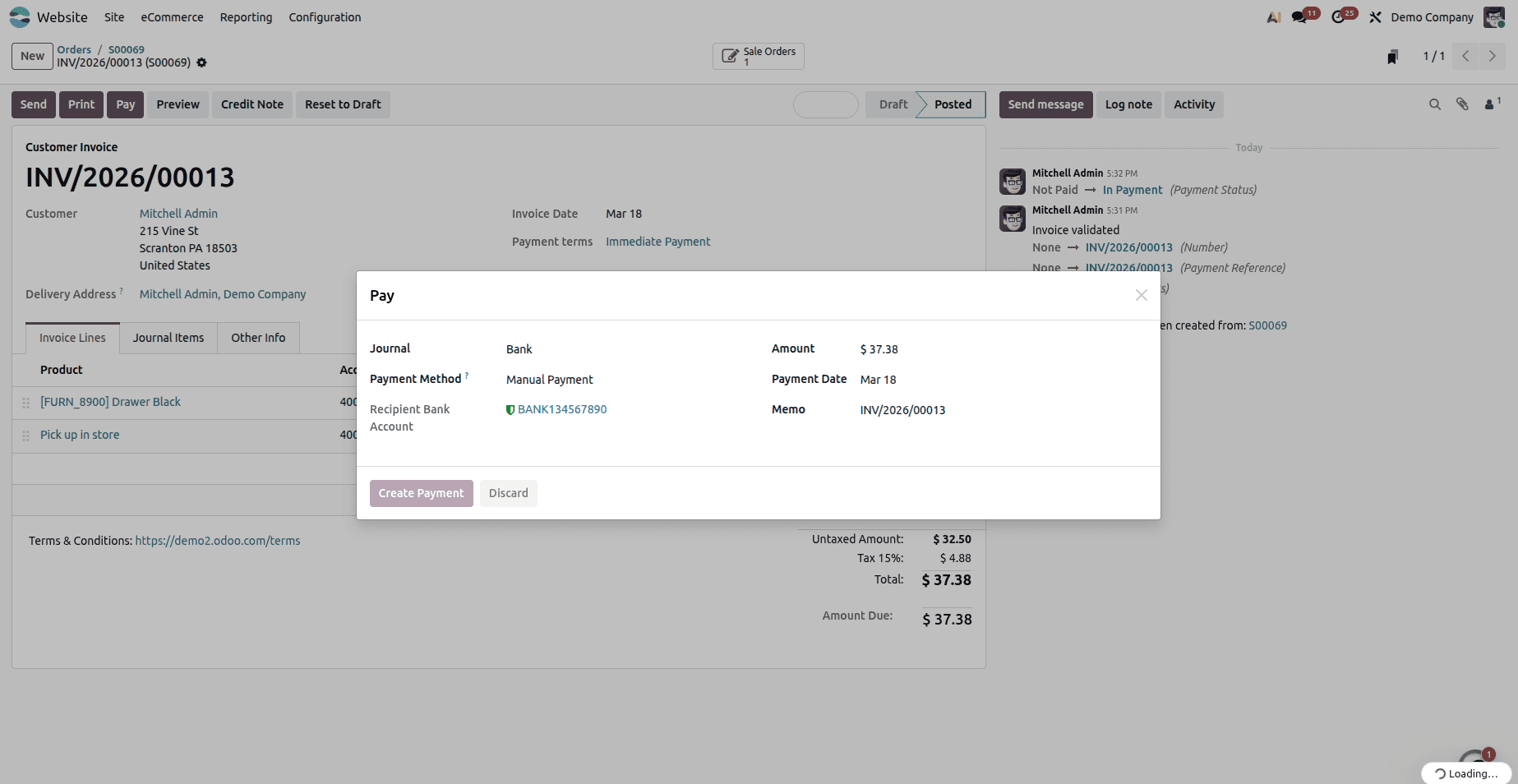
The sale is now complete.
Enabling In-Store Pickup and On-Site Payments in your Odoo 18 e-commerce store is more than just a convenience—it’s a strategic way to enhance customer satisfaction, increase sales, and streamline your operations. By offering flexibility in how and when customers collect and pay for their orders, you bridge the gap between your online and physical stores, creating a seamless omnichannel experience. With Odoo 18’s intuitive configuration for shipping methods and payment providers, setting up Click & Collect and Pay-in-Store is straightforward, allowing you to focus on delighting your customers and driving growth. Start implementing these features today and turn every online visit into an opportunity for in-store engagement.
To read more about How to Enable E-store Picking and Payment for Odoo 18 Ecommerce Store, refer to our blog How to Enable E-store Picking and Payment for Odoo 18 Ecommerce Store.