Have you ever wondered how Odoo creates purchase orders, sales orders, and invoice numbers automatically in a tidy, progressive manner? Sequences are the source of this magic. Making your own sequence is a crucial ability for every Odoo developer, regardless of whether you're developing a bespoke application or expanding an already-existing model.
This tutorial will show you how to create unique sequence numbers in Odoo 19 using both the frontend (Odoo UI) and code (Python + XML). You will be able to create distinct identifiers for every model in your custom module at the end.
Step 1: Using Code to Create Sequences
Python may be used to call the sequence whenever necessary, and XML can be used to define your sequence in your custom module.
XML: Specifying the Order
Create a file like data/sequence_data.xml in your module:
<?xml version="1.0" encoding="UTF-8"?>
<odoo>
    <data noupdate="1">
        <record id="seq_custom_model" model="ir.sequence">
            <field name="name">Custom Sequence</field>
            <field name="implementation">standard</field>
            <field name="code">custom.model</field>
            <field name="prefix">CUST/%(year)s/</field>
            <field name="suffix">CUST/%(year)s/</field>
            <field name="number_next_actual">10/</field>
            <field name="padding">5</field>
            <field name="number_next">1</field>
            <field name="number_increment">1</field>
            <field name="company_id" eval="False"/>
        </record>
    </data>
</odoo>
Explanation:
- name > Human-readable name of the sequence
- code > Technical code (used in Python to fetch the next number)
- prefix > Add a prefix value (e.g., year, static text)
- suffix > Add a suffix value (e.g., year, static text)
- padding > Number of digits (e.g., 00001, 00002, etc.)
- number_next_actual > The starting number (default: 1)
- number_increment > The step size between generated numbers (default: 1)
- company_id > If set, applies per company (multi-company setup)
- implementation > While assigning a sequence number to a record, the 'no gap' sequence implementation ensures that each previous sequence number has been assigned already. While this sequence implementation will not skip any sequence number upon assignment, there can still be gaps in the sequence if records are deleted. The 'no gap' implementation is slower than the standard one.
Year Formats
- Current Year with Century (%(year)s)
Displays the full year including the century (e.g., 2026).
- Current Year without Century (%(y)s)
Displays the last two digits of the year (e.g., 26).
Month & Day
- Month (%(month)s)
Displays the current month as a number (01–12).
- Day (%(day)s)
Displays the current day of the month (01–31).
- Day of the Year (%(doy)s)
Displays the day number within the year (001–366).
Week Information
- Week of the Year (%(woy)s)
Displays the week number in the year (00–53).
- Day of the Week (%(weekday)s)
Displays the day of the week as a number (0–6, where Monday = 0).
Time Formats
- Hour (24-hour format) (%(h24)s)
Displays the hour in 24-hour format (00–23).
- Hour (12-hour format) (%(h12)s)
Displays the hour in 12-hour format (01–12).
- Minute (%(min)s)
Displays the current minute (00–59).
- Second (%(sec)s)
Displays the current second (00–59).
ISO 8601 Date Standards
- ISO Year with Century (%(isoyear)s)
Displays the ISO week-based year (e.g., 2026).
- ISO Year without Century (%(isoy)s)
Displays the last two digits of the ISO year.
- ISO Week Number (%(isoweek)s)
Displays the ISO week number (01–53).
Python: Using the Sequence
In your model (e.g., models/custom_model.py):
- Use the same code (ir.sequence.next_by_code('code')) in your Python model to fetch the next number.
# -*- coding: utf-8 -*-
from odoo import api, fields, models
class CustomModel(models.Model):
    _name = 'custom.model'
    _description = 'Custom Model with Sequence'
    name = fields.Char(string='Reference', required=True, copy=False, readonly=True,
                       default=lambda self: 'New')
    description = fields.Text(string="Description")
    @api.model_create_multi
    def create(self, vals):
        """ override the create function to apply the sequence code in our custom model records """
        if vals.get('name', 'New') == 'New':
            vals['name'] = self.env['ir.sequence'].next_by_code('custom.model') or 'New'
        return super(CustomModel, self).create(vals)
Updating __manifest__.py
Make sure you load your XML data in the manifest:
'data': [
    'data/sequence_data.xml',
],
Step 2: Creating Sequences from Odoo Frontend (UI)
If you prefer not to use code, Odoo allows creating sequences directly from the interface:
- Go to: Settings > Technical > Sequences & Identifiers > Sequences
- Click Create and fill the below fields mentioned in the table.
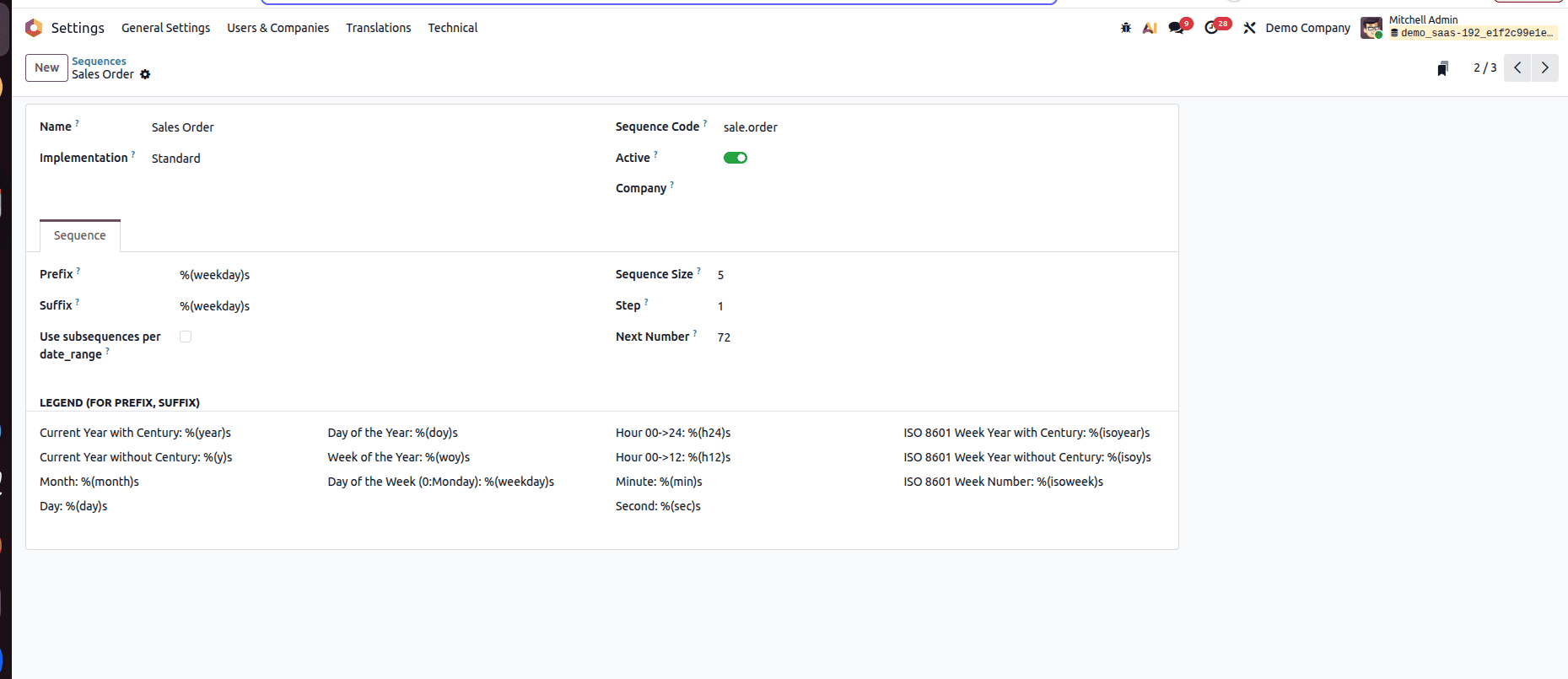
| FIELDS | USAGE |
| Name | Your sequence name |
| Implementation | Selection field with options: standard and no gap |
| Sequence Code | A unique technical code |
| Prefix | Prefix value of the record for the sequence |
| Suffix | Suffix value of the record for the sequence |
| Sequence Size | Odoo will automatically add some '0' on the left of the ‘Next Number' to get the required padding size. |
| Next Number | Starting value for the sequence |
| Increment | Step size of the sequence number |
| Company | If set, applies per company (multi-company setup) |
When assigning a sequence number to a record, the ‘no-gap’ sequence implementation ensures that each preceding sequence number has already been assigned. Although this implementation does not skip any numbers during assignment, gaps may still appear if records are deleted. Additionally, the ‘no-gap’ implementation is slower than the standard sequence method.
A sequence created from the Odoo UI will not automatically apply to a custom model. To use that sequence, the create() method of the model must be overridden, and the sequence generated using ir.sequence.next_by_code(). Also, any sequence created through the UI can be edited later to adjust formatting, prefixes, padding, or reset rules without modifying the model code.
Creating sequences in Odoo 19 is both powerful and flexible. Whether you define them in code for portability across modules or directly in the frontend for quick configuration, sequences help maintain order and consistency across your business workflows.
In Odoo 19, sequences are an essential component for preserving organized, uniform, and distinct record identification throughout your system. Sequences offer the flexibility required for actual business workflows, whether you define them programmatically for improved control and portability or set them via the user interface for fast modifications.
You can create meaningful and scalable sequences by knowing how to set up prefixes, padding, date-based formats, and implementation types. In addition to improving data structure, mastering sequences also makes your Odoo applications more professional and traceable.
To read more about How to Create a Sequence Based on a Field (Date) in Odoo 19, refer to our blog How to Create a Sequence Based on a Field (Date) in Odoo 19.