The reservoir module is the foundation for all upstream stories. Data entry includes information on the fluid type, lease, and the life cycle of this particular exercise. The lifecycle begins at the Exploratory and Appraisals stages, goes through the Development and Production stages, and ends up at the Depleted and Abandonment stage.
Interestingly, the reservoir module has a volumetric block. The user just needs to input the values for the porosity, drainage area, thickness of the net pay, and the volume of oil is calculated automatically. The moment one inputs the recovery factor, the software provides the value of the recoverable reserves. The geologists can manually input their reserve estimation into the software.
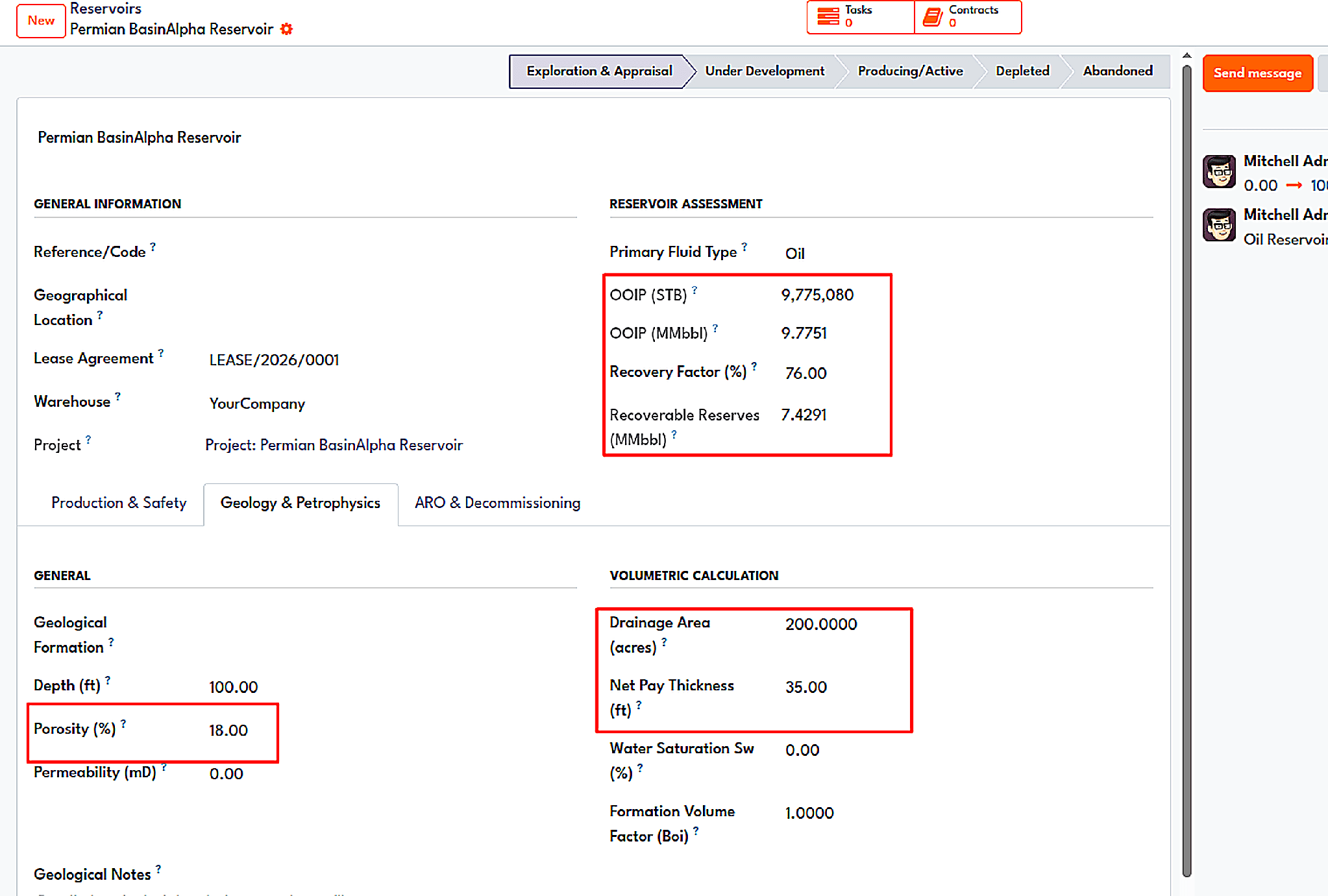
The reservoir form: OOIP, recovery factor, and recoverable reserves are calculated from the geology inputs.
The same form is used to maintain data relevant to safety. Automatically, the content of H2S is categorized into four types: sweet, trace (1-100 ppm), moderately sour, and highly sour. Once the reading goes beyond the safe mark, the form generates a red banner indicating that special handling may be required. It may look trivial, but it alerts the people involved in the work instead of just placing an HSE folder in front of them.
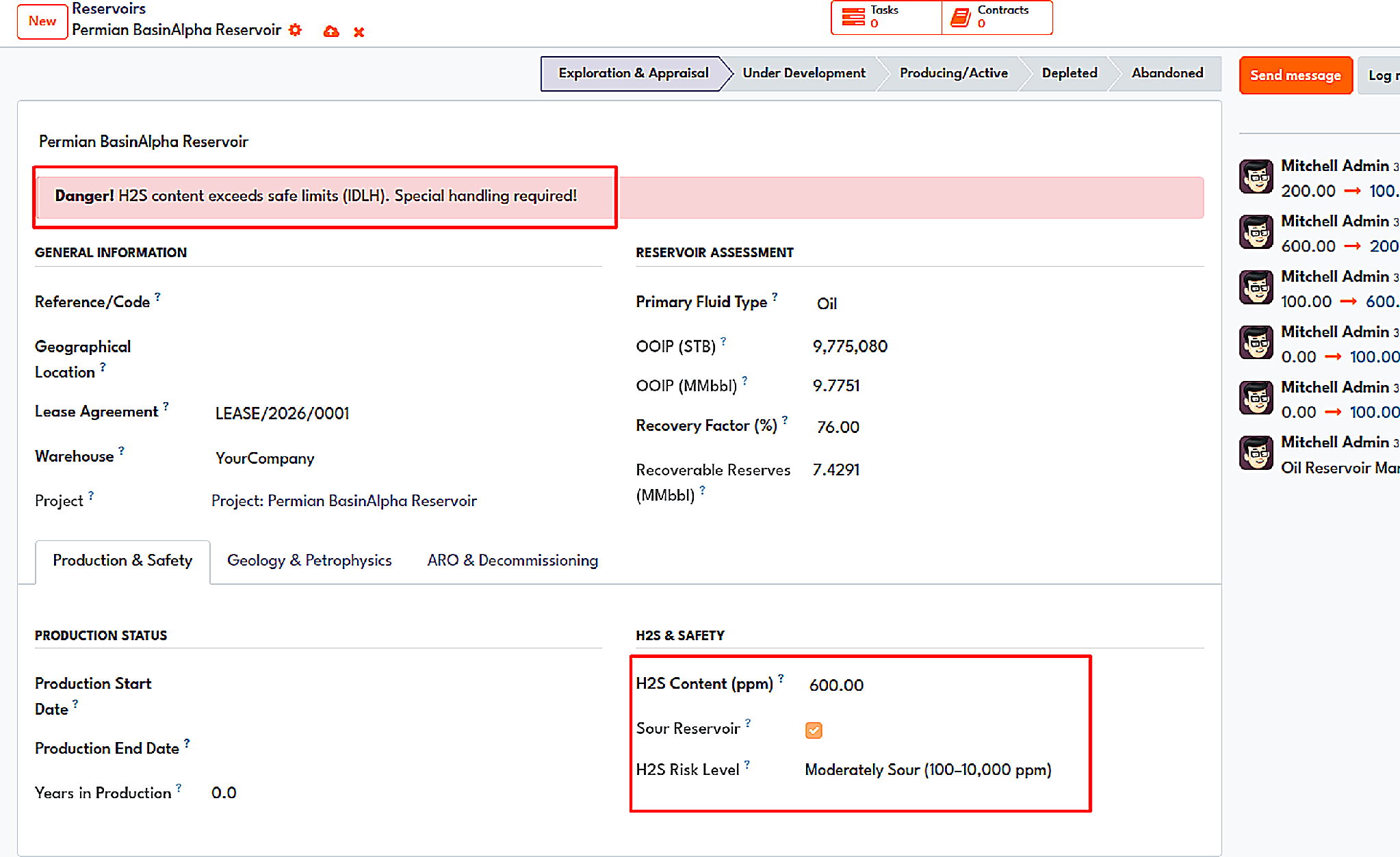
A reservoir at 600 ppm H2S triggers a danger banner on the form.
Building a reservoir also initiates another associated project along with a storage site. That may seem insignificant until you recall how many implementations kick off with someone making those three records manually and misspelling them.
Land rights
A lease contract has a clock attached to it, and if you do not know the time, you may lose the lease. The Lease program tracks agreements as Draft, Active, Force Majeure, Assigned, Expired, or Terminated, keeping essential components like lease type (Delay Rental or Paid-Up), owner, holder, dates, acreage, and coordinates.
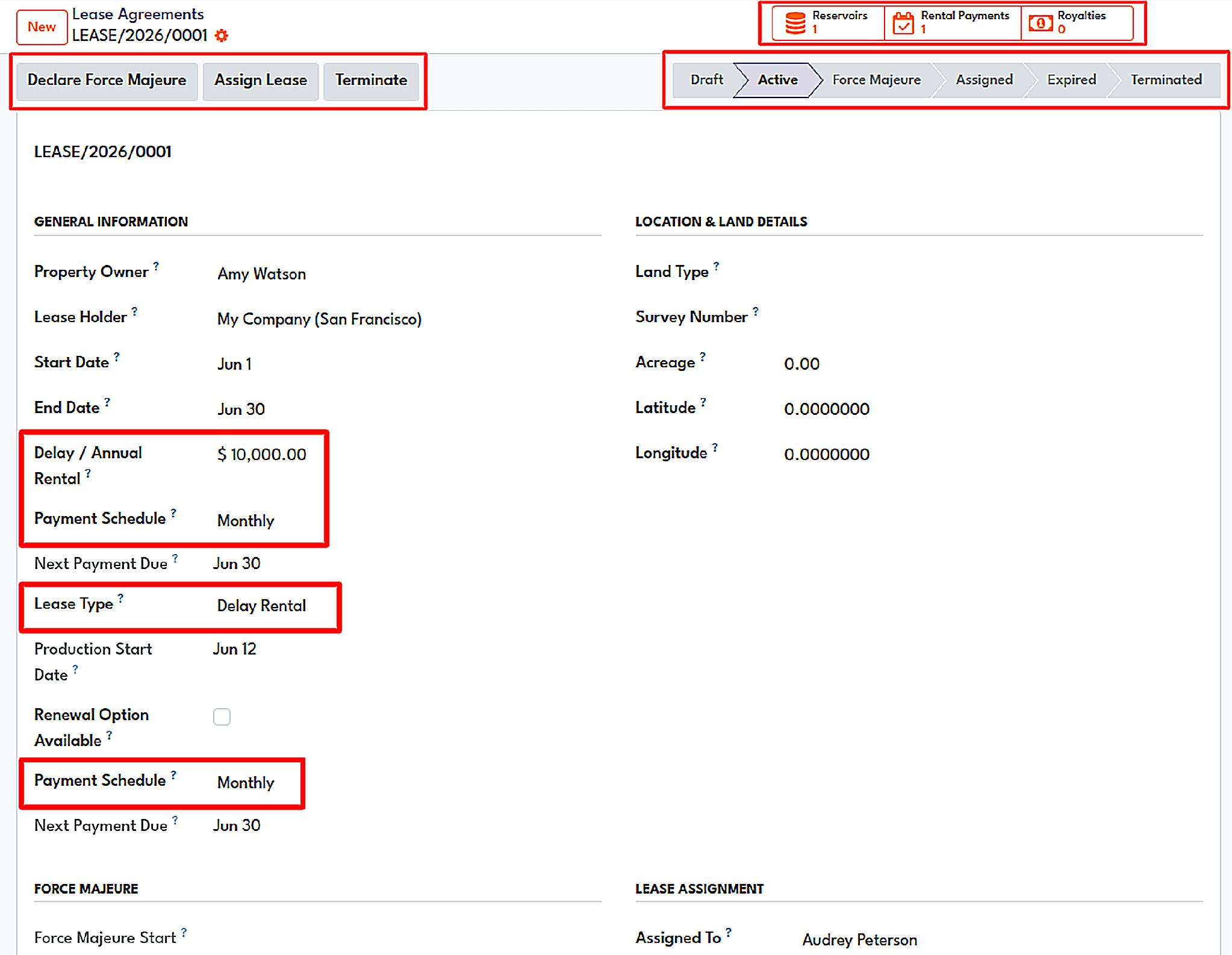
A lease agreement with the lifecycle bar, rental terms, and the Force Majeure and Assign Lease actions.
This is where ‘delayed rents’ is useful. You can select monthly, quarterly, or annual payments and thus create delayed rent schedules. Each entry can be marked accordingly as paid, waived, or converted into vendor invoices. Upon the start of production, one operation triggers the start of production, waives the remaining delayed rents, changes the lease to Held by Production, and activates royalties.
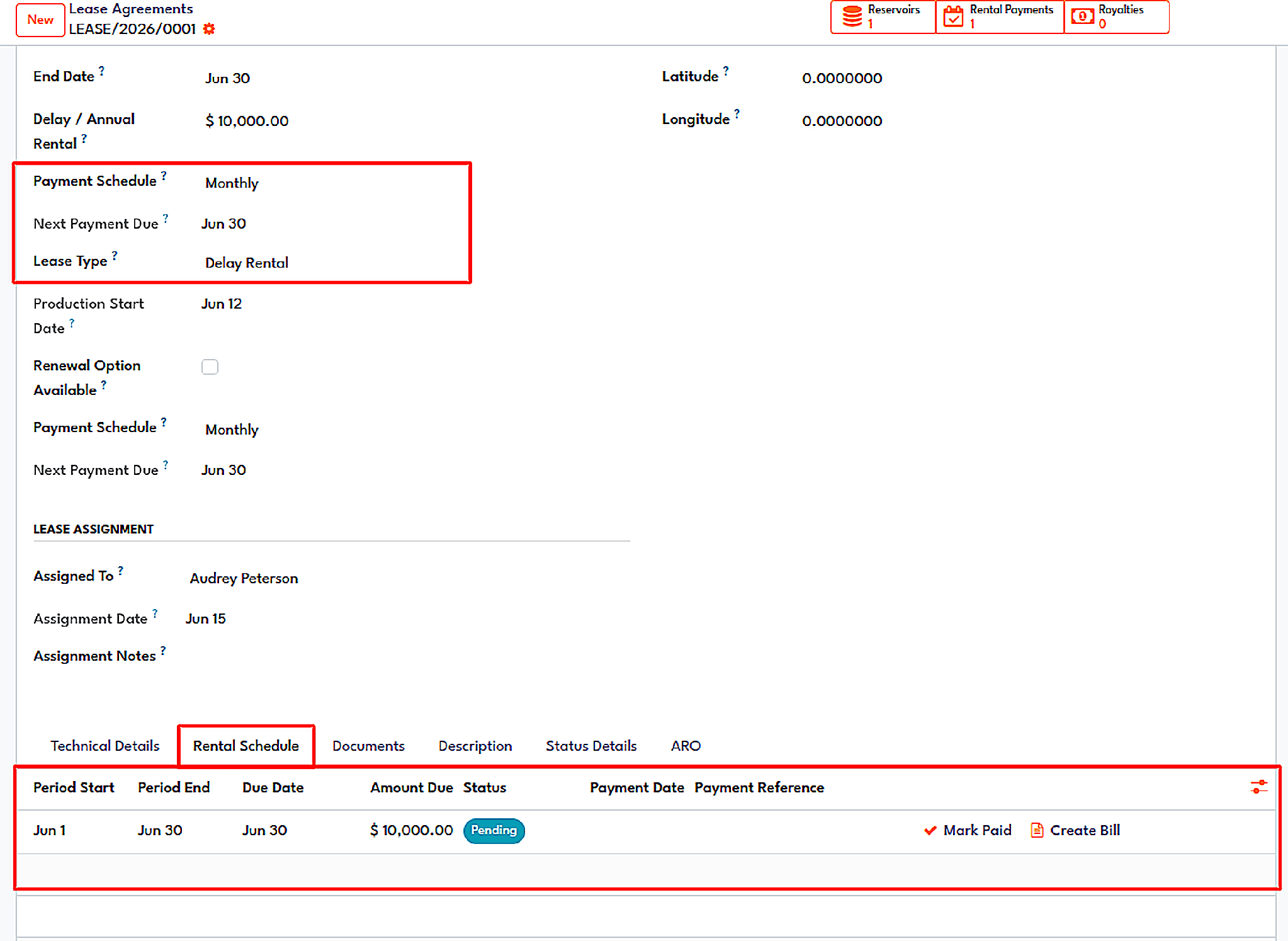
The Rental Schedule tab, with Mark Paid and Create Bill actions per period.
There are two more workflows that are as important as they seem. When a force majeure event is declared, it temporarily stops lease obligations and notes the reason. While force majeure is lifted, lease obligations resume as before. When a lease is transferred to another partner, operating rights are transferred together with the possibility to retrieve them back if the deal does not go as planned. The upstream dashboard includes tiles for active leases, expiring leases, and acreage.
Wells as projects, tanks as inventory
The Project module enhances an existing Odoo project by incorporating specific vernaculars. The project specifies license area, block, ownership, profit sharing, and contract. What previously constituted the basis of various projects now becomes the well in our classification and includes its own name and data such as API, operator, field, coordinates, spud date, depth, and plunge.
The Wells go from Planned, to Drilling, to Producing, to Shut-in, and then to Abandoned stages, so the Kanban board is basically a real-time snapshot of the field.
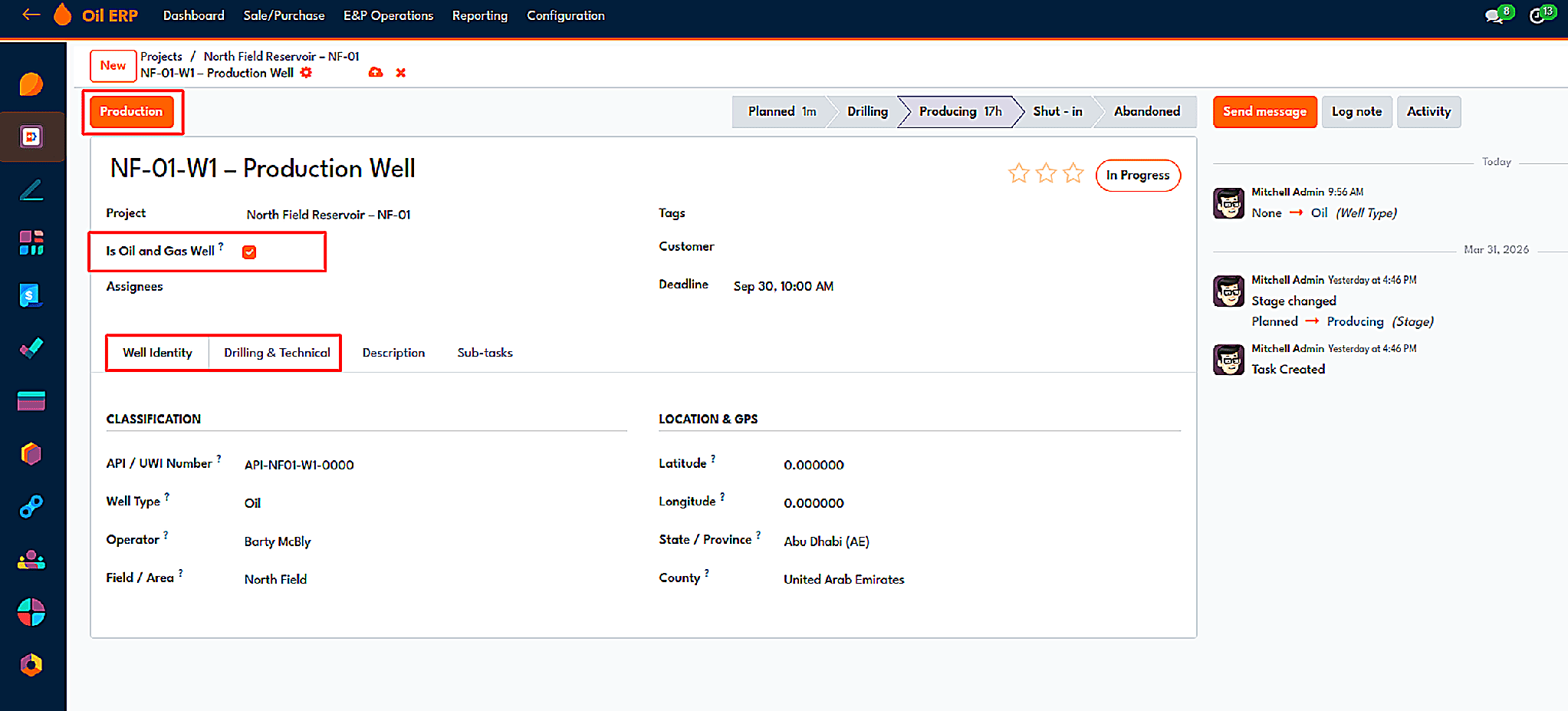
A well task with the well identity tab: API number, well type, operator, field and location.
The tanks are treated just like regular stock locations. A tank storage location is marked as such if it can show automatic tank gauging values like the following: gross volume, ullage, fill percentage, API gravity, and alarm levels. If a barrel is produced, that means the oil has moved to that tank, thus making the numbers of oil on your balance sheet the same as in the tank.
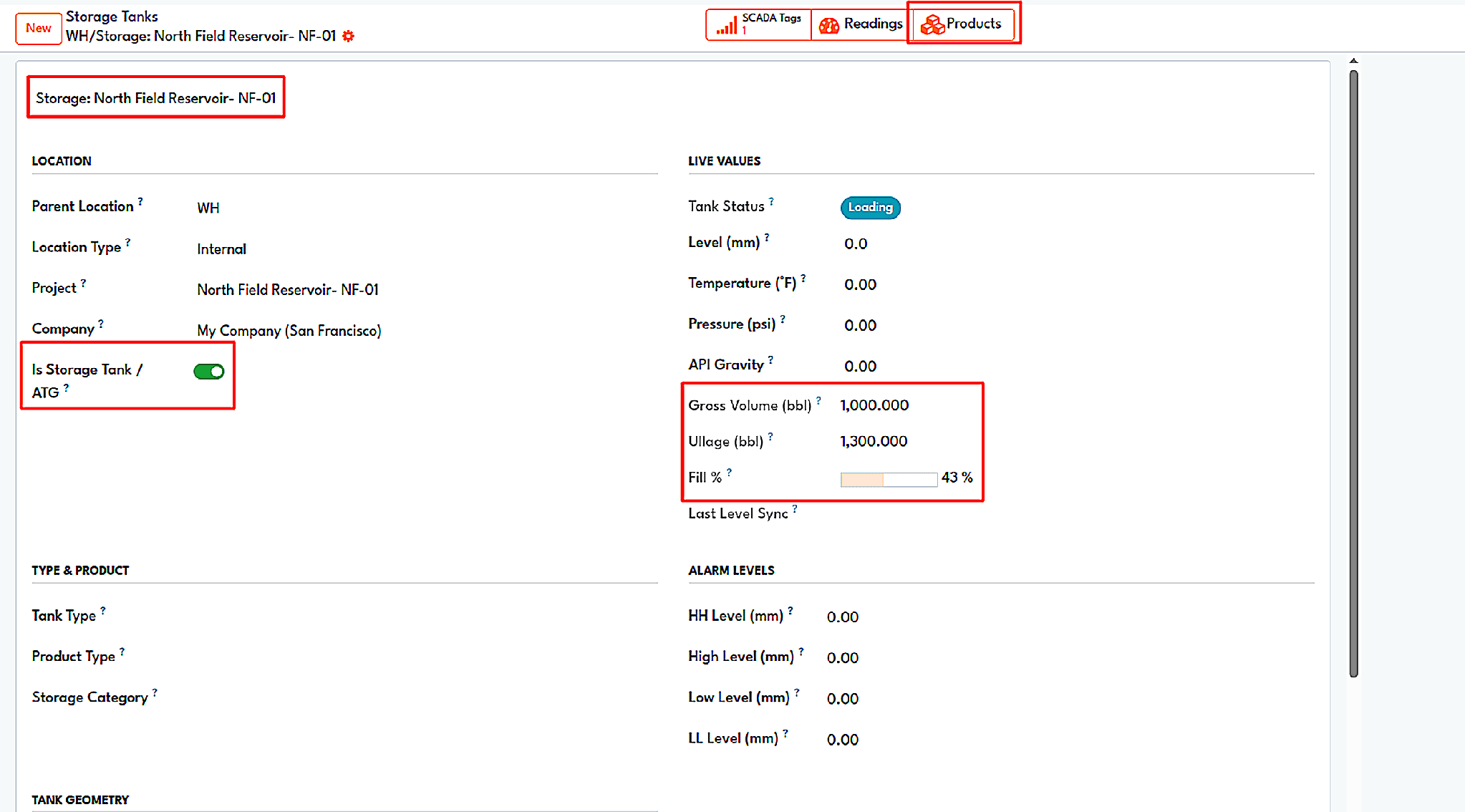
A storage tank location showing gross volume, ullage, and fill level.
The daily production figures are recorded using a Record Production wizard in the well activity where the date and warehouse are selected, then the amounts are recorded before saving the record. Each entry is tagged with its source, whether SCADA or manual entry, thus making it easier to know the original input numbers entered by human beings.
Production accounting
The above wizard works for small operations; larger operations need real production accounting, which is precisely the purpose of the Production Accounting module. The underlying principle of its design is easy to explain and difficult to implement: field data is considered to be a draft unless an authorized person approves it.
Each facility (pad, battery, plant) is based in the field and has its own rules regarding net production, basis of allocation, gas treatment, cutoff time, tolerances, and approval policies. Every day, facility-day records data from wells, tank levels, meters, lab analyses, gas manipulation, injection, and the reasoning behind corrections. SCDA can create the drafts automatically.
Net production originates from stream activities (crude oil, condensate, NGL, LPG) correlated to production wells, followed through balancing for hydrocarbons, water, and gas. Stock movement numbers and downstream operations are manifested only when the day is green-lighted. At month's end, the period reconciliation applies either a ratio or back allocation, and custody transfers are made with ownership taking place.
Royalties that follow the production
Royalty computation is the process in which small mistakes occur every month. The Royalty Module associates each royalty entry with its lease and thus constructs it on the basis of production data: period, well, product, volume, price per unit, and income before deductions. After transportation and storage charges are deducted, withholding tax is applied, and then we receive the net royalty amount.
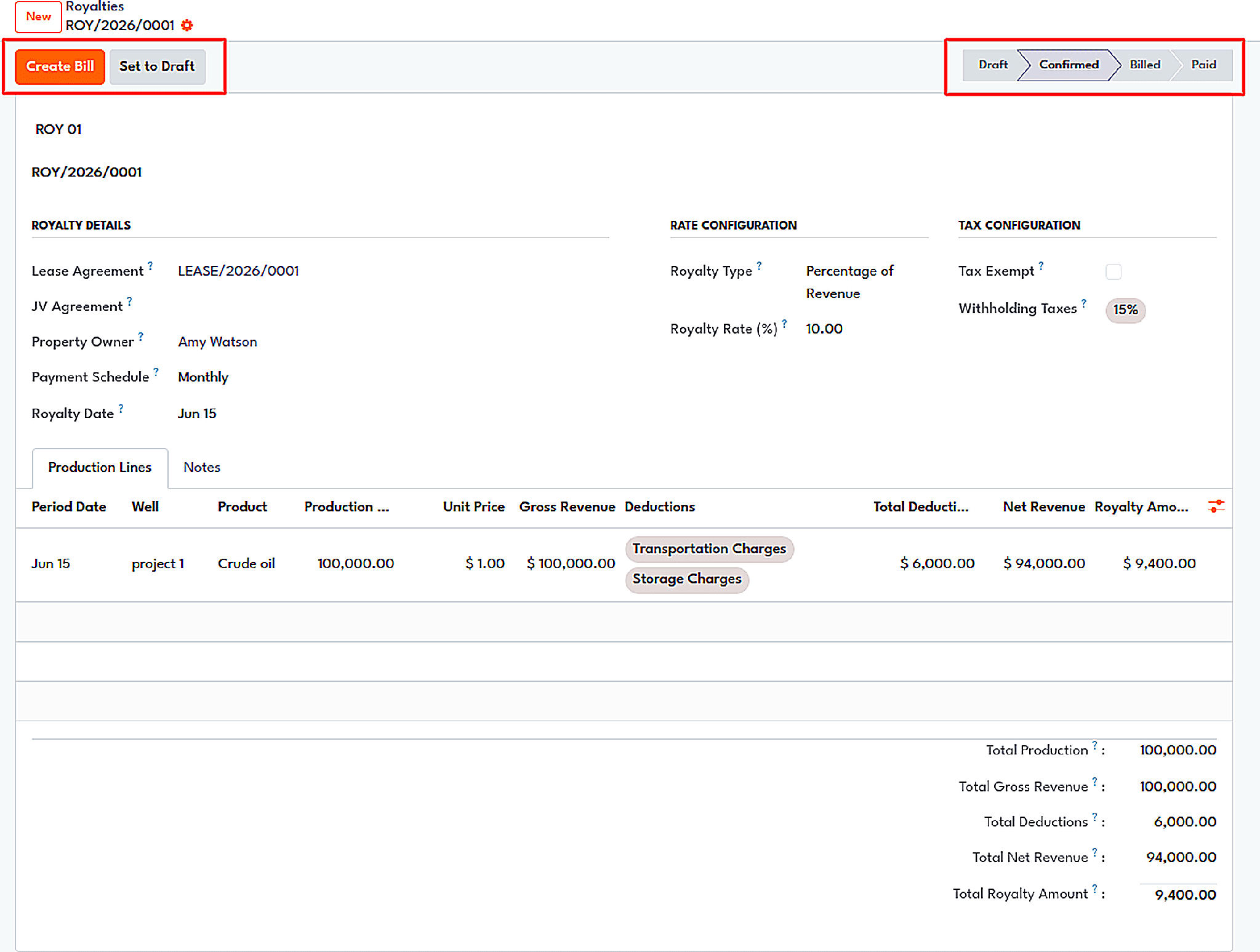
A confirmed royalty document with production lines, deductions, and net royalty totals.
The process for the record goes from Draft to Confirmed and continues through Billed to Paid. A volume is brought in by a Create/Update Royalty function from a daily production report. If the lease is in a joint venture, a portion of the royalties will have to go through the JV revenue sharing so the lessor portion can be deducted from the partner payments.
Joint Venture Agreement
In a joint operating agreement, the operator is identified along with the working interests and net revenue interests of the respective partners. The system will not allow a saving unless the working interests exactly sum to one hundred percent and only one operator is involved. While this may sound draconian, it has the effect of eliminating a category of billing disputes beforehand.
AFEs and partner voting
Under the contract, the Authority for Expenditure is prepared with a type (CAPEX, OPEX, Workover, or Exploration) and cost lines. The Approval and Rejection buttons will be available per partner, with the AFE moving to the approved state when the partners vote yes, with shareholders holding more than 51 percent working interest. The actual and estimate costs will be updated on the AFE as they come in.
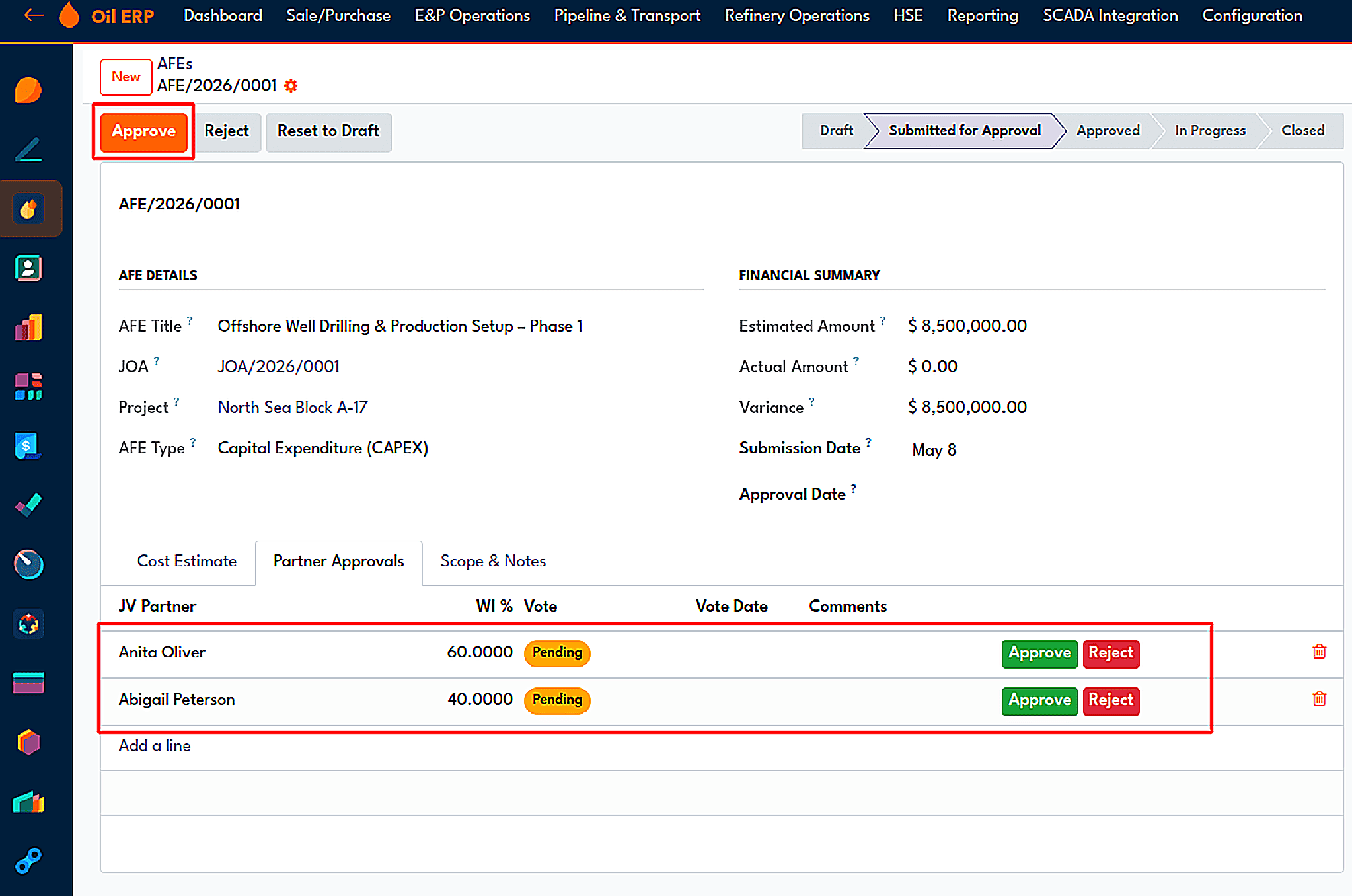
Partner approvals on an AFE, weighted by working interest.
Cash calls and joint interest billing
You should enter the monthly cash call amount, and the partner share will break it down according to working interests. So, in the example depicted in the module, 8,500 dollars will become 5,100 and 3,400 if split in a 6:4 ratio. While the generation of invoices takes place, the system creates an invoice for the customer per non-operating partner, excluding the operator and other partners already invoiced, which is why clicking twice is an absolutely safe practice. After this activity, the respective partner shows Not Paid, In Payment, or Paid.
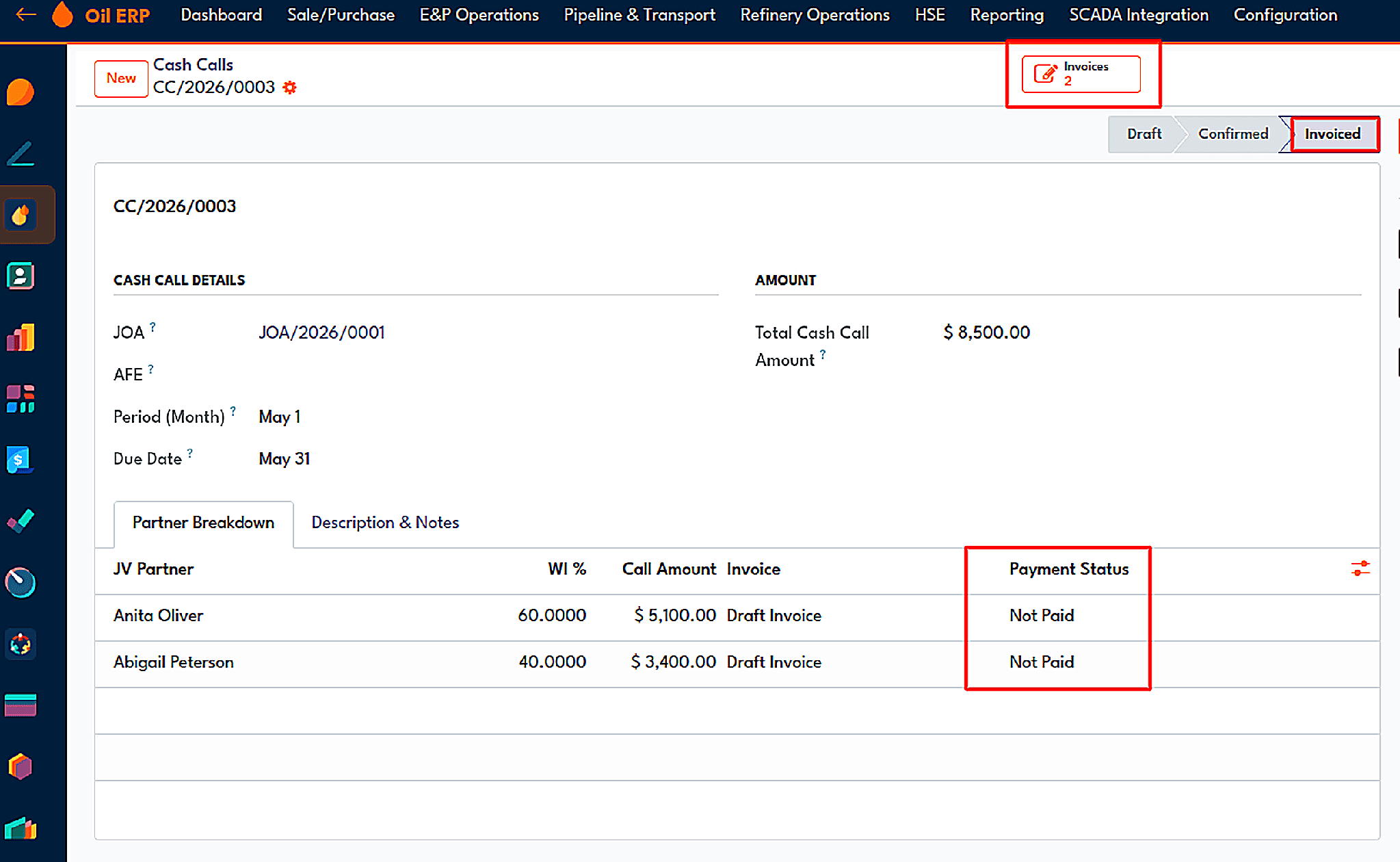
A cash call is invoiced to non-operator partners, with payment status per partner.
The process for effective cost billing is similar for the application of actual costs: collecting the cost amounts, calculating the corresponding allocations, and invoicing the shareholders. If there is ever a change of interests due to a sale of a partner or a new partner joining the firm, this process is tracked through an ownership transformation record which contains the initial and final interest proportions along with the date of the change.
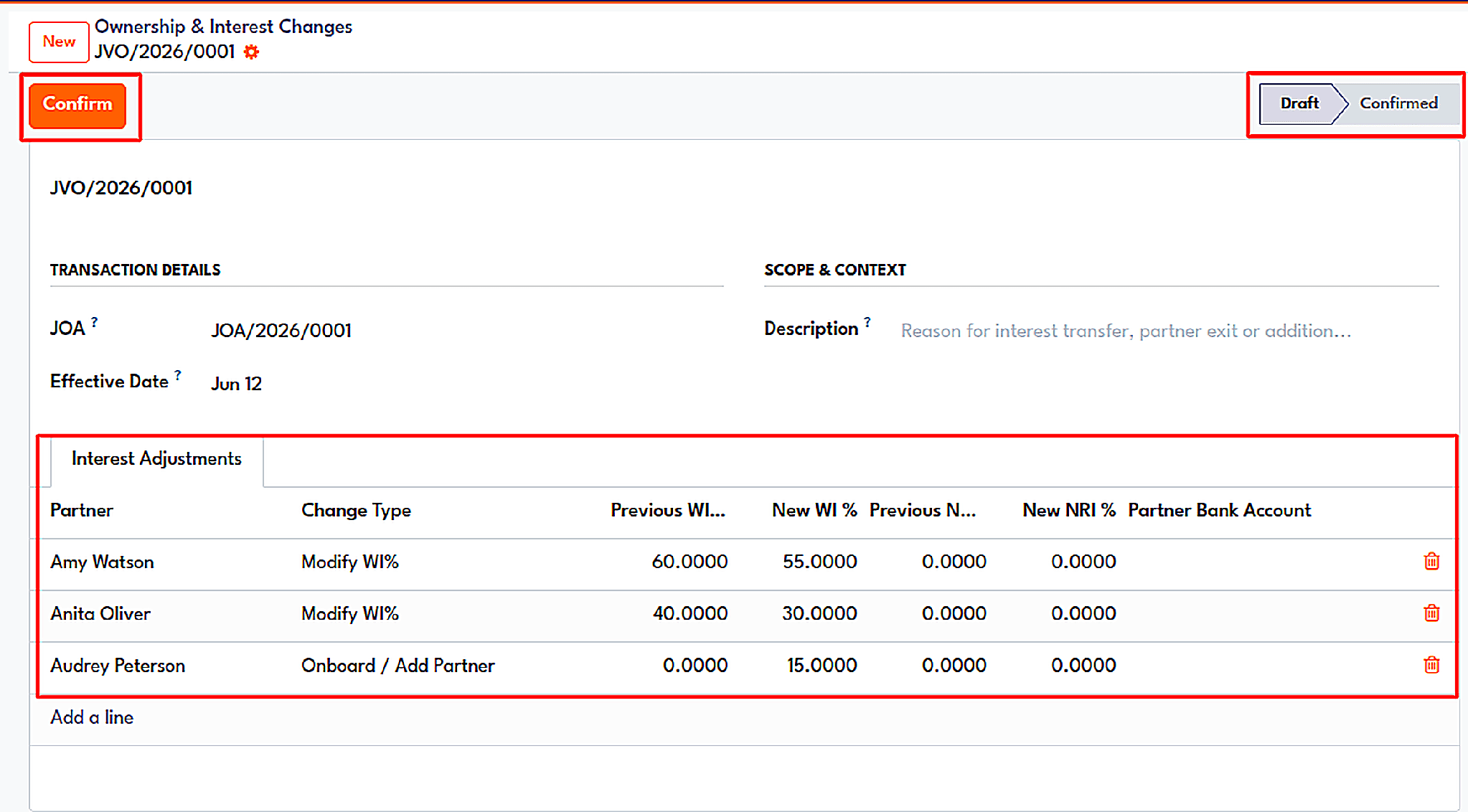
An ownership change record showing previous and new working interest for each partner.
Tender Management
The tendering process goes through a sequence of stages including Draft, Published, Evaluation, Negotiation, and Awarded. One of the methods to evaluate tenders is through the Lowest Price or Weighted Score evaluation. To pre-qualify the vendors, bids are accepted while the tender is published so that tenders go through negotiations before being awarded. In the weighted tenders, negotiation is conducted with a negotiated-price column available. A bid is confirmed, and the contract with the vendor and the price is created, and all of the other bids are rejected. An explanation is recorded when cancelling a tender, or re-tendering is done with the capability to go back.
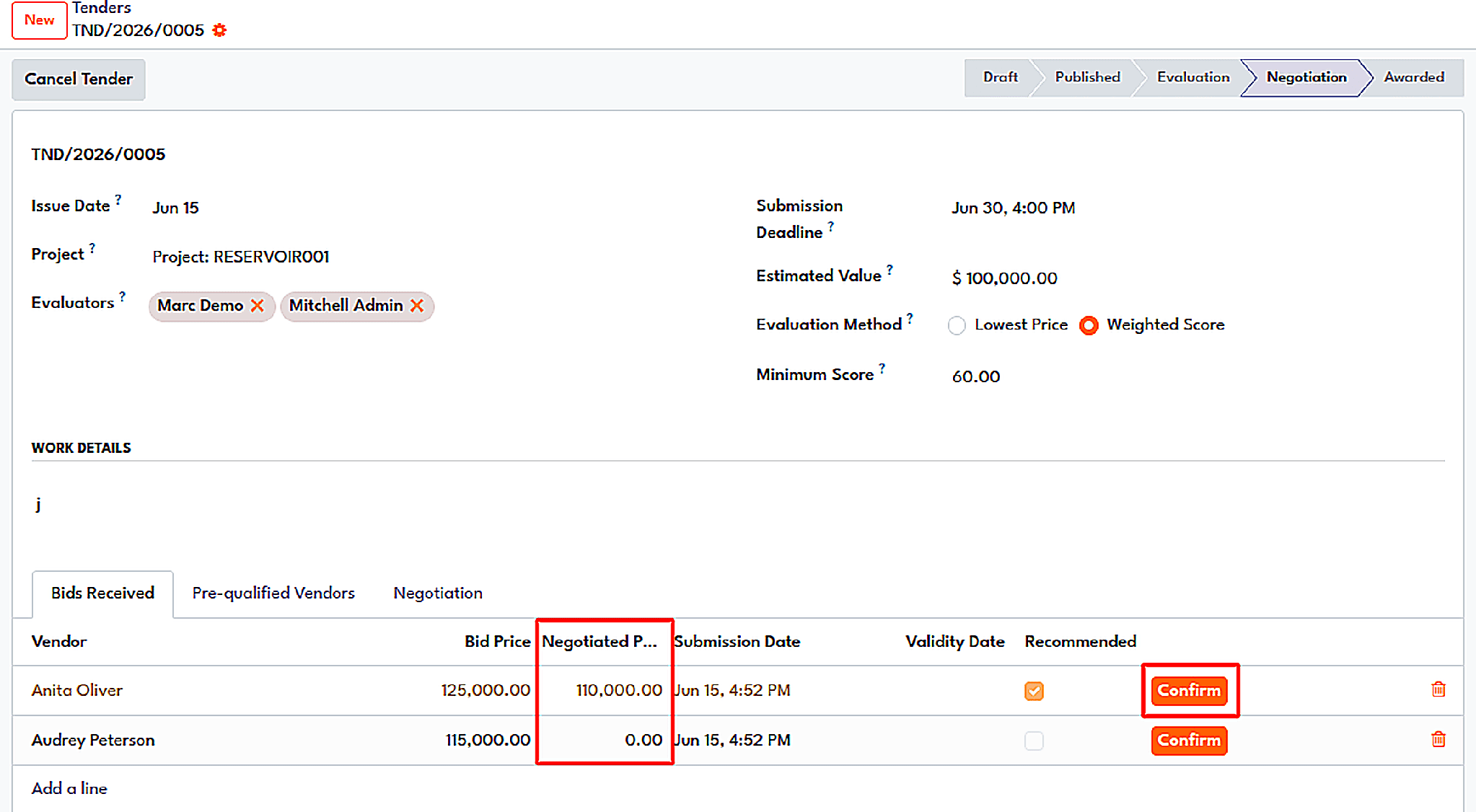
A tender in the Negotiation state, with negotiated prices next to the original bids.
Contract Management
Price is controlled by the agreement. The agreements are linked to the individual contract along with the equipment, which are processed using review and approval procedures. Amendments are created to amend the contracts, as the amendments can be understood when the wizard shows old and new information on the screen.
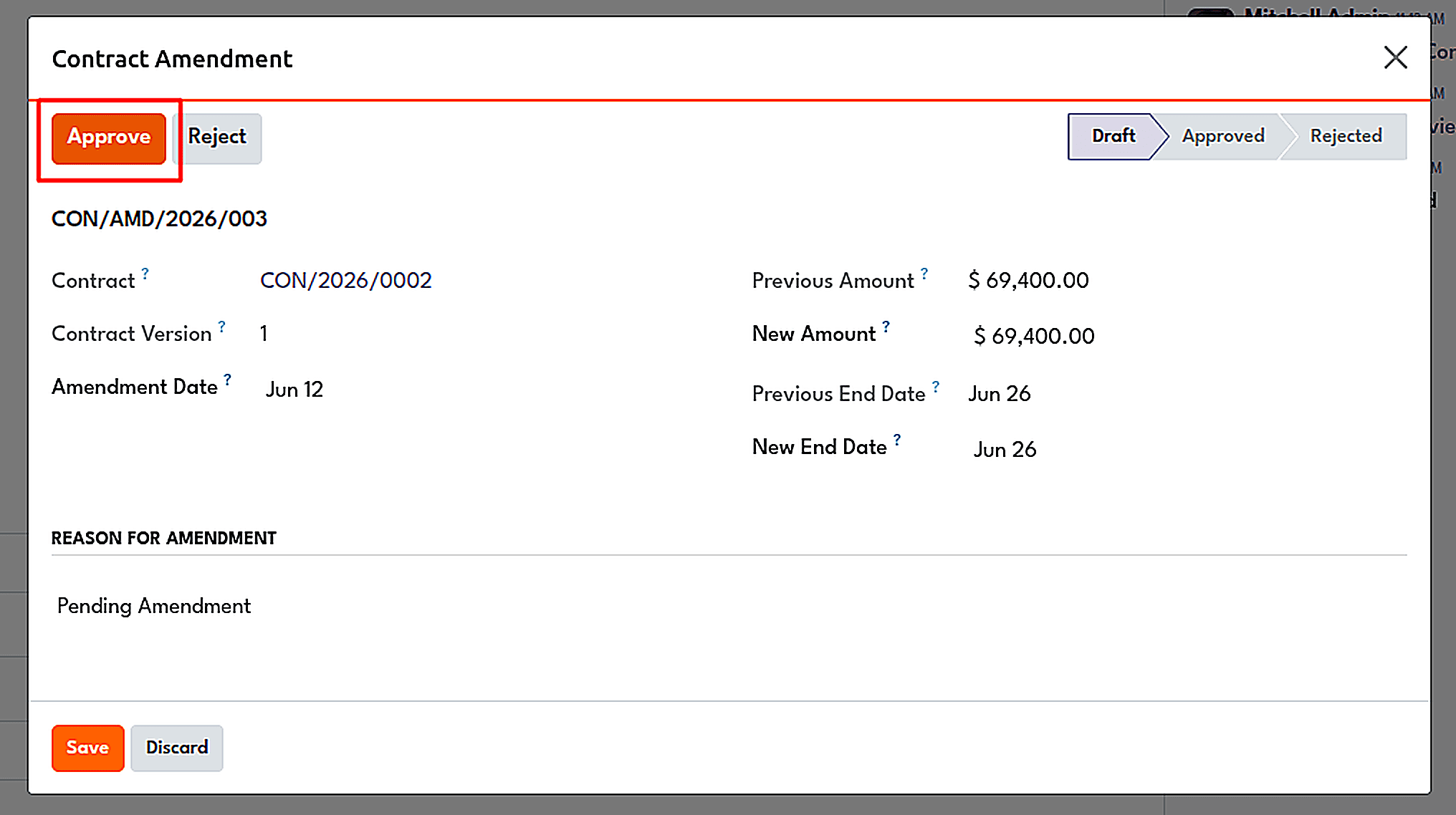
The amendment wizard compares the previous and new contract values before approval.
Procurement
The front end is covered. A single requisition indicates the necessity of making a purchase, which is then followed by the buyer's determination of whether it is going to be an RFQ, tender, or call-off order. Financial checks performed will take into consideration all budgets planned, provided, and expended so far. In the case of high-ordered items, it is going to be sent to the committee for deciding on the award and product acceptance.
Equipment and people on the well site
The Equipment module enhances the traditional Odoo maintenance application by providing the significant information that an asset requires, namely, criticality (importance), onshore-offshore location type, installation and certification dates of the equipment, operating pressure-temperature limits, and its application in a given well. The corrective and preventive maintenance requests are based on the same record, and it is possible to set up periodic requests with the help of the related accounting asset that tracks the depreciation of the equipment.
The movement of a pump from well to well is done through simple request approval involving the source site, target site, and transfer date; it ensures that the history of every asset is preserved.
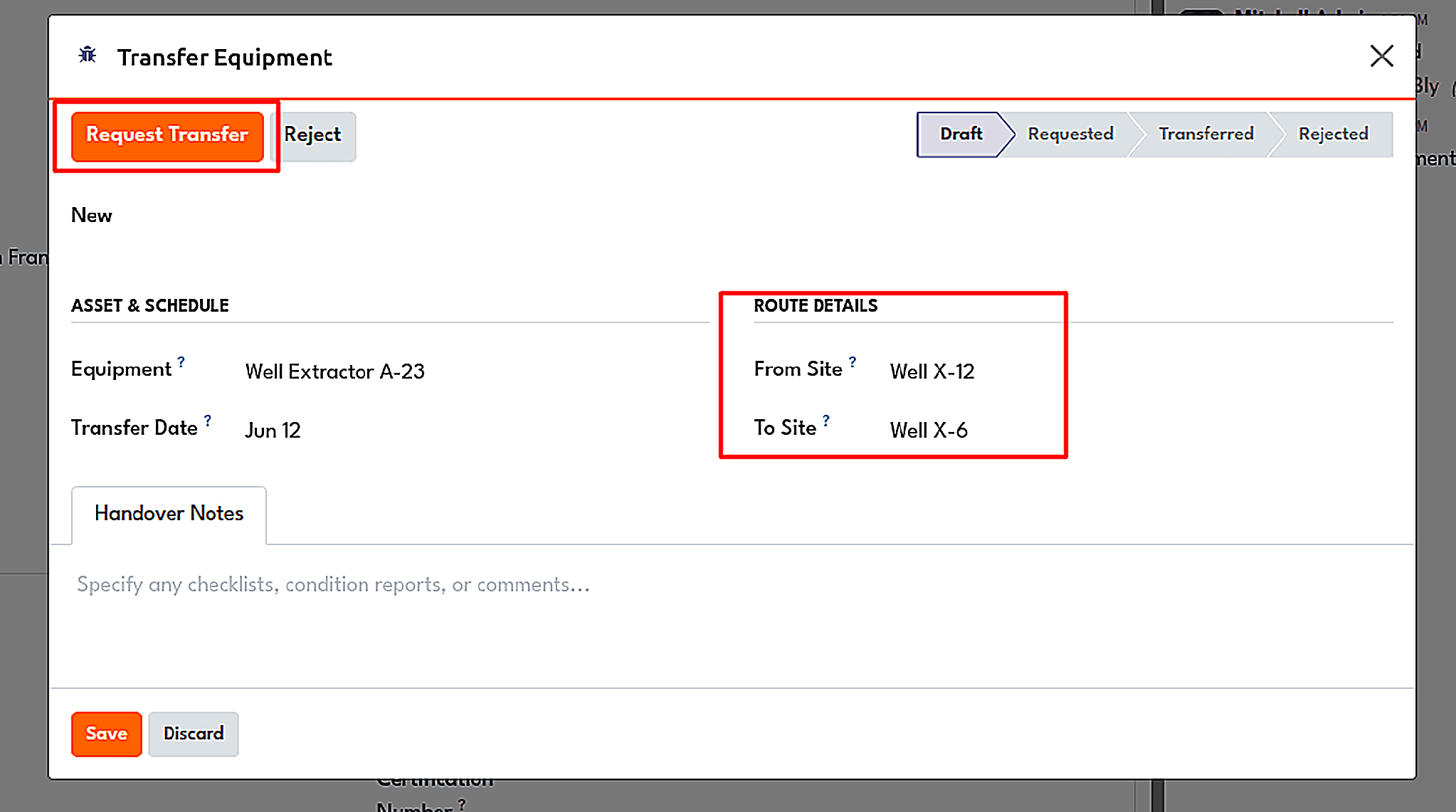
Requesting a site-to-site equipment transfer.
The Employee module addresses an issue that every Field Accountant is aware of: crew cost allocation. The hourly pay, danger allowance, and location allowance for the employee are noted. Crews are allocated to job tasks, timesheets are completed on the task, and a daily cost wizard creates summarized expenses for the day, week, or month with a possibility of excluding already invoiced employees. Consequently, a preliminary expense with analytic distribution is produced.
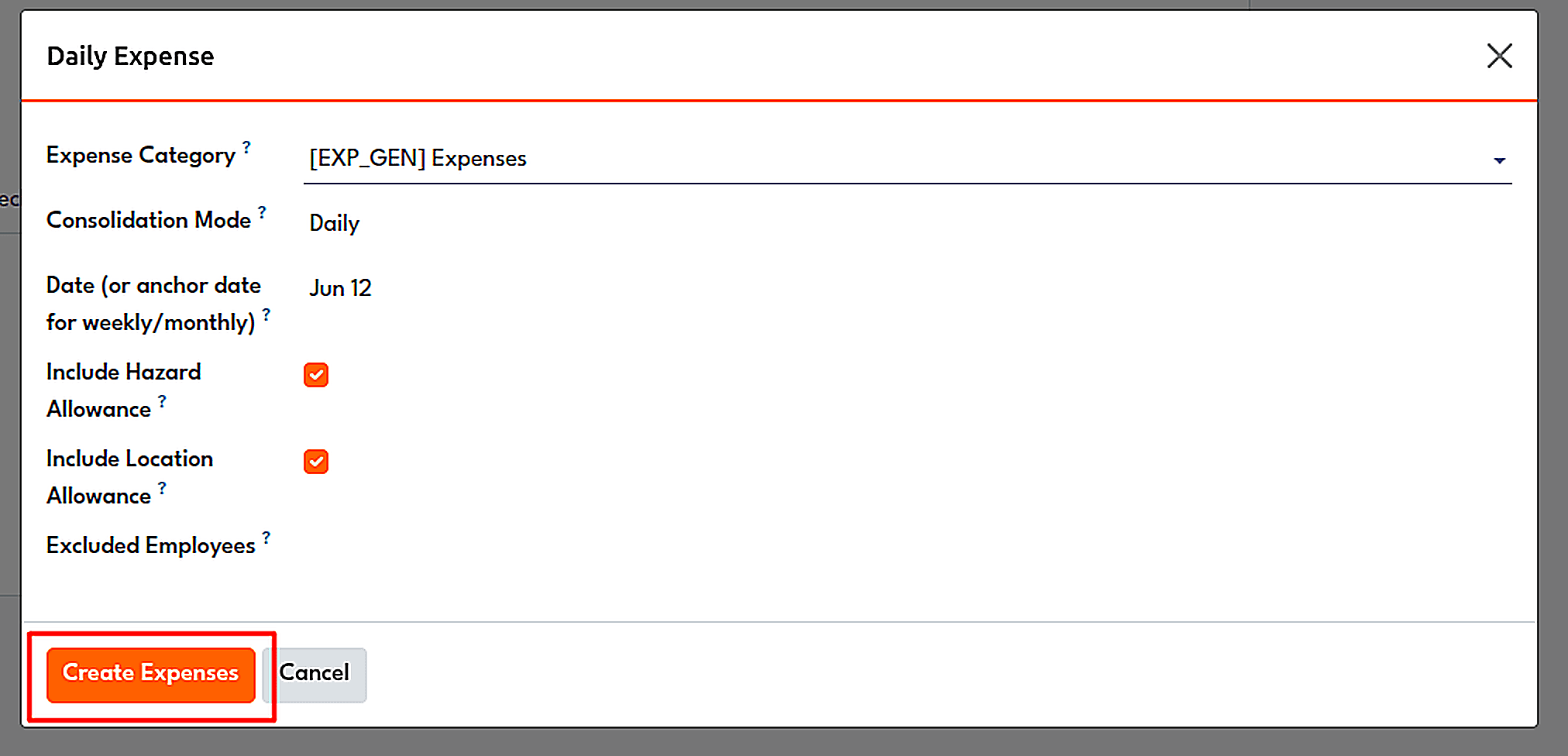
The Daily Expense wizard: category, consolidation mode and allowance rules.
Production optimization: seeing the loss while it is still small
As soon as reliable figures are made available to production accounting, the Production Optimization module gets things started. The engineers set their daily goals for each product stream coming from the well. As numbers start coming in, the well form shows the deviation from the set target. The algorithms used in the module’s own testing, which ran with the amount of oil coming from the well equal to 8 litres, resulted in a deviation of -56.67 percent and the emergence of a Below Target flag.
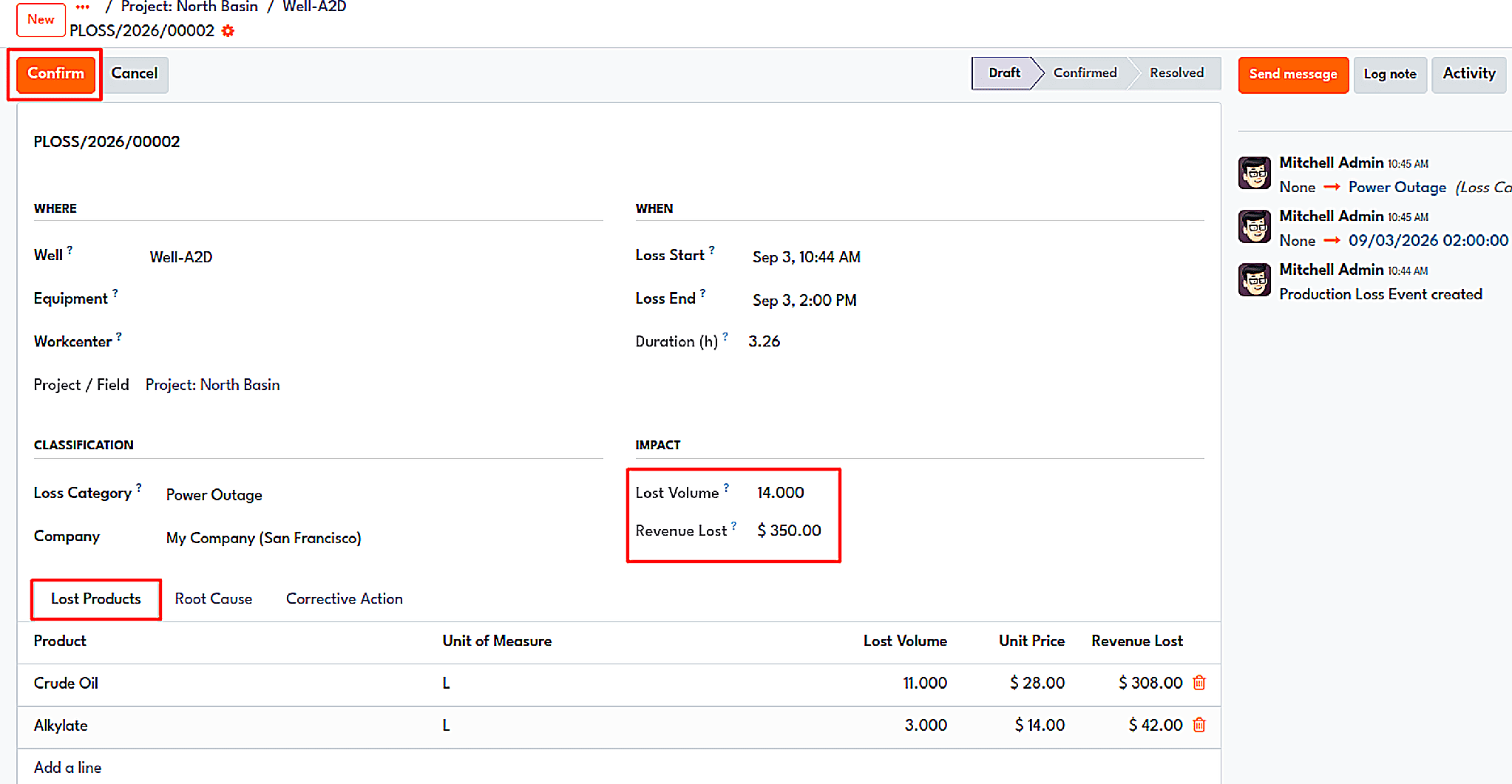
A production loss record linked to a well, with root cause, outage timeline, and revenue impact.
The operator proceeds to document the lost production's origin, the loss-causing apparatus, and the time of interruption. The system performs its operations, and consequently, a broken pump signifies a loss of profits while also displaying the causes of loss ranked by price.
From the economic perspective, the company's monthly cash inflow is calculated, taking into consideration the decline ratio, prices, and expenses so as to predict when the revenue will stop coming from the well. Every assessment ends with a conclusion or recommendation (to keep, to monitor, to intervene, to stop the production, or to give up on the well). If the result is either intervention or something higher and more serious, the well team will have to take this into account and do the task.
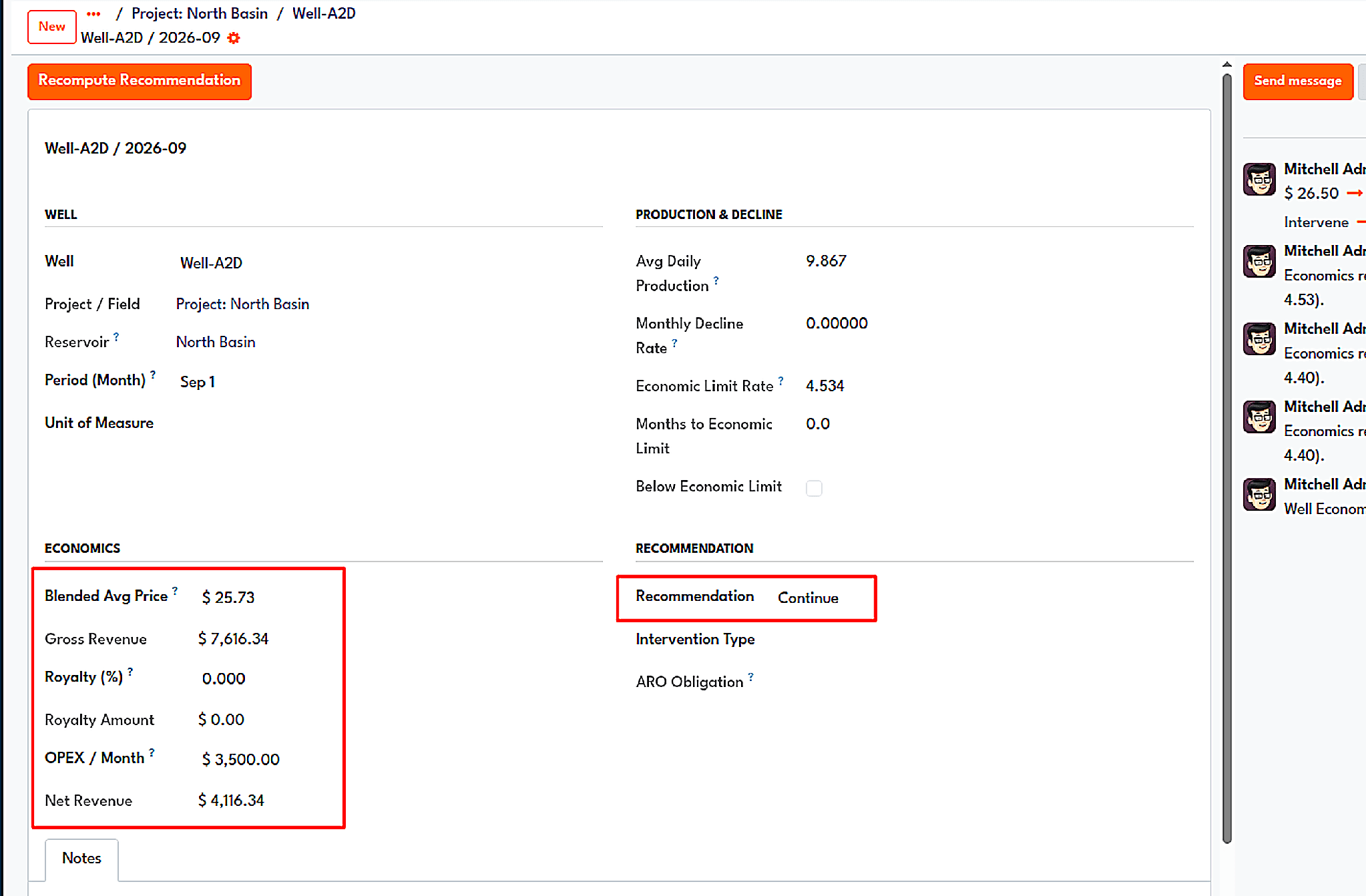
Well economics for one month: blended price, gross revenue, OPEX, net revenue and a recommendation.
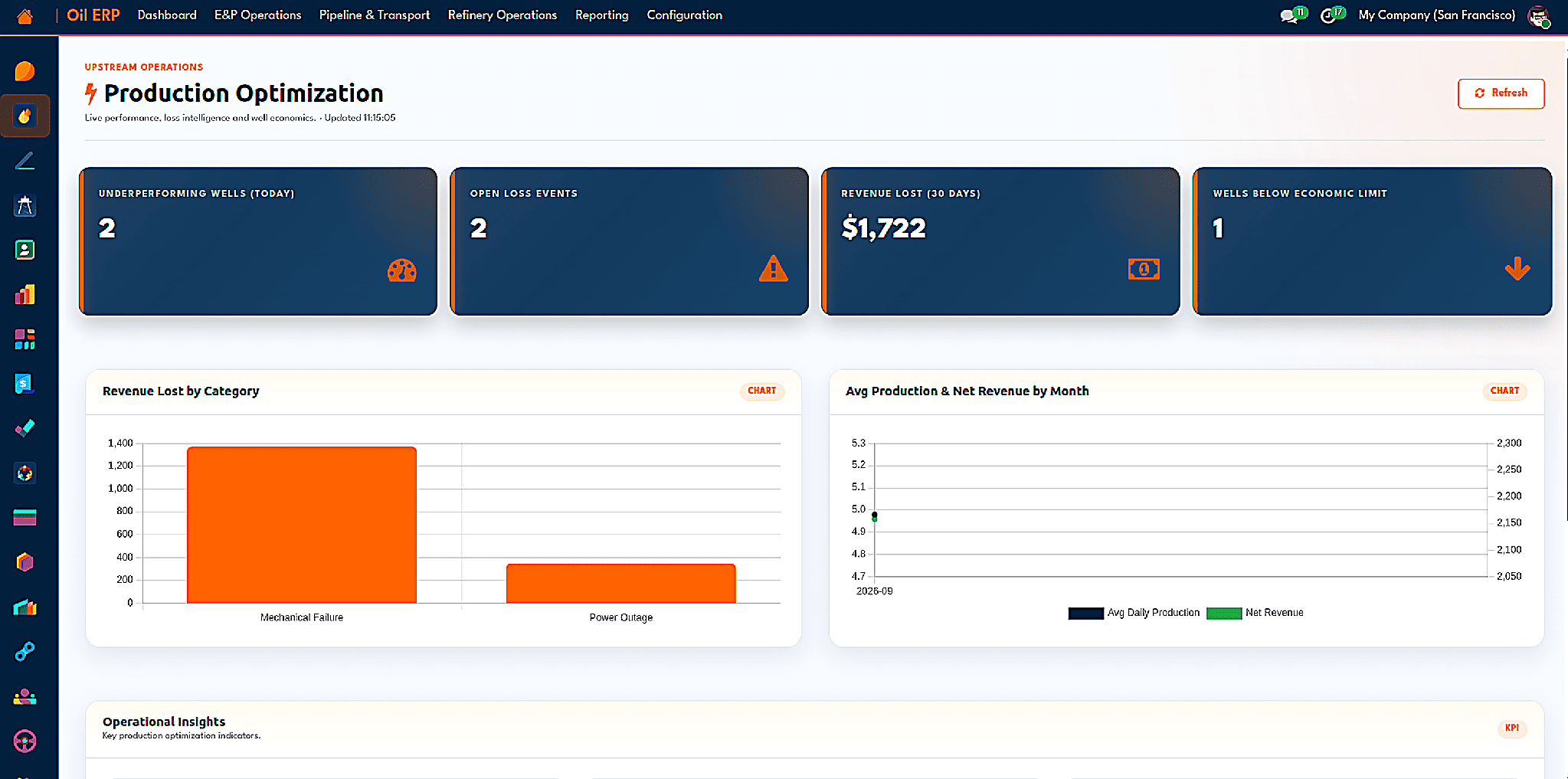
The executive dashboard with open loss events, revenue lost, and wells below economic limit.
ESG
Reporting emissions can be arduous due to the widely distributed nature of the raw data. The ESG system connects the data to sites and equipment where emissions are measured in terms of Scope 1, 2, or 3 associated with known timestamps. Emission rates of pollutants can be entered manually, downloaded from Climatiq using an API, or retrieved from the emission factors library maintained by the IPCC. Matching algorithms will assign the relevant emission rates to goods and services purchased depending on the product, vendor, or account, so an invoice for diesel will automatically be marked with the necessary emission rate.
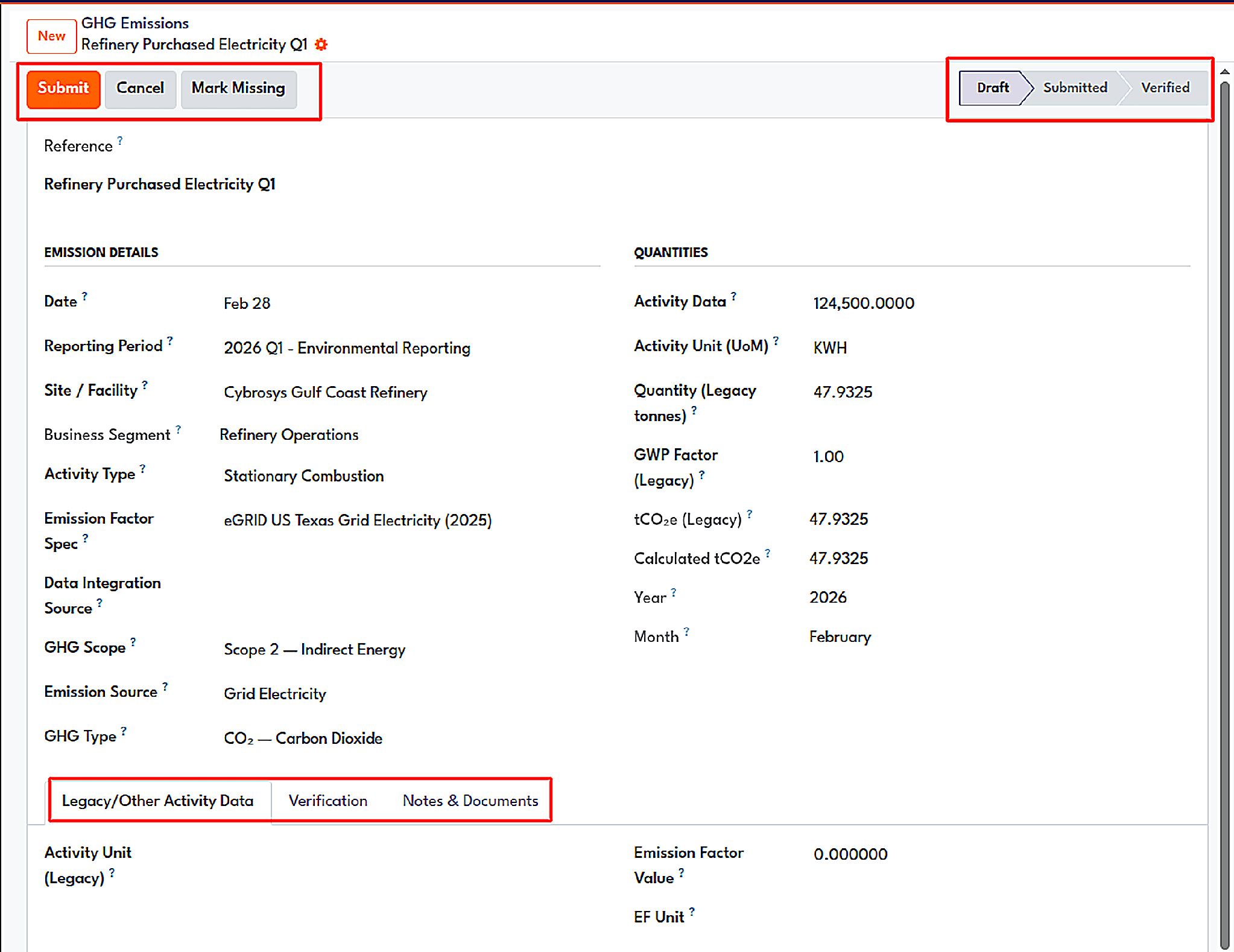
An emission record: activity data, emission factor, GHG scope, and calculated CO2e, with a submit and verify workflow.
Apart from emission figures, the module maintains track of energy consumption, water use, waste produced, and any spills that occur. The module records carbon offsets and emissions reduction targets achieved along with workforce demographic figures and any regulatory compliance and HSE incidents. The transportation emissions wizard produces emission figures using the vehicle and driver data, and the ESG dashboard summarizes all these statistics.
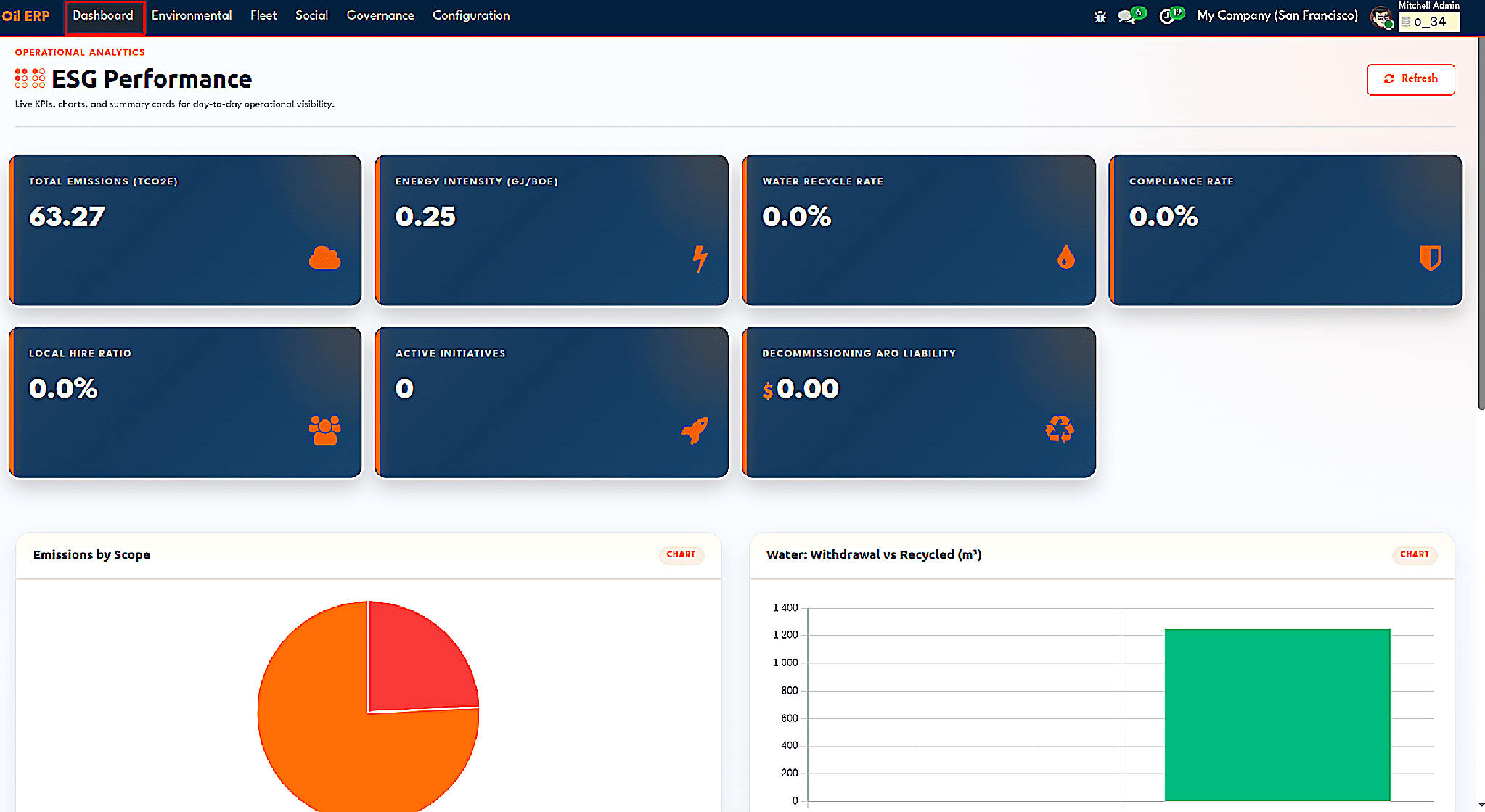
The ESG performance dashboard.
Asset retirement obligations
When it comes to the costs associated with decommissioning, all upstream companies are aware of these expenses, but unfortunately many of them do not properly record these costs. In this case, the ARO module is compliant with IAS 37. An obligation is created with the use of a template which stores information about the journal and the asset, a liability, as well as accounts of accretion, default discount rate, and frequency of accretion. Detailed information on current cost, inflation, and abandonment date needs to be entered into the system to get the present value calculated and the initial entry prepared and posted.
Next, it is necessary to keep an eye on the liability that should be accounted for on an annual basis in line with the effective interest approach, which also considers calculations with the daily scheduler in case any changes occur. In case the regulator changes the regulations and new costs need to be estimated, the Revise Estimate wizard will enable you to perform calculations.
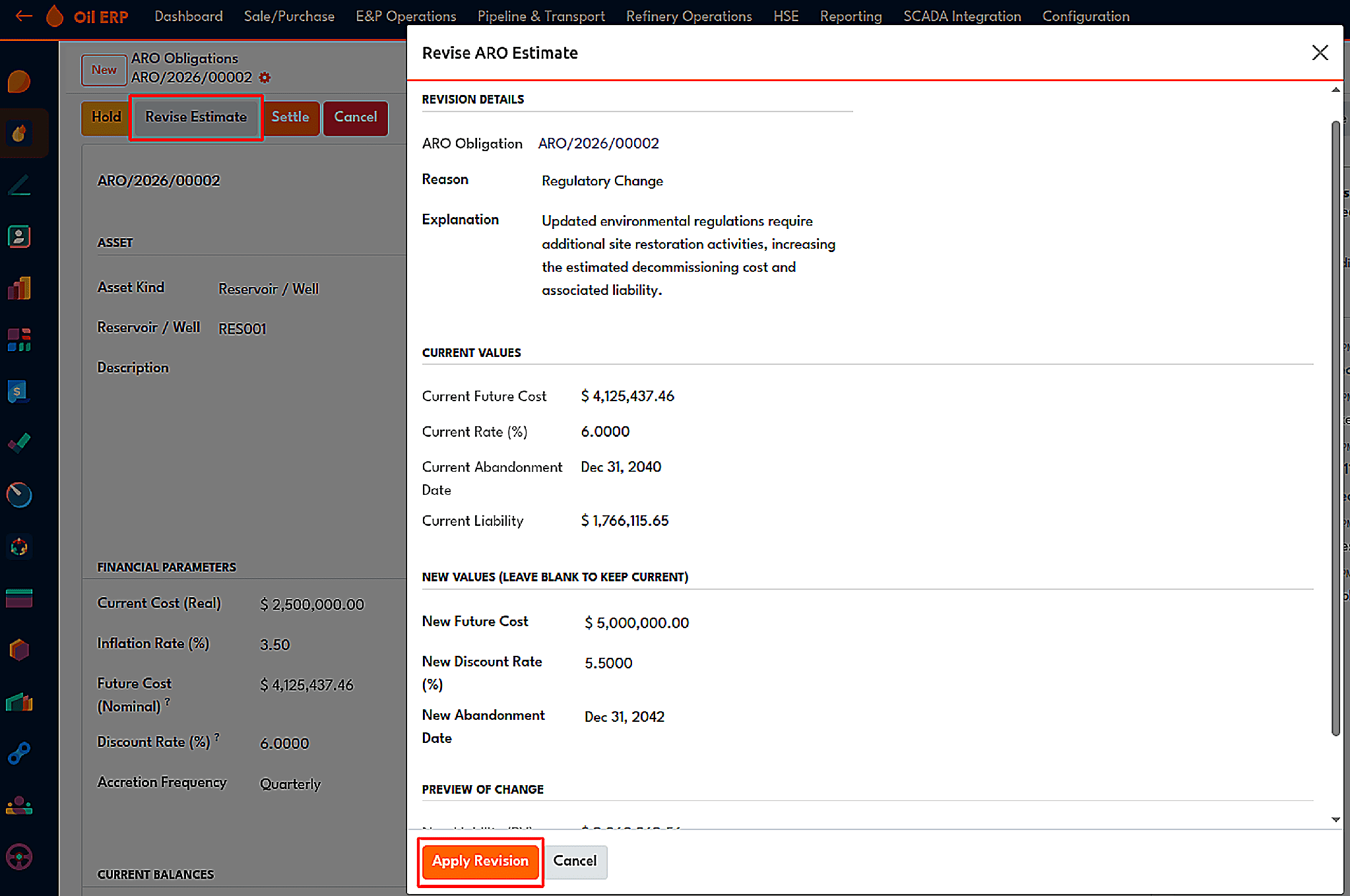
The Revise ARO Estimate wizard previews the updated liability before applying it.
When a joint venture has possession of the asset, the associate in a joint venture shall be liable for its share according to its percentage of interest in it. At the time of the commencement of decommissioning works, expenditures are added to the work-in-progress account, which consists of different bills from vendors. Afterward, the liability gets released, salvage revenue is recognized, and the income or loss gets recorded accordingly.
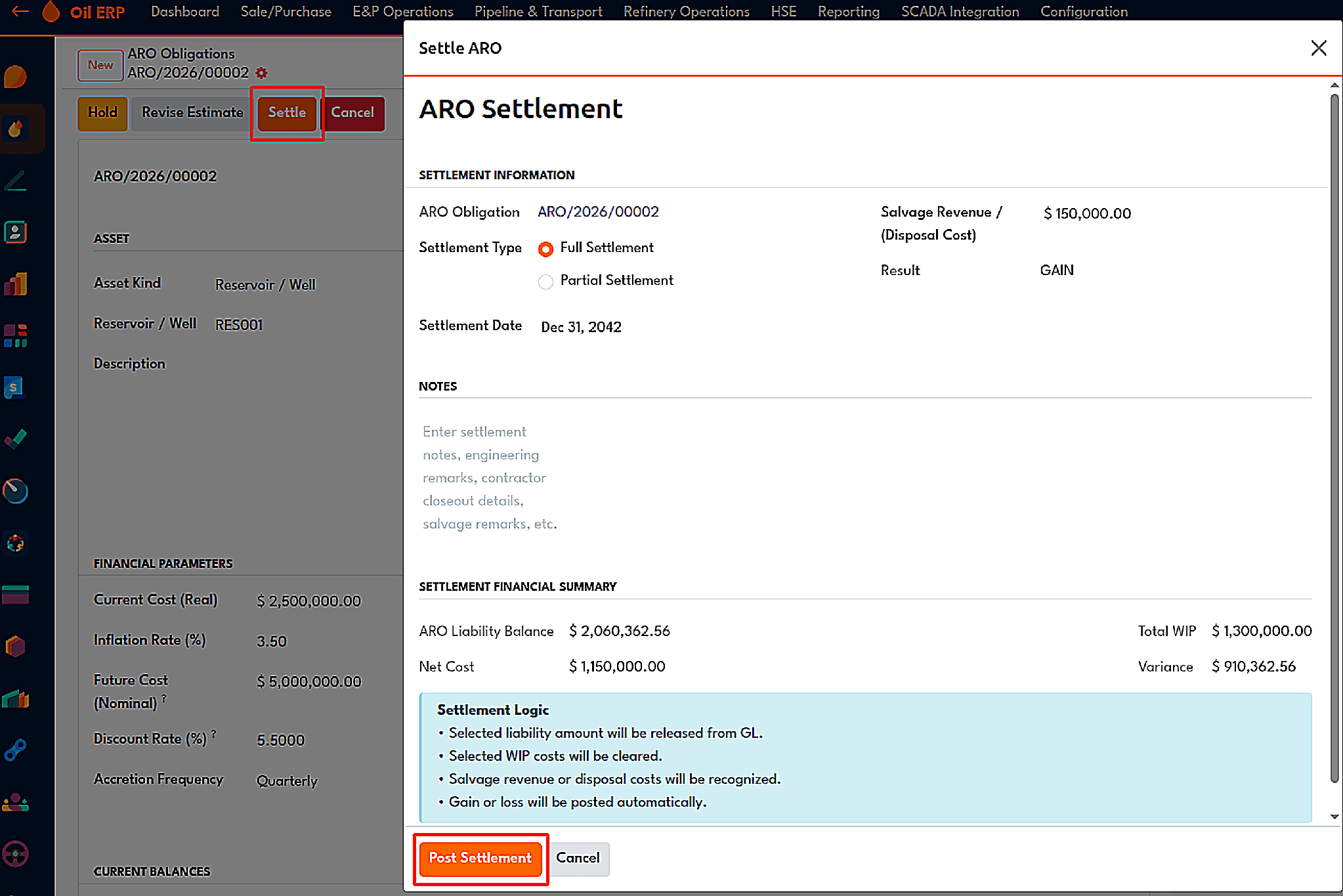
The Settle ARO wizard includes the financial summary and settlement logic.
Upstream operations cover decades of a field's life, and Oil ERP follows them from the first reservoir record to the final decommissioning entry. The reservoir module calculates reserves from geology inputs, the lease module tracks rentals and Held by Production status, wells are managed as projects and tanks as stock locations, and Production Accounting makes sure field data stays a draft until someone approves it.
From there, royalties, joint venture billing, procurement, equipment, crew costs, production optimization, ESG reporting, and asset retirement obligations all build on the same approved numbers. Each module feeds the next, so the barrels counted in the field are the same barrels that appear in partner invoices, royalty statements, and the balance sheet.
To read more about A Complete Guide to HSE Management in the Oil and Gas Industry, refer to our blog A Complete Guide to HSE Management in the Oil and Gas Industry.