It is necessary to consider the management of user access in order to design a secure enterprise application in Odoo. The users can have access to the same model but may not have the permission to read and write the same record. If there are several security conditions that relate to the same user, it is important to understand the interaction between them.
Odoo 20 introduces a unified security model through ir.access, bringing model access permissions and record-level restrictions together. This changes the way developers implement security settings, particularly when migrating custom modules or troubleshooting unexpected access errors.
The primary difference here is that of permissions versus restrictions. Access rows related to groups offer access to the qualified records, while those that are not tied to any group are restricted. The domains of these two types of rows are combined differently, directly affecting which records a user can access.
In this blog, we will explore how permissions and restrictions work in Odoo 20, how their domains are combined, how the computed kind field is used, and how developers can troubleshoot access problems using practical examples.
Understanding the ir.access Model in Odoo 20
In earlier Odoo versions, access control was primarily handled through two mechanisms:
- ir.model.access: Controls model-level permissions, including read, write, create, and unlink records.
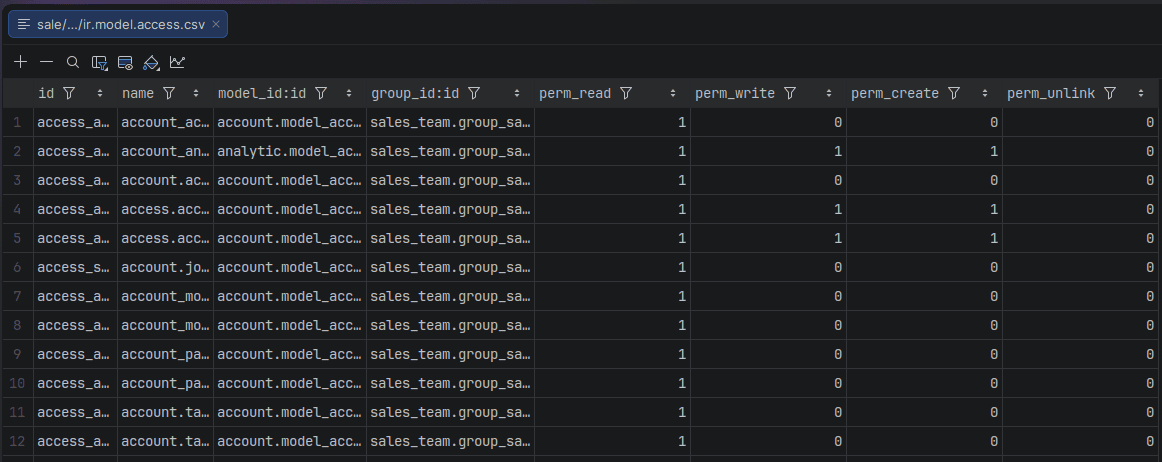
- ir.rule: Controls access to individual records through domain conditions.
These mechanisms worked together. A user could have permission to read a model but still be unable to access a particular record because of a record rule.
Odoo 20 introduces ir.access to bring these concepts into a unified security model.
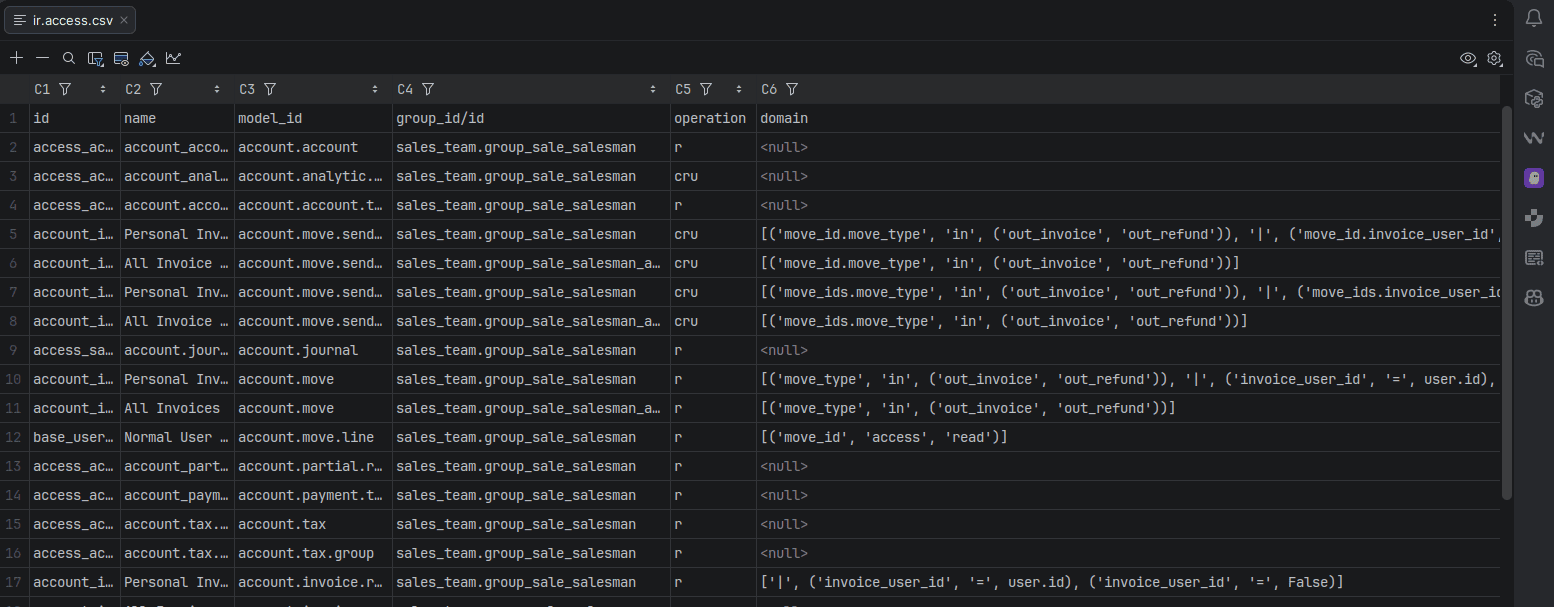
An access row contains a model, the operation being applied, a domain, and a group. The existence or absence of the group makes the row either a permission or a restriction.
There are two types of access rows.
1. Permission: These rows have a group_id and grant the configured operation to users covered by that group, provided the records satisfy the domain.

2. Restriction: These rows do not have a group_id. They restrict access by requiring records to satisfy their domains.

Understanding this distinction is essential because the two types of rows do not combine in the same way.
How Permission Rows Work in Odoo 20
A permission row grants access to qualifying records for users belonging to the specified group.
Consider a custom model in which members of a particular group should be allowed to read records assigned to them.
Intended configuration includes:
- ID: The ID for the access definition.
- Name: The name for the access definition.
- Model: The model containing the records.
- Group: The group receiving the permission.
- Operation: Read.
- Domain: A condition identifying records allocated to the current user.
Note:
- Operation is marked now as c, r, u, d letters, where the use of each indicates allowing or restricting the corresponding access.
- c = create, r = read, u = update, d = delete/unlink
Since there is a group specified, this row acts as a permission.
Now, consider another permission which gives access to records of one’s own department. Such a user who is entitled to both permissions would be able to access a record in different ways. This is possible because permission domains are combined using OR.
For example:
Permission A: records that are assigned to the current user.

Permission B: records that belong to the user's department.

Thus, the resulting composite condition would be:
Permission A OR Permission B
The record will thus qualify under one of the permissions, provided it fulfills the relevant restrictions as well.
It is helpful in cases where users have intersecting duties. For instance, a manager may have access to his personal files and those of his department.
How Restriction Rows Work in Odoo 20
Restriction rows behave differently from permission rows.
Suppose an organization wants to restrict access to records belonging to the user's current company.
The intended configuration includes:
- ID: The id for the access definition.
- Name: The name for the access definition.
- Model: The model containing the records.
- Group: None.
- Operation: Read.
- Domain: A condition requiring the record to belong to the current company.
Since the group is empty, the row acts as a restriction rather than a general permission.
This distinction is important. A restriction with a domain matching the current company does not independently grant access to every record in that company.
The user must still have an applicable permission for the requested operation. The restriction then limits the records available through those permissions.
For example, a user may have permission to read a particular record, but the record can remain inaccessible if it does not satisfy the company restriction.
A restriction limits existing access; it does not replace the permission required to access a model.

How Odoo 20 Combines Permissions and Restrictions
The most important rule in the ir.access model is how the domains of applicable access rows are combined.
Suppose a user has three permission domains: P1, P2, and P3. The permission domains are combined using OR: P1 OR P2 OR P3.
Now, suppose three restrictions apply: R1, R2, and R3. The restriction domains are combined using AND: R1 AND R2 AND R3.
The final condition is represented as (P1 OR P2 OR P3) AND R1 AND R2 AND R3.
This means that a record must satisfy at least one applicable permission domain and every applicable restriction domain.
Example: Combining Department Permissions and Company Restrictions
Suppose a user needs to access records assigned directly to them or records belonging to their department.
The permission conditions are:
P1: The record is assigned to the current user.

P2: The record belongs to the current user's department.

A company restriction also applies:
R1: The record belongs to the current company.

The effective condition becomes:
(Assigned to the current user OR Belongs to the current user's department) AND (Belongs to the current company)
The user will be able to access the records using any of these permissions, although the company's restriction will be binding on both access routes.
Adding another permission does not remove the company restriction. This is particularly important when configuring security for applications with multiple departments, organizational units, or companies.
Why a Domain Does Not Automatically Grant Access
A domain defines a condition on records, but the domain alone does not determine whether an access row grants or restricts access.
Consider the following two configurations.
Example A: Group-specific permission
- Model: The target model.
- Group: A specific user group.
- Operation: Read.
- Domain: Records assigned to the current user.
This row grants the specified operation to qualifying users for records matching the domain.
Example B: Group-less restriction
- Model: The same target model.
- Group: None.
- Operation: Read.
- Domain: Records belonging to the current company.
This row does not grant general read access to company records. Instead, it restricts the records that remain available through the applicable permissions.
Both rows contain domains, but their effects differ because their group configurations differ.
When reviewing an access row, developers should examine four elements together:
- The model.
- The operation.
- The group.
- The domain.
Looking at the domain alone is insufficient to determine the row's role in the final security evaluation.
How Non-Overlapping Restrictions Can Block Access
An additional effect of the use of the AND operator while applying restrictions is that, in case of incompatible conditions, the resulting condition does not match any record at all.
Consider that we have two restrictions on the same model and operation. One restricts company_id = 1, and another restricts company_id = 2. The result is the following restriction: company_id = 1 AND company_id = 2
As a result of these restrictions being incompatible, the record can match neither condition since it can belong to only one company. Hence, the restriction domain does not include any record.
Now, let's consider that the user has appropriate permission to access his own records. The resulting condition will look as follows:
(User's record) AND company_id = 1 AND company_id = 2
Such permission is unable to overcome these incompatibilities.
How can developers prevent this problem?
Before introducing a restriction, check how it interacts with existing restrictions. A practical review should include the following:
- Identify existing restrictions for the model and operation.
- Compare their domain conditions.
- Check whether the conditions can be satisfied simultaneously.
- Test with users from different companies and groups.
- Verify that the resulting access matches the business requirement.
A restriction that appears correct in isolation may cause an access problem when combined with another restriction.
This is particularly important in multi-company environments, where company conditions must be designed carefully.
Understanding the kind Field in Odoo 20
The ir.access model includes a computed field named kind and in the UI labelled as Type.
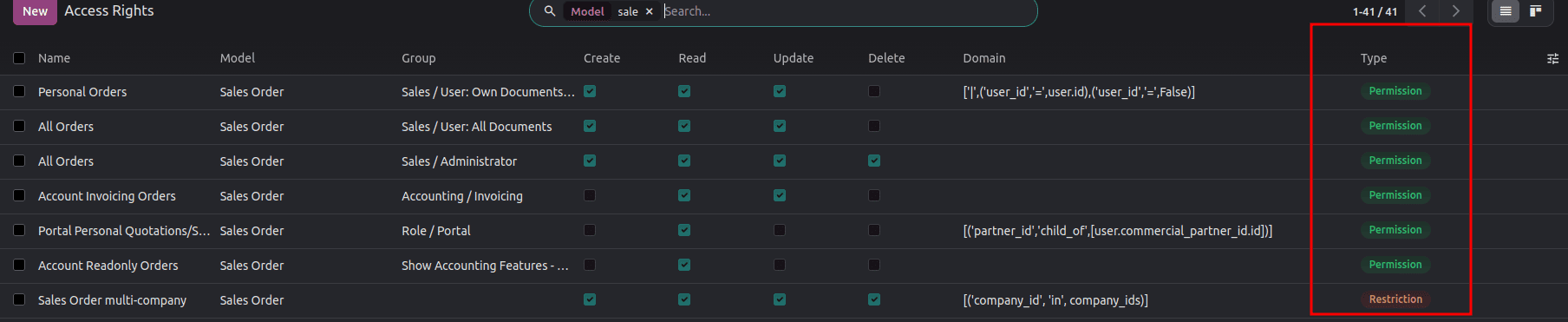
It distinguishes between two values:
This field helps developers identify the role of an access row without interpreting its domain manually.
When a group is specified, the row is classified as a permission. When no group is specified, the row is classified as a restriction. The field is computed from the access configuration rather than being an independent security switch.
Developers should not treat kind as an alternative way to grant permissions. Its purpose is to represent whether the access row adds permission or imposes a restriction.
How is the kind field computed?
The technical implementation uses the following computation methods:
- _compute_kind
- _compute_sql_kind
@api.depends('group_id')
def _compute_kind(self):
   for access in self:
       access.kind = 'permission' if access.group_id else 'restriction'
def _compute_sql_kind(self, table):
   return SQL(
       "CASE WHEN %s IS NULL THEN %s ELSE %s END",
       table.group_id, 'restriction', 'permission',)
These methods support the field's ORM computation and SQL-side computation.
This distinction matters when inspecting access records programmatically or extending the model in a custom module.
Why does SQL-side computation matter?
A computed field can represent information derived from other fields rather than information entered directly by an administrator.
SQL-side computation support provides a database-level way to derive the field's value. This is useful when the field needs to participate in database operations such as searching or querying.
In extending ir.access, the field declaration and computations involved need to be checked in the Odoo 20 source revision by developers.
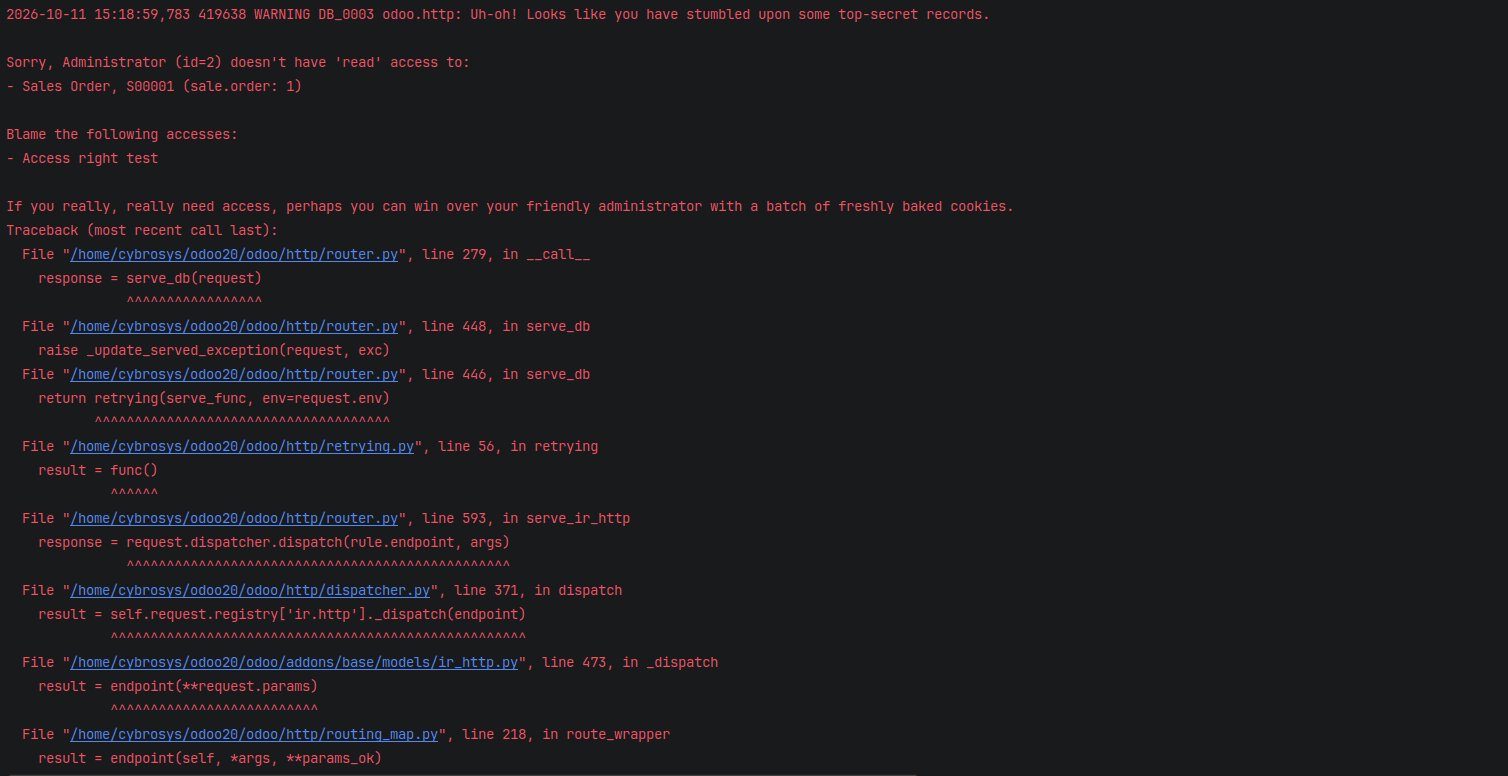
Debugging Access Problems with --dev=access
When an access error occurs, the visible message may not immediately identify the responsible access row.
Odoo provides the --dev=access development option to assist with access-related debugging.
The --dev=access option helps developers understand why a user can or cannot access a particular record in Odoo 20. Use the diagnostic information available with --dev=access alongside the relevant source code to investigate the failure.
Without --dev=access, when an access violation happens, the following brief warning is logged by the server:

Now, to check with ––dev=access, either run the terminal command below:
./odoo-bin -c odoo.conf --dev=access
Run this in your development environment using the configuration file for the instance you are investigating.
Or add the –– dev=access to the conf file as shown in the image below:
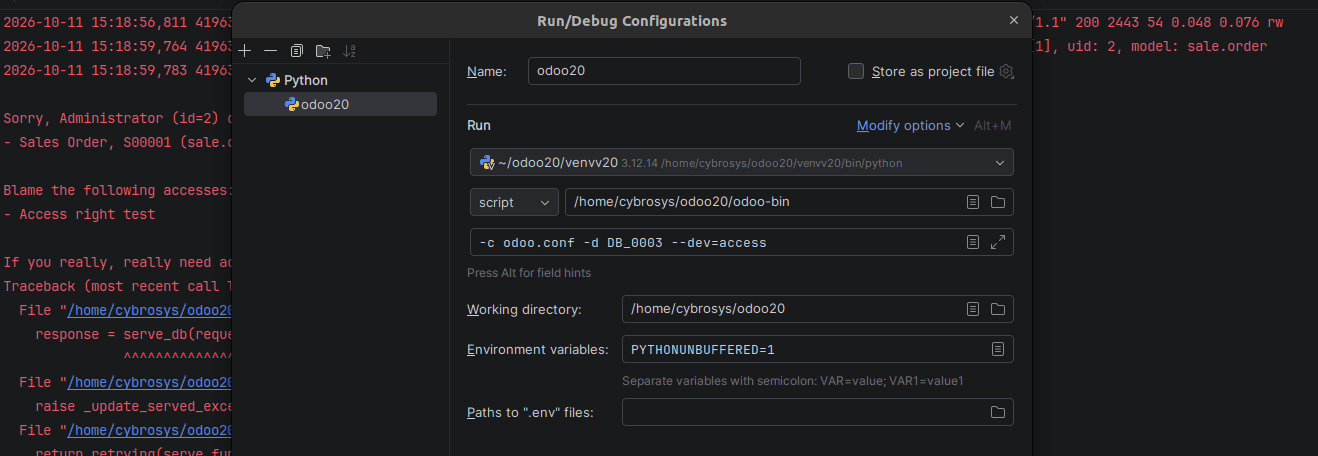
When --dev=access is used, the entire Python stack trace is also printed, letting you know the exact line of code that triggered the check:
Common Mistakes in Odoo 20 Access Configuration
- Considering rows without groups as global permissions: Rows without a group_id serve as a restriction instead of granting a permission in isolation.
- Considering all access rows joined by OR: Permission domains use OR, but restriction domains use AND.
- Using incompatible restrictions: Multiple restrictions may result in a domain that does not match any record.
- Assuming a match in the domain means access is allowed: The row could be acting as a restriction instead of granting access.
- Not considering the operation being performed: Permissions might be different for read, create, write, and delete operations.
- Not considering group inheritance: The user might also have more permissions because of being a member of other groups.
Odoo 20’s ir.access model in combination necessitates that developers have to think about permissions and restrictions jointly, rather than considering every access record as an individual access grant.
An access record with a group provides permission for the records that qualify, and an access record without a group is considered a restriction on those records. Permission domains are logically OR'd, and restriction domains are logically AND’d.
This is the reason why a record satisfies a permission yet is not accessible, and also why adding a seemingly reasonable restriction unexpectedly prevents access to all records.
The computed kind field can be used to tell the two apart, and a methodical debugging process helps the developers figure out what causes the access issues.
While working on your own custom modules or during migrations, it is necessary to examine the model, operation, group, and domain of each access record in relation to your application and see how it affects your permissions and restrictions.
To read more about How New ir.access Model Replacing ACLs and Record Rules in Odoo 20, refer to our blog, How New ir.access Model Replacing ACLs and Record Rules in Odoo 20.